2-16 Starling Monitor - User Guide
System Configuration
Internal Chargeable Batteries
The Starling Monitor contains a battery pack with four chargeable batteries (14.8Vdc). These
are re-charged whenever the Monitor is connected to mains power.
The Monitor can operate without this external power connection, and is then working in
Battery
Power Mode
- see explanations in Battery Power Mode.
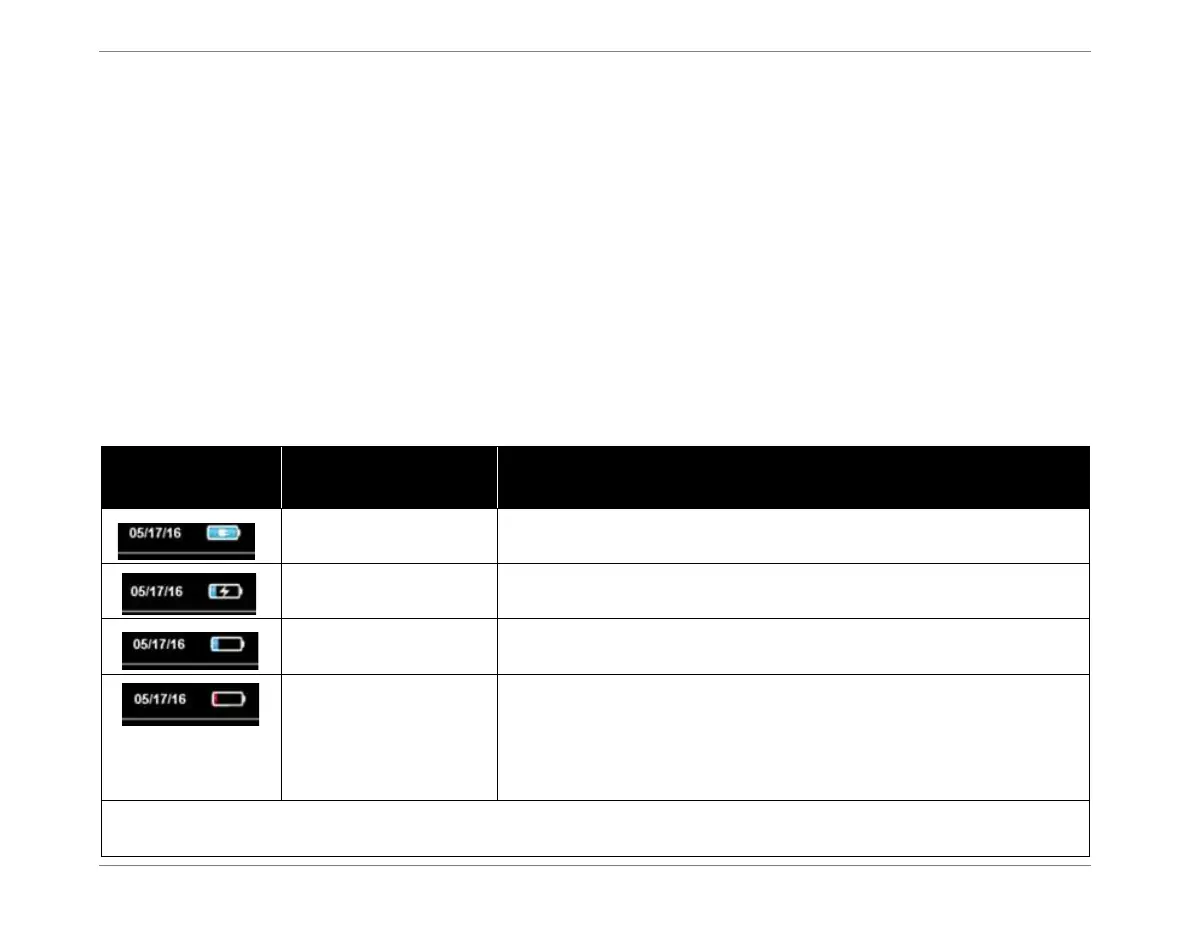
Whenever power to the Starling Monitor is On, the charged status of the batteries is always
indicated by the display of a Battery Status icon - shown in Table 2-2.
Note
It is recommended that users routinely observe the on-screen Battery status indicator for
satisfactory operation of the recharging process.
Battery Status Indicators
Table 2-2 Battery Status Indicators
Battery Icon
Monitor Connected
to Mains Power
Status
Yes Battery fully-charged
Yes Battery charging in progress
No
Monitor operating in Battery Power mode.
If battery capacity approaching low, charging is recommended.
No
Monitor operating in Battery Power mode.
Battery low.
A Low Battery warning message will be displayed.
After a few minutes, the system will perform an automatic shutdown
and the acquired data will be saved.
Note: If attempting to turn ON system power while the battery capacity is low, a message is displayed warning
the user that battery charging is required.













 To Next Page