GE HEALTHCARE
DIRECTION FC091194, REVISION 11 VIVID 7 SERVICE MANUAL
3 - 114 Section 3-11 - Connectivity Setup - Software v2.x
3-11-8 Verification of a Connection Set Up to EchoPAC PC - Software v2.x
1.) Press CONFIG (F2) and log on as adm, see 4-2-4 "Log On to the System as ‘ADM’" on page 4-12.
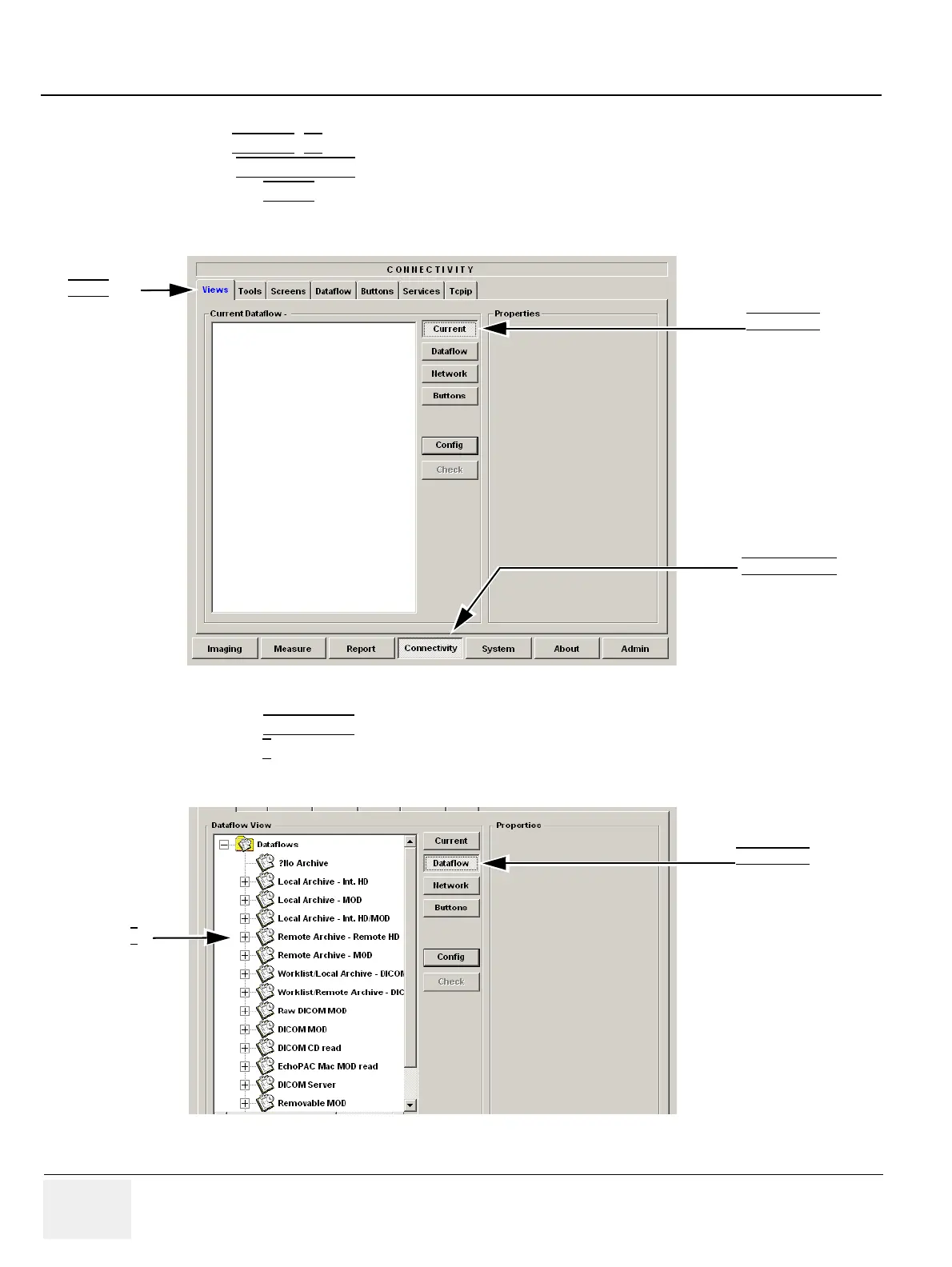
2.) Select CONNECTIVITY
(in the lower part of the window).
3.) Select the VIEWS
tab, located in upper part of window, to display the Current Dataflow Views
screen, see Figure 3-121.
4.) Select the DATAFLOW button to see all available data flows, see Figure 3-122.
5.) Select the +
beside the dataflow you want to check (here: Remote Archive - Remote HD) to see its
contents.
Figure 3-121 Current Dataflow Views screen
Figure 3-122 Pre-configured Data flows in Vivid 7
VIEWS tab
CONNECTIVITY tab
DATAFLOW
button
DATAFLOW
button
Select +


 To Next Page