CS193/CS173/CS163 12-25
Utility mode
12
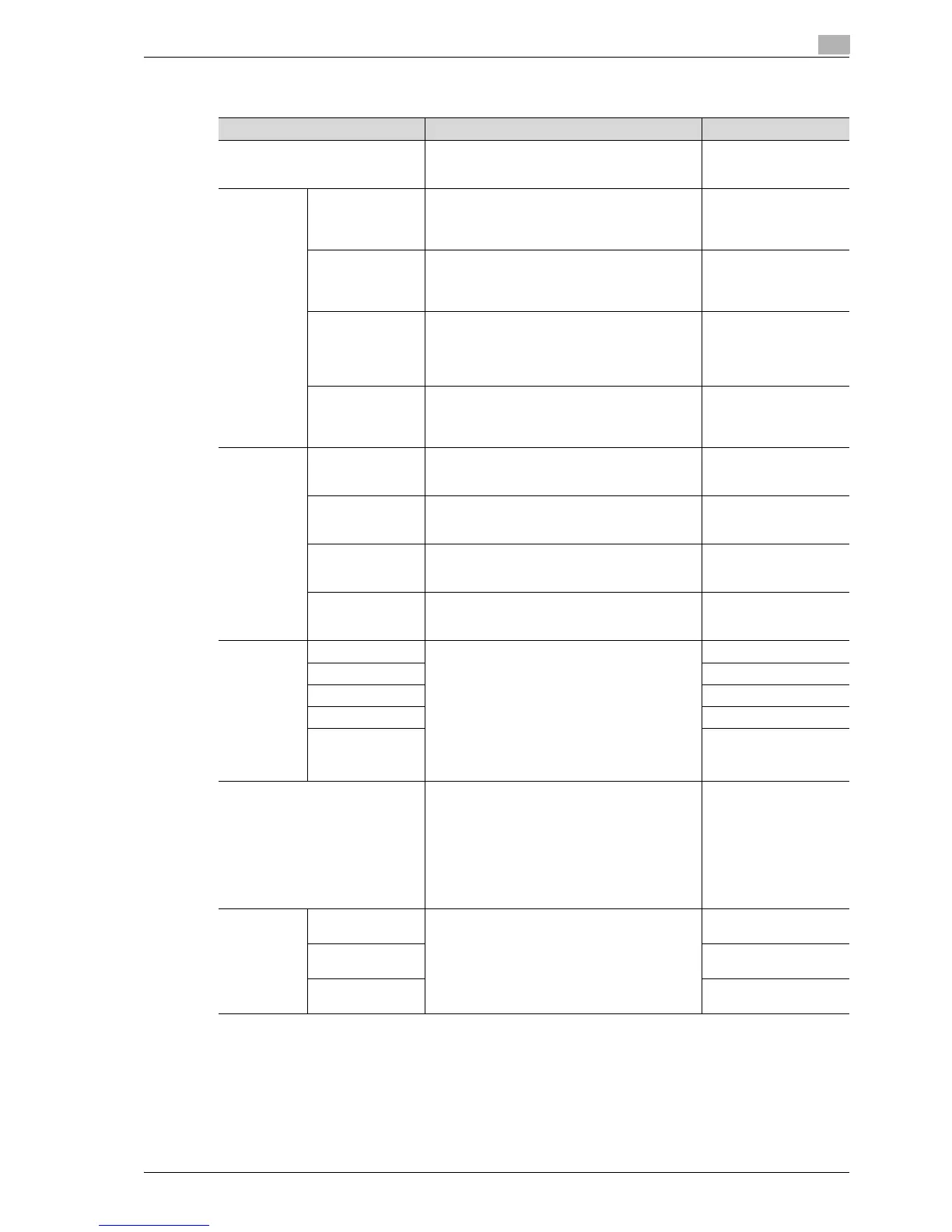
Expert Adjustment
Parameter Description Default Setting
AE Level Adjustment Specify the initial value for auto exposure (AE) be-
tween 0 and 4. The higher the setting, the more
that the original background is emphasized.
Standard (2)
Printer Ad-
justment
Leading Edge
Adjustment
Adjust the starting print position between -3.0 and
3.0 mm at the leading edge of the paper (with re-
spect to the paper feed direction). Adjustments
can be specified for each paper type.
0.0 mm
Centering Adjust the starting print position between -3.0 and
3.0 mm at the left edge of the paper (with respect
to the paper feed direction). Adjustments can be
specified for each paper tray.
0.0 mm
Leading Edge Ad-
justment (Duplex
Side 2)
Adjust the starting print position between -3.0 and
3.0 mm at the leading edge of the paper for the
second side during automatic double-sided cop-
ying. Adjustments can be specified for each paper
tray.
0.0 mm
Centering (Duplex
2nd Side)
Adjust the starting print position between -3.0 and
3.0 mm at the left edge of the paper for the sec-
ond side during automatic double-sided copying.
Adjustments can be specified for each paper tray.
0.0 mm
Finisher Ad-
justment
Center Staple Po-
sition *
1
Adjust the stapling position (between -10 and 10
mm) when printing with the "Center Staple & Fold"
setting.
0
Half-Fold Position
*
1
Adjust the folding position (between -10 and 12.7
mm) when printing with the "Center Staple & Fold"
setting.
0
Punch Horizontal
Position Adjust-
ment*
2
Adjust the horizontal position of the punched
holes between -10 mm and 10 mm.
0
Punch Regist Loop
Size Adjustment*
2
Adjust the hole-punching shift for double-sided
printing and outputting cover pages between -
4 mm and 4 mm.
0
Density Ad-
justment
Thick –Yellow Adjust the image density for printing on thick pa-
per or OHP transparencies. The density can be
adjusted separately for each color (yellow, ma-
genta, cyan and black for a color image and the
black image density). The higher the setting, the
darker the density.
Adjust the setting for yellow, magenta, cyan and
black between -5 and +5.
Adjust the setting for "Black Image Density" be-
tween -2 and +2.
0
Thick –Magenta 0
Thick –Cyan 0
Thick –Black 0
Black Image Den-
sity
0
Image Stabilization Perform an image stabilization if the image is in-
correct, even after the gradation levels have been
adjusted.
• Image Stabilization Only:
Perform a normal image stabilization.
• Initialize + Image Stabilization:
Select when a good result was not achieved
after "Image Stabilization Mode" was select-
ed.
Image Stabilization Only
Color Regis-
tration Ad-
just
Color Registration
Adjust (Yellow)
Adjust the color registration if color shifts can be
seen in the print result.
-
Color Registration
Adjust (Magenta)
-
Color Registration
Adjust (Cyan)
-



 To Next Page