12
Utility mode
12-26 CS193/CS173/CS163
*
1
Appears when finisher is installed with the saddle stitcher attached.
*
2
Appears when finisher is installed with the punch kit attached.
!
Detail
For the procedure on adjusting the printer, refer to "Printer Adjustment" on page 12-41.
For the procedure on adjusting the finisher, refer to "Finisher Adjustment" on page 12-46.
For the procedure on adjusting the color registration, refer to "Color Registration Adjust" on
page 12-52.
For the procedure on adjusting the gradation levels, refer to "Gradation Adjustment" on page 12-54.
[Finisher Adjustment] appears only when an optional finisher is installed.
Only "Black Image Density" is available for OHP transparencies.
List/Counter
Gradation
Adjustment
Image Stabiliza-
tion Only
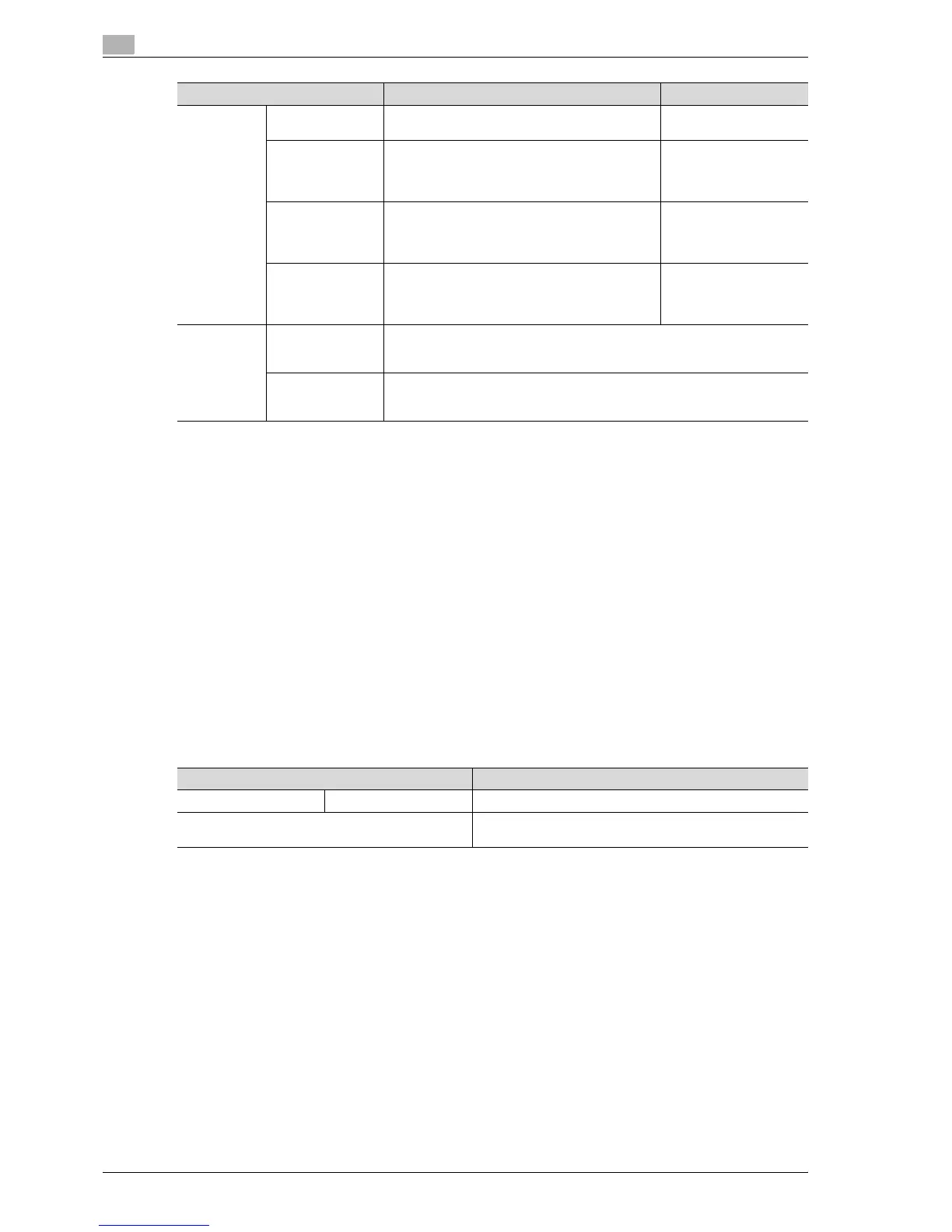
When adjusting the gradation levels, first press
the [Start] key to perform image stabilization.
-
Copy Adjust the gradation levels if there are changes in
the color gradations of the print image. The ad-
justment is made with stress on increasing the
number of images stored in the memory.
-
Printer (Gradation) Adjust the gradation levels if there are changes in
the color gradations of the print image. The ad-
justment is made with stress on the gradations in
images.
-
Printer (Resolu-
tion)
Adjust the gradation levels if there are changes in
the color gradations of the print image. The ad-
justment is made with stress on the reproducibility
of text and lines.
-
Line Detec-
tion
Prior Detection
Setting
Select whether or not a warning appears when the left partition glass is dirty,
and specify the dirt detection level. The dirt detection operation is performed
before and after scanning an original using the ADF.
Detection While
Feeding Setting
Specify the level at which dirt is detected when scanning an original using the
ADF. If "Do Not Remove" is selected, the operation to remove lines is not per-
formed.
Parameter Description Default Setting
Parameter Description
Management List Job Settings List The machine settings can be printed.
Paper Size/Type Counter Store combinations of paper sizes and paper types to be
counted.



 To Next Page