12
Utility mode
12-30 CS193/CS173/CS163
User Authentication Settings
2
Note
The user authentication parameters appear only if "User Authentication" on the General Settings screen
is set to any setting other than "OFF".
Account Track Settings
2
Note
The account track parameters appear only if "Account Track" on the General Settings screen is set to
"ON".
Print Without Authentication
Printer Counter List
External Server Settings
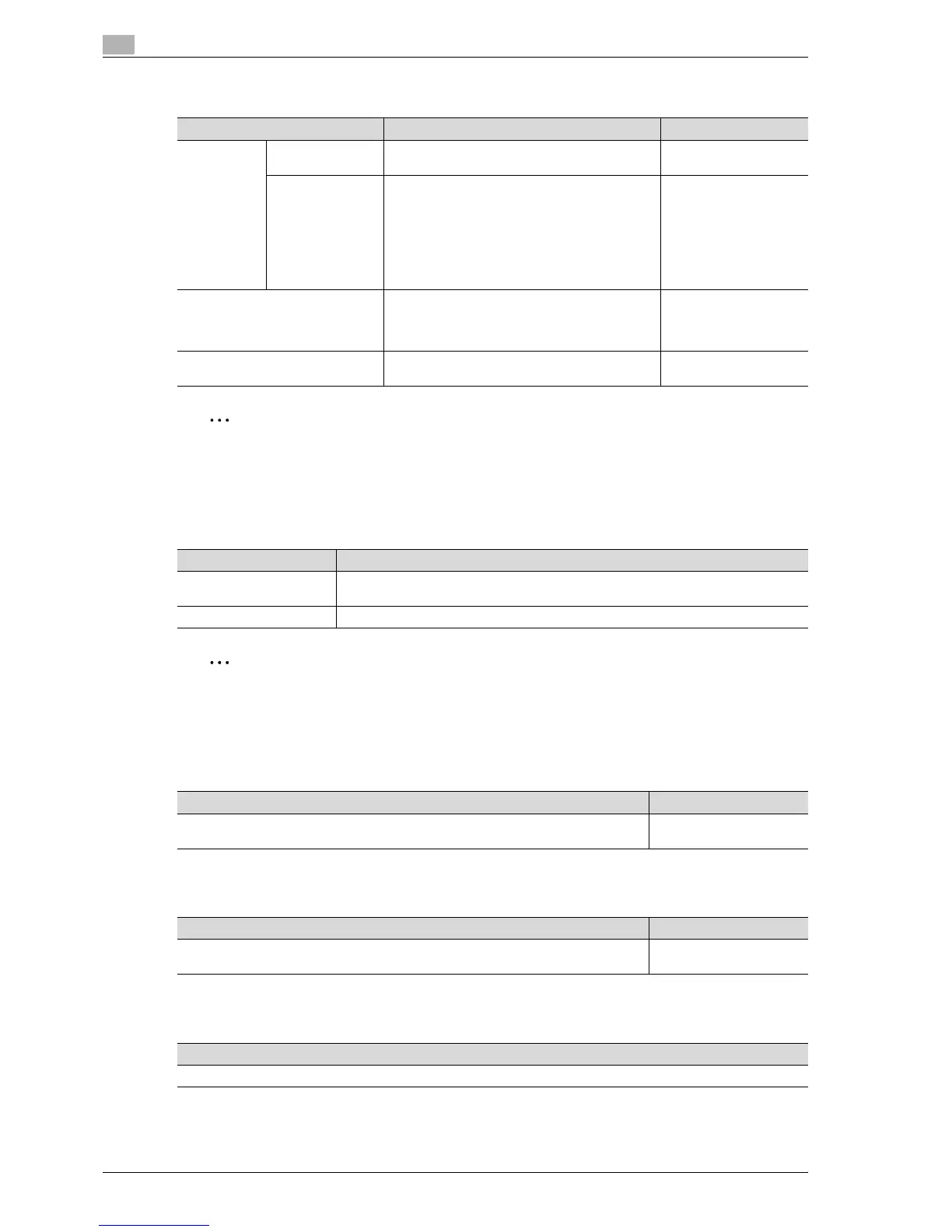
Parameter Description Default Setting
Administra-
tive Settings
User Name List Select whether or not a list of user names is dis-
played in the user authentication screen.
OFF
Default Function
Permission
Operations that are possible with this machine
can be limited when authenticating with an exter-
nal server.
Copy: Allow
Scan: Allow
Fax: Allow
Print: Allow
User Box: Allow
Print Scan/Fax TX: Allow
Save to External Memo-
ry: Allow
User Registration Register the users of this machine. In addition, the
password, printing permissions, number of prints
allowed, authentication information, and function
permissions can be specified for each user.
-
User Counter The copy, print and fax/scan use for each user
can be checked.
-
Parameter Description
Account Track Registra-
tion
Register the accounts using this machine. In addition, the password, printing permis-
sions and number of prints allowed can be specified for each account.
Account Track Counter The copy, print and scan/fax use for each account can be checked.
Description Default Setting
Select whether or not printing is permitted without specifying a user or account. If print-
ing is permitted, prints are counted for public users.
Restrict
Description Default Setting
This parameter appears only if user authentication or account track settings have been
specified. The use for each user or account can be checked.
Tray 1/1-Sided
Description
Specify the external server that performs user authentication.



 To Next Page