CS193/CS173/CS163 12-35
Utility mode
12
!
Detail
The operation of the "Prohibited Functions When Authentication Error" parameter applies to the
following passwords.
User passwords, account passwords, user box passwords, passwords for confidential documents, and
the administrator password
If the control panel cannot be operated even after touching [Release] from the "Prohibited Functions
When Authentication Error" parameter to specify the items whose operation restrictions are canceled
or if an operation is prohibited from a failed attempt to authenticate the administrator password, restart
the machine. Restart the machine, wait for the time specified in "Release Time Settings", and then
perform the administrator authentication.
2
Reminder
When the machine is turned off, then on again with the main power switch, wait at least 10 seconds to
turn the machine on after turning it off. The machine may not operate correctly if it is turned on
immediately after being turned off.
Enhanced Security Mode
HDD Settings
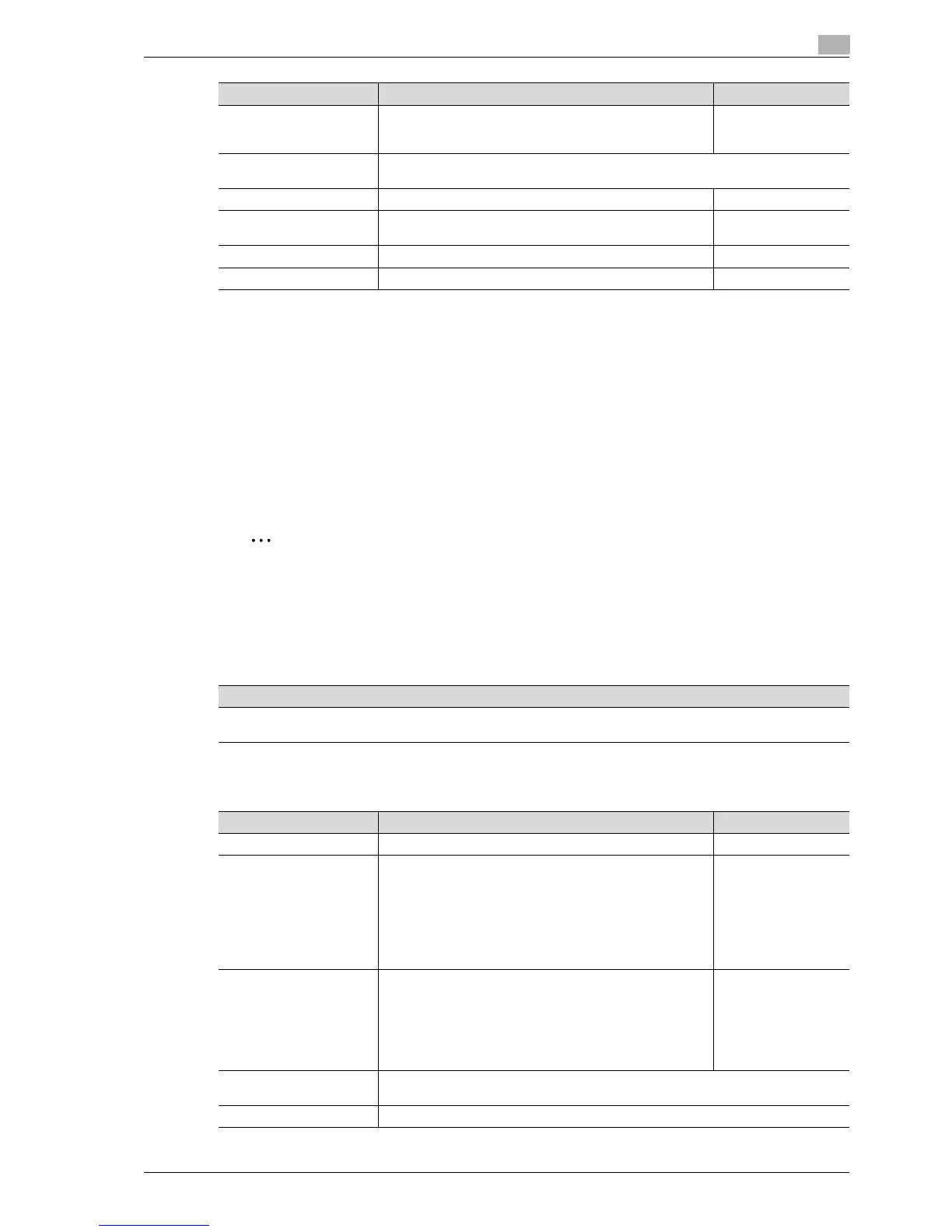
Manual Destination Input Select whether or not a recipient can be typed in manually in
a recipient input screen.
If "Restrict" is selected, LDAP searches cannot be performed.
Allow
Print Data Capture Select whether or not data for a print job can be captured. For details, refer to the User
manual – Print Operations.
Restrict Fax TX Select whether or not fax transmissions are prohibited. OFF
Hide Personal Information Select whether or not the file name and destination are hid-
den in the job log.
OFF
Display Activity Log Select whether or not the communication log is displayed. ON
Delete Job Log The entire job log can be cleared. -
Parameter Description Default Setting
Description
Settings necessary for applying enhanced security mode appear. Select whether or not to apply enhanced mode set-
tings when the necessary settings are specified. For details, contact your service representative.
Parameter Description Default Setting
Check HDD Capacity Information concerning the hard disk capacity is displayed.
Overwrite Temporary Data Specify whether or not to overwrite the temporary image data
saved on the hard disk with all operations for copying, scan-
ning, faxing and computer printing. For details on the set-
tings, refer to the User manual – Box Operations. By
specifying a setting to overwrite temporary data, the area of
the hard disk where image data is saved after printing or
sending can be overwritten, and the data can be erased. This
process prevents disclosure of image data on the hard disk.
NO
Overwrite All Data Select this parameter to overwrite and delete all data on the
entire hard disk in the specified patterns for mode 1 through
mode 8 when returning the machine from lease or disposing
the machine in order to prevent disclosure of the data. For de-
tails on the settings, refer to the User manual – Box Opera-
tions. Before performing this operation, contact your service
representative.
Mode 1
HDD Lock Password Specify the password for protecting data on the hard disk. For details, refer to the User
manual – Box Operations.
Format HDD Format the hard disk. For details, refer to the User manual – Box Operations.



 To Next Page