MFP OPTIONS: B140/B246 SERIES 15 February 2006
1-166
1.23.7 IEEE 802.11B INTERFACE BOARD (B582-01, -02)
ACCESSORY CHECK
Check the accessories and their quantities against this list:
Description Q’ty
1. IEEE 802.11b Interface Board............................................... 1
2. WLAN PIC Card .................................................................... 1
3. Antennas .............................................................................. 2
4. Velcro pads .......................................................................... 2
5. Antenna Cap ......................................................................... 1
Installation
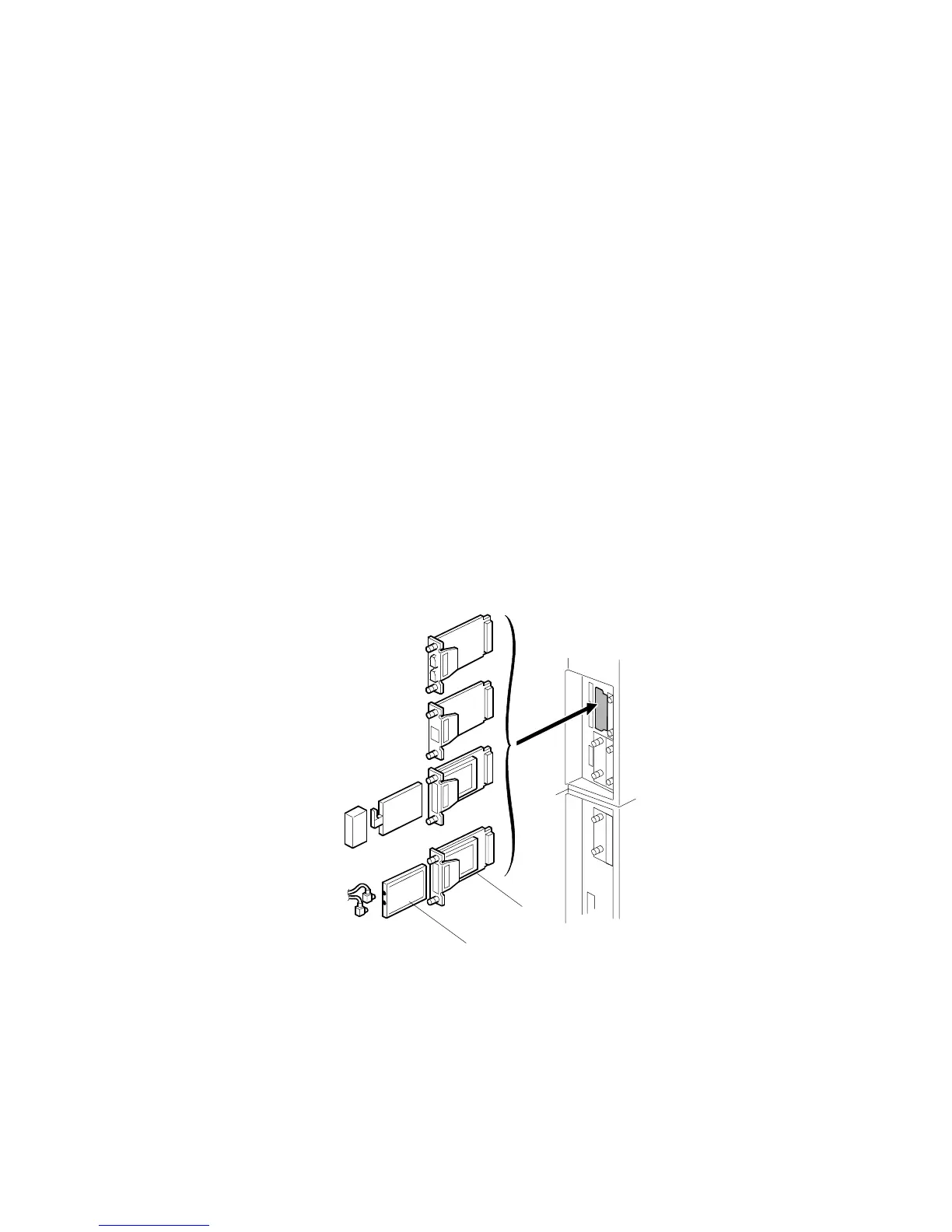
You can only install one of these cards, because only one PCI slot (B1) is available
for these options:
• USB 2.0
• IEEE 802.11b (Wireless LAN)
• IEEE 1394 (FireWire)
• Bluetooth Interface Unit G377
If a different card is installed in B1, you must remove it before you install IEEE
802.11b Interface Board.
1. Turn the machine off.
2. Remove the cover of Slot B1 (! x 2).
3. Remove the plastic cap from the PCI card.
4. Insert the PCI card [A] into the wireless LAN board.
5. Install the wireless LAN board [B] in Slot B1 and attach it with the screws.
B659I108.WMF
[A]
[B]



 To Next Page