15 February 2006 Z-FOLDING UNIT (B660)
1-69
Installation
Docking to the Finisher
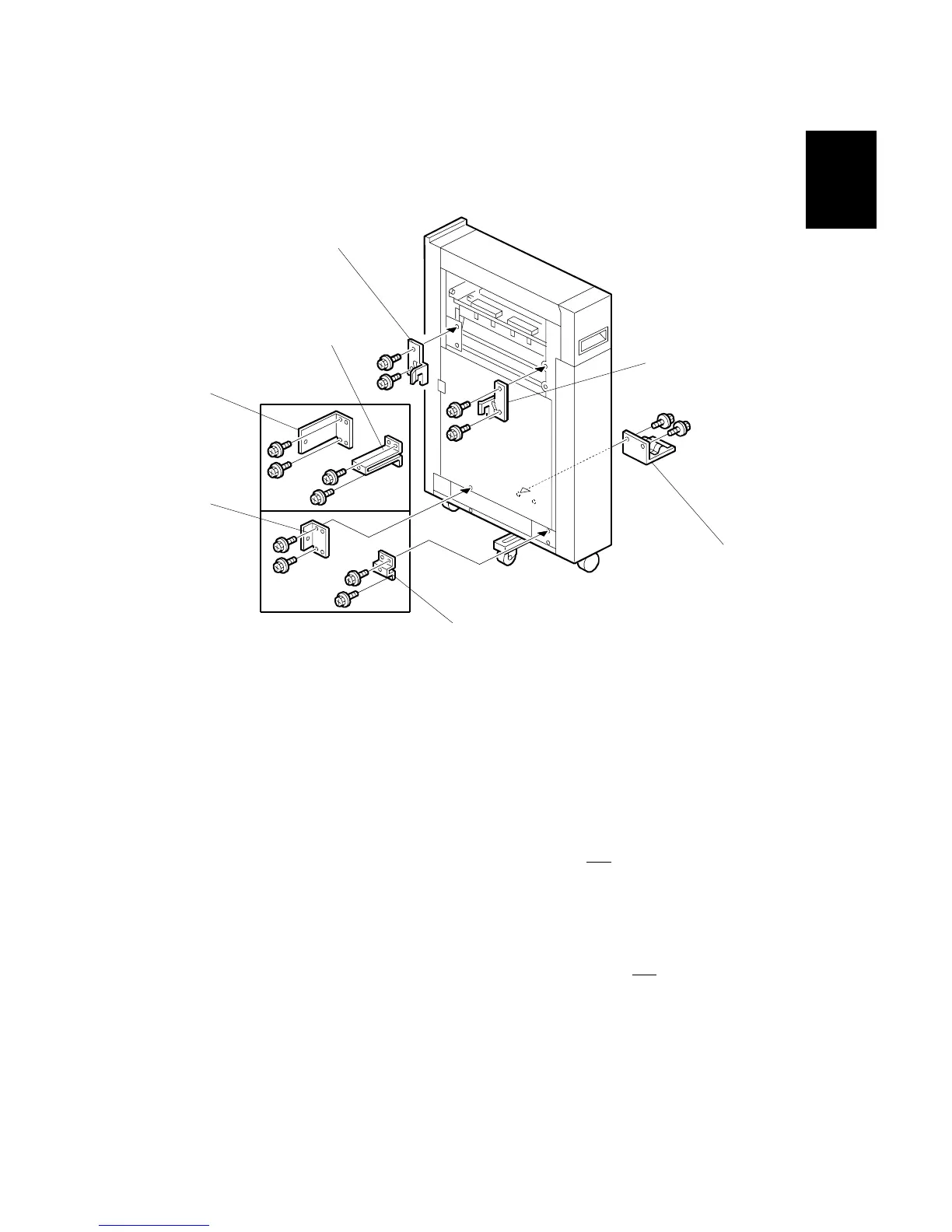
1. Remove the back cover of the finisher (" x 2).
2. Attach the left docking bracket [A] to the Z-folding unit (" x 2) (Bracket
provided with the finisher).
3. Attach the right docking bracket [B] to the Z-folding unit (" x 2). (Bracket
provided with the finisher).
4. Attach the rear locking bracket (" x 2).
• Attach rear bracket [C] if the cover interposer tray is installed.
• Attach rear bracket [D] if cover interposer tray is not installed.
5. Attach the front locking bracket (" x 2).
NOTE: This step is required only when the Z-folding unit is installed with the
B674 (SR861).
• Attach front bracket [E] if the cover sheet interposer is installed.
• Attach front bracket [F] if the cover sheet interposer is not installed.
6. Attach the ground plate [G] to the Z-folding unit (" x 2).
B660I004.WMF
[A]
[B]
[C]
[D]
[E]
[F]
[G]



 To Next Page