MFP OPTIONS: B246 SERIES 15 February 2006
1-196
1.24.13 COPY DATA SECURITY UNIT TYPE C (B829)
Accessories
Description Q’ty
1. PCB IPU Option .........................................................................1
Installation
If the present IPU board does not contain this application, it must be replaced with
an IPU board that does.
B246 Series: IPU
• Disconnect ADF cable
Remove:
• Rear upper cover (! x2) (☛3.3.5)
• Rear lower cover (! x2) (☛3.3.5)
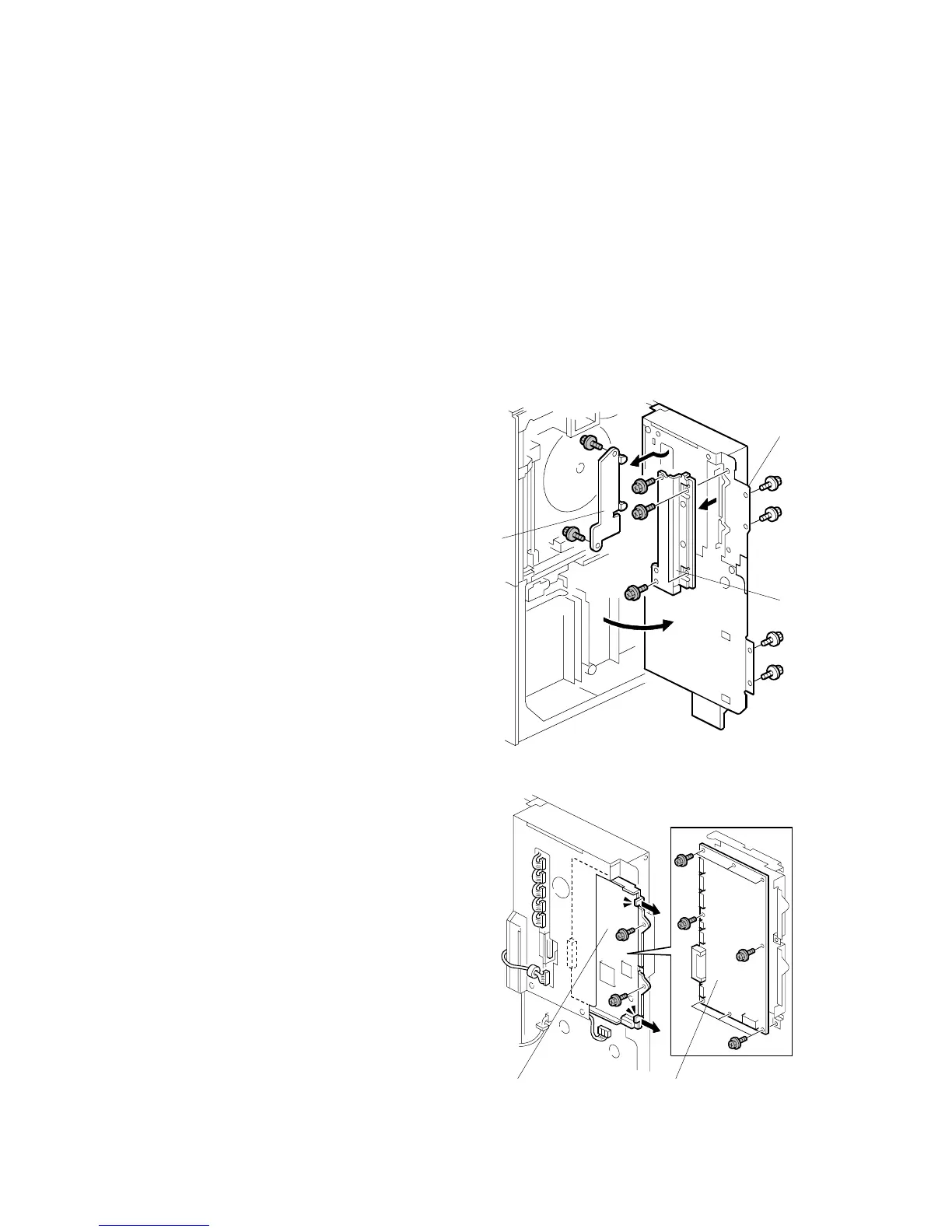
Remove:
[A] Screws and swing open the controller
box (! x4).
[B] Left connector shield (! x2)
[C] Right connector shield (! x4)
[D] IPU board unit (" x7, ! x2)
• Slowly slide the IPU board and
bracket out of the controller box.
[E] IPU (! x8
B829I101.WMF
B829I102.WMF
[A]
[B]
[C]
[D] [E]



 To Next Page