15 February 2006 SERVICE PROGRAM MODE TABLES
5-35
Service
Tables
SP2xxx Drum
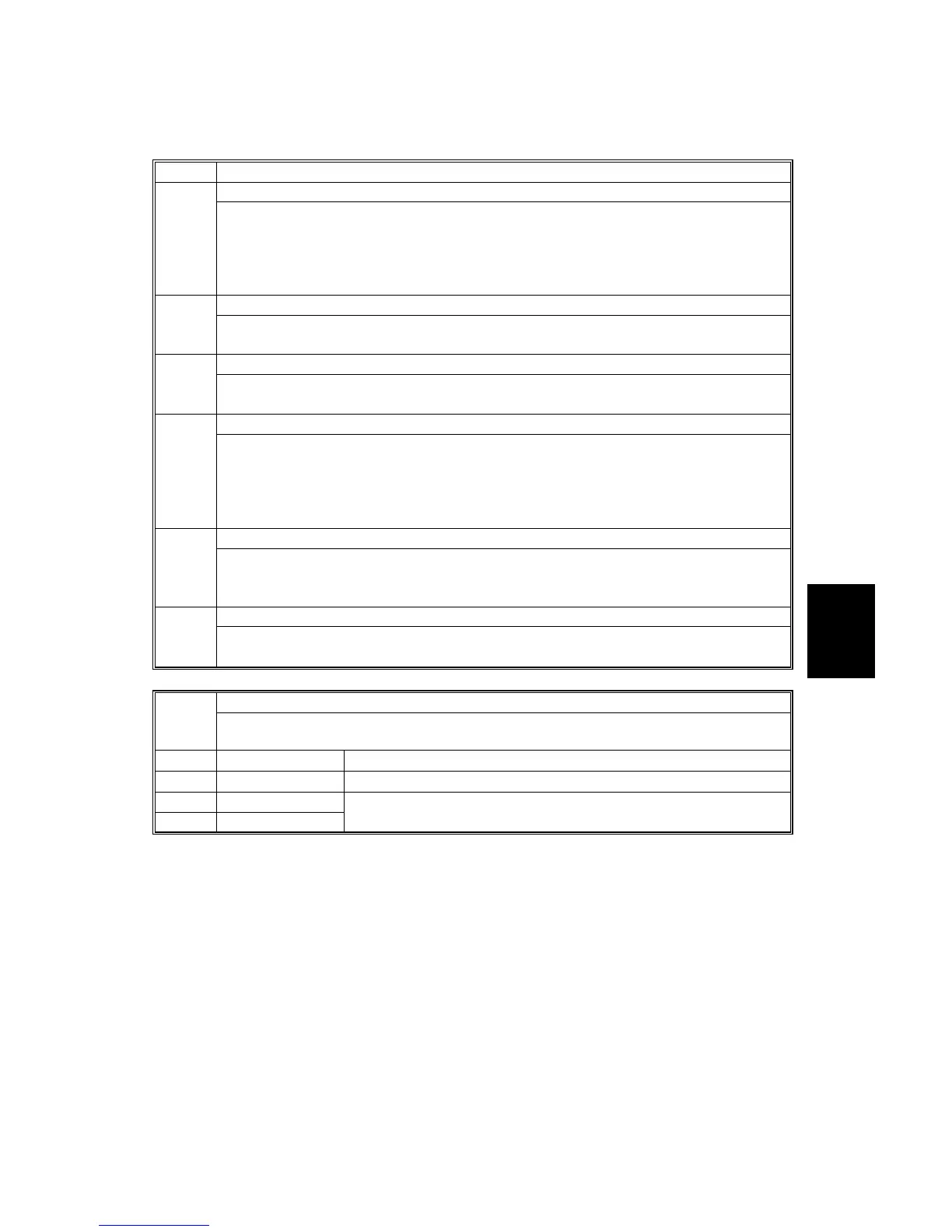
2001* Charge Roller Bias Adjustment
001 Applied Voltage for Image Processing
Adjusts the voltage applied to the grid plate during copying when auto process
control is off.
[–600~–1300/ 10 V]
After replacing the charge corona wire or the drum, reset to the factory default
setting.
002 ID Sensor Pattern: Adjustment of Applied Voltage
Adjusts the voltage applied to the grid plate when the ID sensor pattern is created.
[–600~–1300/10 V]
003 Setting for Total Bias Current
Adjusts the total current applied to the charge corona wire. DFU
[–900~–1500/10 µA]
004 Setting for Total Bias Current of Grid
Adjusts the voltage applied to the grid plate during copying when auto process
control is on.
[–600~–1300/10 µA]
This voltage changes every time auto process control starts up (every time the
machine is switched on).
005 Total Bias Grid Current: OHP Total
Adjusts the voltage applied to the grid plate when OHP mode is selected.
[–600~–1300/10 V]
Use this if there is a copy quality problem when making OHP’s.
006 Total Bias Current: Photo Mode Total
Adjusts the voltage applied to the grid plate when Photo mode is selected. DFU
[–1400~ –2800/10 µA]
2101* Printing Erase Margin
These settings adjust the erase margin for the leading, trailing, left, and right
edges.
001 Leading Edge
[0.0~9.0/0.1 mm], Specification: 3±2 mm
002 Trailing Edge
[0.0~9.0/0.1 mm], Specification: 3±2 mm
003 Left Edge
004 Right Edge
[0.0~9.0/0.1 mm], Specification: 2±1.5 mm



 To Next Page