MFP OPTIONS: B246 SERIES 15 February 2006
1-182
1.24.5 IEEE1394 INTERFACE BOARD (B581)
Accessories
Description Q’ty
4. IEEE 1394 Board ...................................................................1
5. 4-Pin Cable............................................................................1
6. 5-Pin Cable............................................................................1
Installation
Only one PCI slot (B2) is available for one of these options:
• Centronics 1284
• IEEE 1394 (FireWire)
• IEEE 801.11b (Wireless LAN)
• Bluetooth Interface Unit B826
• Cumin-M B818
Important
• If another card is installed in B2, you
must remove it before installing this card.
1. Switch the machine off.
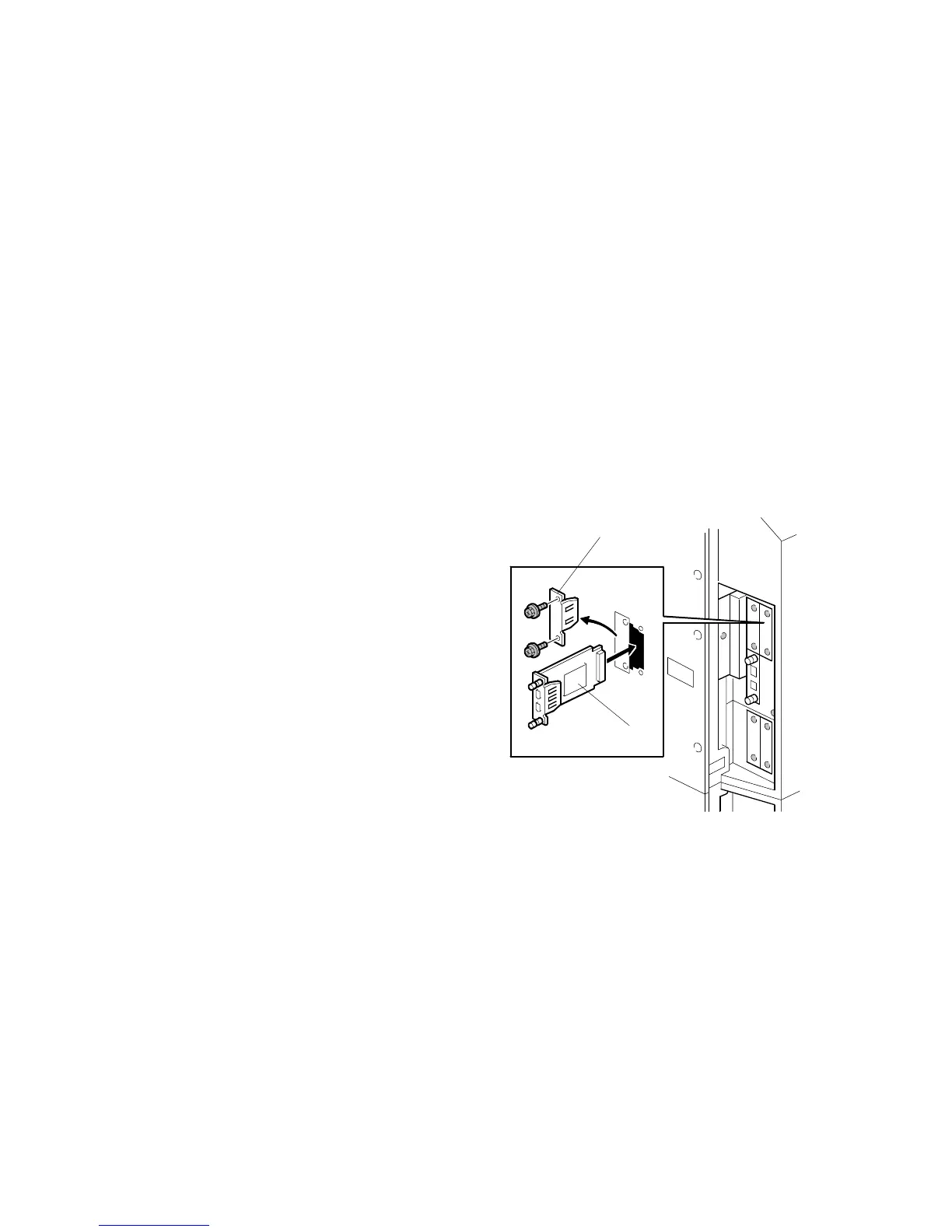
2. Remove the cover [A] of Slot B2 (! x
2)
3. Insert the IEEE 1394 board [B] into
Slot B2 and fasten it with the screws.
4. Switch the machine on and print a configuration page to confirm that the
machine recognizes the installed board:
User Tools> Printer Features> List/Test Print> Configuration Page
B581I101.WMF
[A]
[B]



 To Next Page