MFP OPTIONS: B246 SERIES 15 February 2006
1-184
1.24.7 BLUETOOTH INTERFACE UNIT TYPE C B826
Accessories
Check the quantity and condition of the accessories.
No. Description Q’ty
1 Bluetooth card 1
2 Bluetooth card cover 1
3 Bluetooth board 1
4 Bluetooth card adapter 1
Installation
Only one PCI slot (B2) is available for one of these options:
• Centronics 1284
• IEEE 1394 (FireWire)
• IEEE 801.11b (Wireless LAN)
• Bluetooth Interface Unit B826
• Cumin-M B818
Important
• If another board is installed in B2, you
must remove it before installing this card.
1. Switch the machine off.
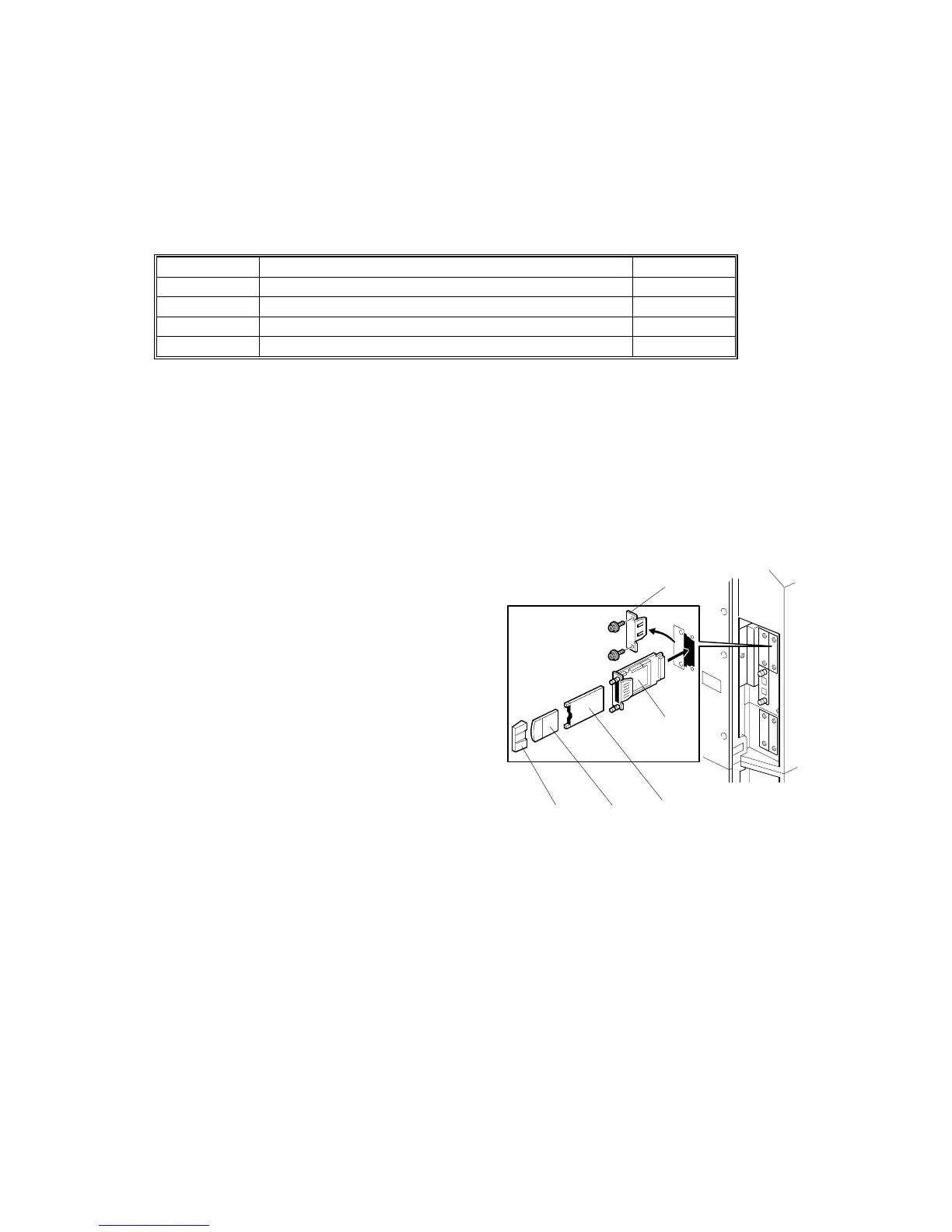
2. Remove the I/F cover slot [A] of Slot
B2 (! x2).
3. Touch a metal surface to remove static
charge from your hands before you
touch the interface card.
4. With both labels facing up, insert the
Bluetooth card [B] into the adapter [C].
5. With the labels facing down, insert the
adapter [C] into the Bluetooth board [D].
6. Insert the interface board (with card and adapter inserted) into Slot B2.
7. Attach the card cover [E] (used to prevent static electricity).
8. Confirm that Bluetooth is installed correctly:
User Tools> Printer Features> List/Test Print> Configuration Page
B826I101.WMF
[A]
[B]
[C]
[D]
[E]



 To Next Page