77
6 Basic Key Operation
6.4
6.
GC-2014
6.4Getting Help
The Help function describes items on the setup screens.
Understanding the items helps to quickly and efficiently set up analytical parameters and proceed
analyses smoothly.
6.4.1 Screen description
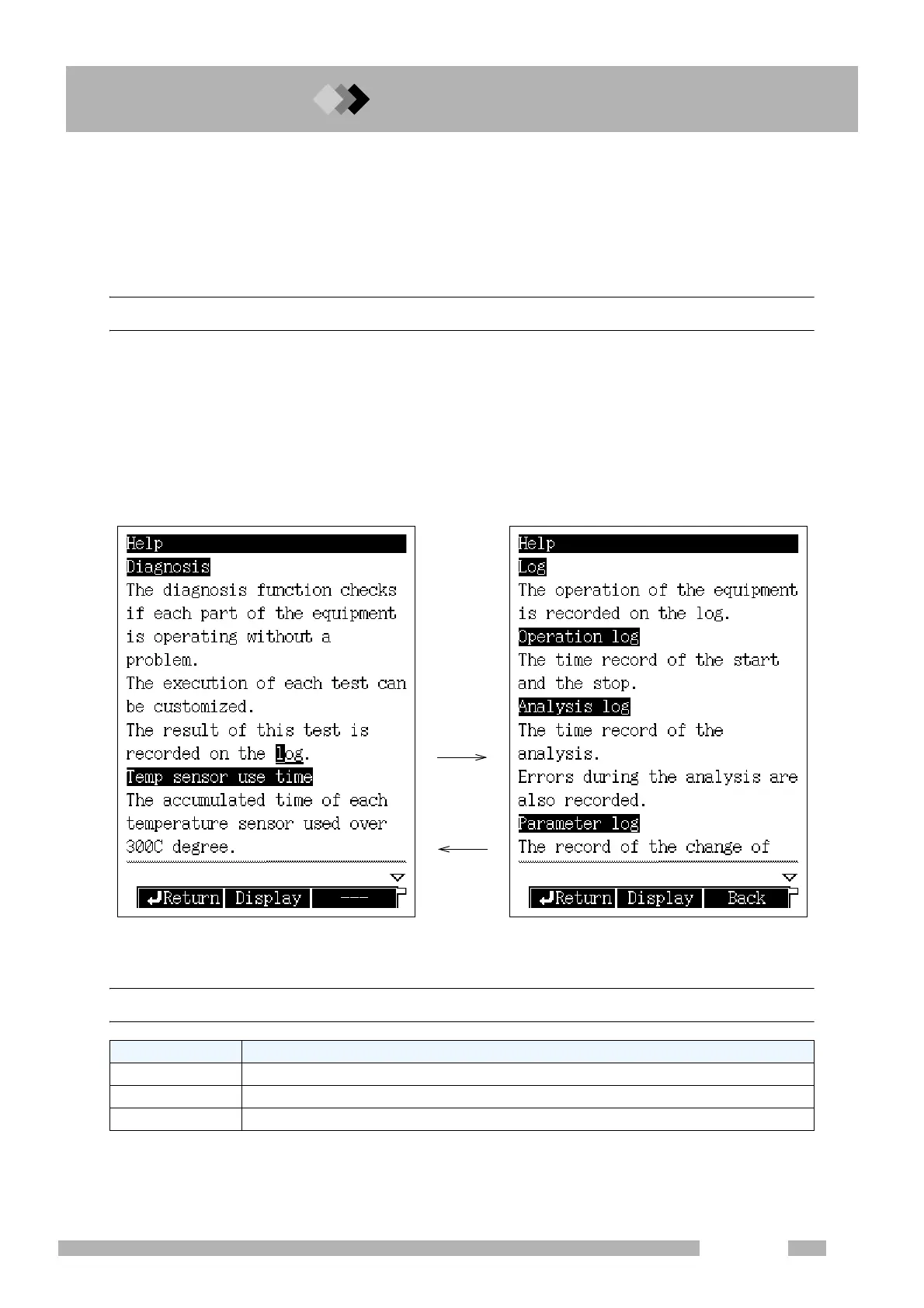
If you do not know the meaning of an item on the screen, press the [HELP] key on the
screen to display the item and its description. For example, the screen shown in Fig. 6.4.1
appears when the [HELP] key is pressed on the [DIAG] key screen.
Items which may be difficult to understand are linked to further descriptions. Set the cursor
on one of these underlined items and press [Display] (PF menu) to access to the linked
descriptions. Fig. 6.4.2 shows the pop-up screen linked to the word “log” on the screen
shown in Fig. 6.4.1.
6.4.2 PF menu
[Display]
[Back]
Fig. 6.4.1 Help screen Fig. 6.4.2 Linked screen
PF menu Description
Return Returns to the screen displayed before the [HELP] key was pressed.
Display Displays the explanation on an item at the cursor position.
Back Returns to the previous screen.



 To Next Page
 Loading...









