SYNTH1: POLYPHONIC PROGRAMMING
Each step of a SYNTH1 type pattern can have separate pitches programmed in four
available pitch slots. This allows for programming chords or other polyphonic note data
per step.
The velocity and gate length of the four pitch slots is shared, this means that setting
VELOCITY/ACCENT or GATE LENGTH/SLIDE for a step will effect all programmed pitch
slots.
The CV signal for a SYNTH1 pattern is always related to pitch slot 1.
SYNTH1: SELECTING THE PITCH SLOT TO PROGRAM
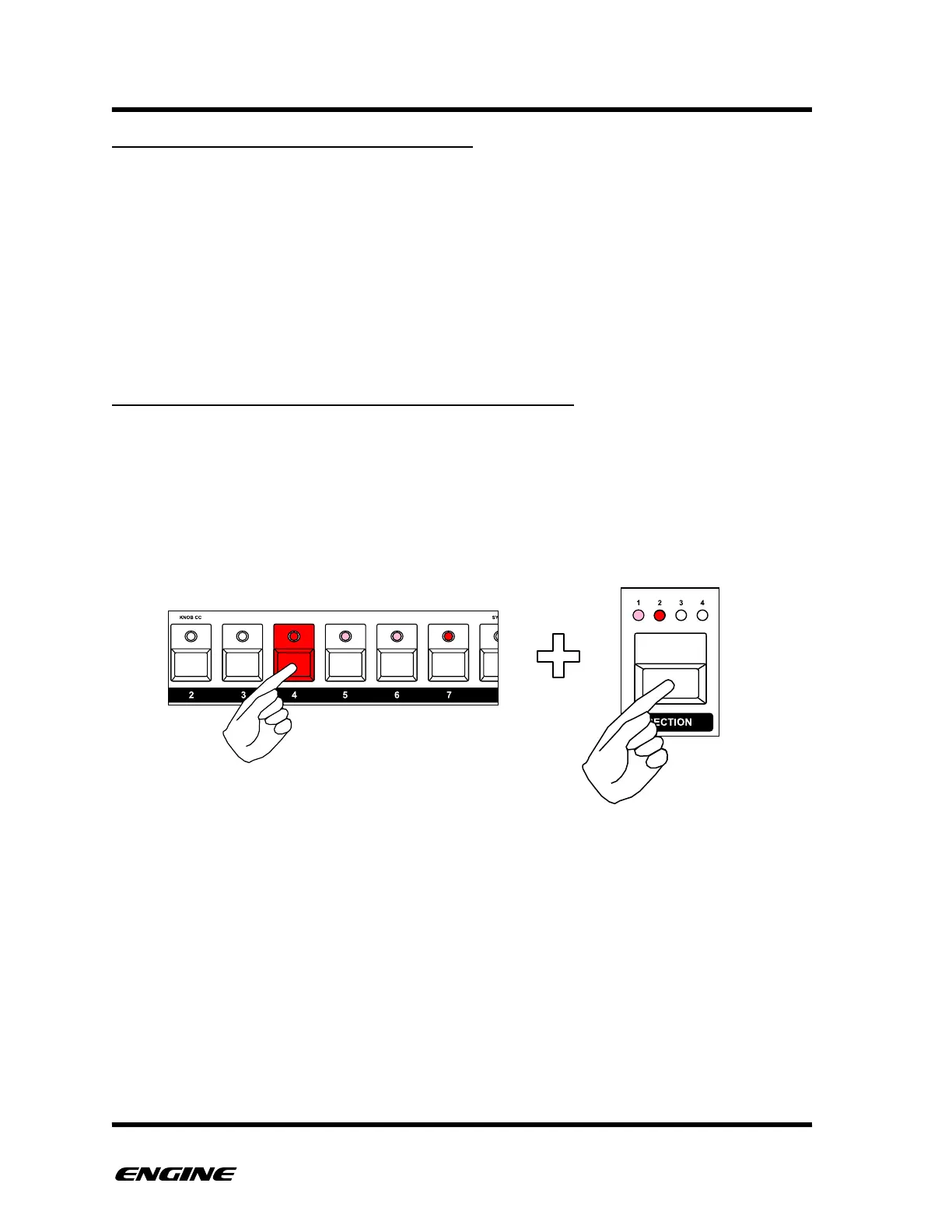
When initially pressing and holding a step button, PITCH SLOT 1 is selected. This is
displayed by a brightly lit SECTION 1 LED. If other pitch slots (2, 3 or 4) are currently
programmed, the corresponding SECTION LED will be lit dimly. Pitch slots that are not
programmed will have an unlit SECTION LED.
To select a different pitch slot, while holding a step button, click the SECTION button. This
will cycle between the four pitch slots.
When a pitch slot is selected, the programmed pitch will be shown on the mini-keyboard
and octave LEDs. If no pitch is programmed, the mini-keyboard will have no LEDs lit.



 To Next Page