EasyManua.ls Logo

Social Entropy Engine - Clearing a Track

Social Entropy Engine
251 pages
Print Icon
To Next Page IconTo Next Page
To Previous Page IconTo Previous Page
Loading...
TRACKS
CLEARING A TRACK
Track clearing can operate in two different ways, depending on whether you wish to just
clear track settings (leaving pattern data intact), or initialize all patterns in a track to a
certain pattern type.
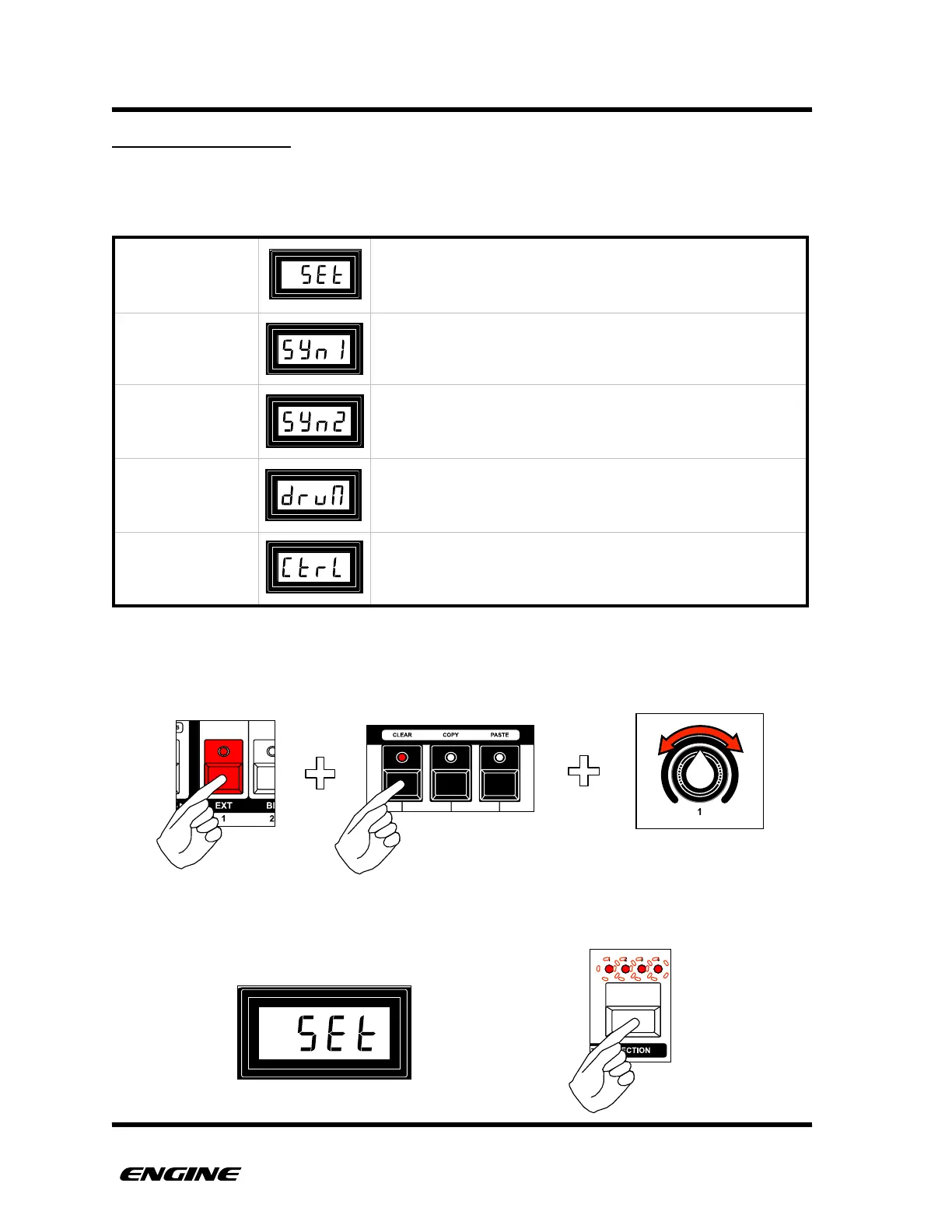
To clear a track, while holding the track select button, click the CLEAR button (F sharp),
then select the CLEAR method by rotating knob 1 or clicking the BACKWARD/FORWARD
buttons.
The LED display will show the clearing method. To execute the clear, click the SECTION
button.

TRACK SETTINGS
Clear all track level settings, but keep patterns as is.
CLEAR PATTERNS
(SYNTH1)
Clear all (64) patterns in the track, set to SYNTH1 type
patterns.
CLEAR PATTERNS
(SYNTH2)
Clear all (64) patterns in the track, set to SYNTH2 type
patterns.
CLEAR PATTERNS
(DRUM)
Clear all (64) patterns in the track, set to DRUM type
patterns.
CLEAR PATTERNS
(CONTROL)
Clear all (64) patterns in the track, set to CONTROL type
patterns.
USER GUIDE 30

Table of Contents