CHANGING PATTERN TYPES
Any pattern can be changed to a DRUM, SYNTH1, SYNTH2 or CONTROL type pattern at
any time. This allows for any mix of pattern types in any track.
The current pattern type is visible on the PATTERN TYPE led, with DRUM patterns showing
a lit LED, SYNTH1 and SYNTH2 type patterns showing an unlit LED and CONTROL type
patterns showing a slow blinking LED.
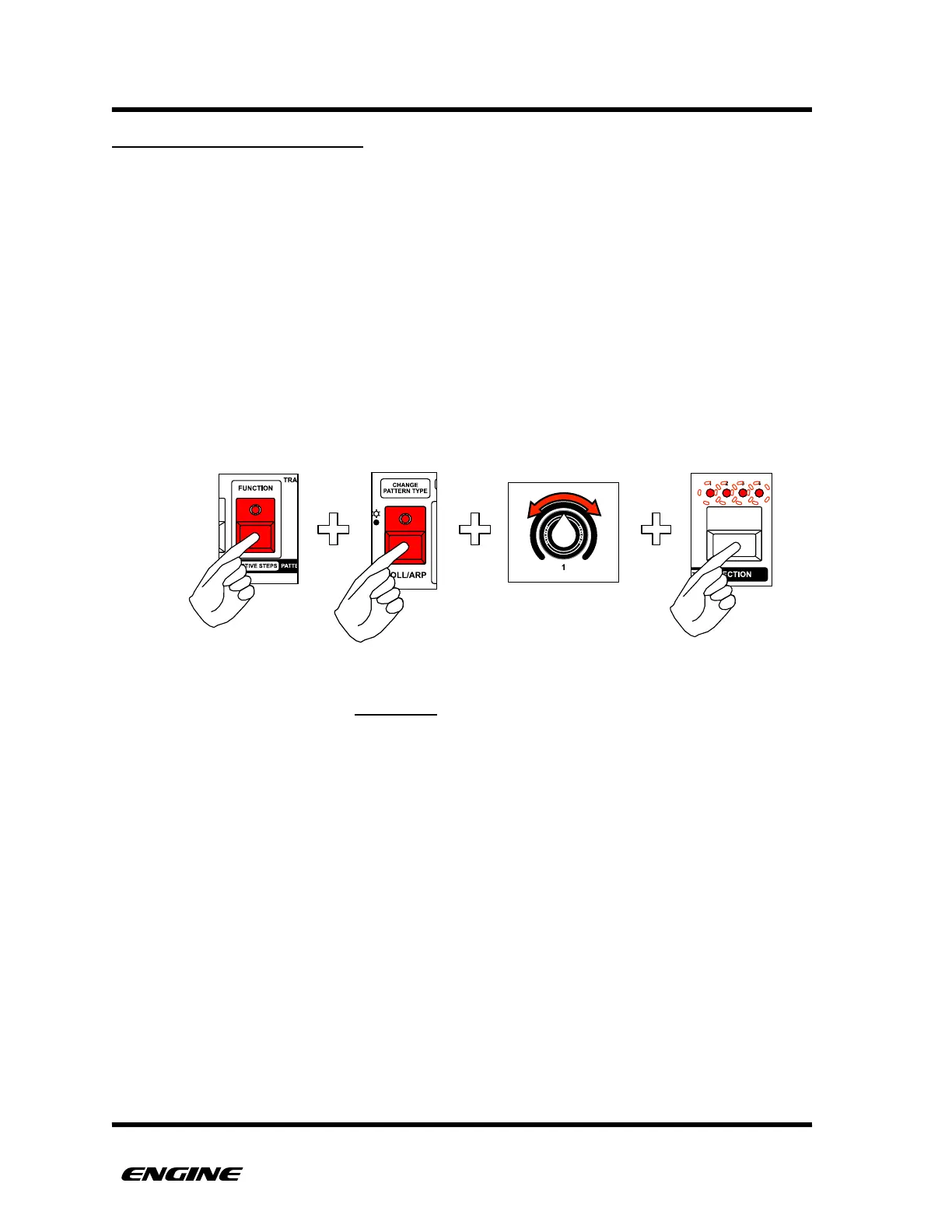
To change the current pattern type, press and hold (or double click) the FUNCTION
button, then press and hold the CHANGE PATTERN TYPE (roll/arp) button. While
holding CHANGE PATTERN TYPE, rotate control knob 1 or click BACKWARD/FORWARD
to select a new pattern type.
The four section LEDs will blink to warn that this operation is destructive. To confirm the
pattern type change, click the SECTION button.
Changing the pattern type is a destructive operation, meaning that the programmed notes
in a sequence will be erased when changing the type! This is necessary because the
pattern memory format for each type of pattern is completely different.
You can immediately UNDO an accidental pattern type change by clicking the RECORD
button, while still holding FUNCTION and CHANGE PATTERN TYPE buttons. The
RECORD LED will light when UNDO is available.



 To Next Page