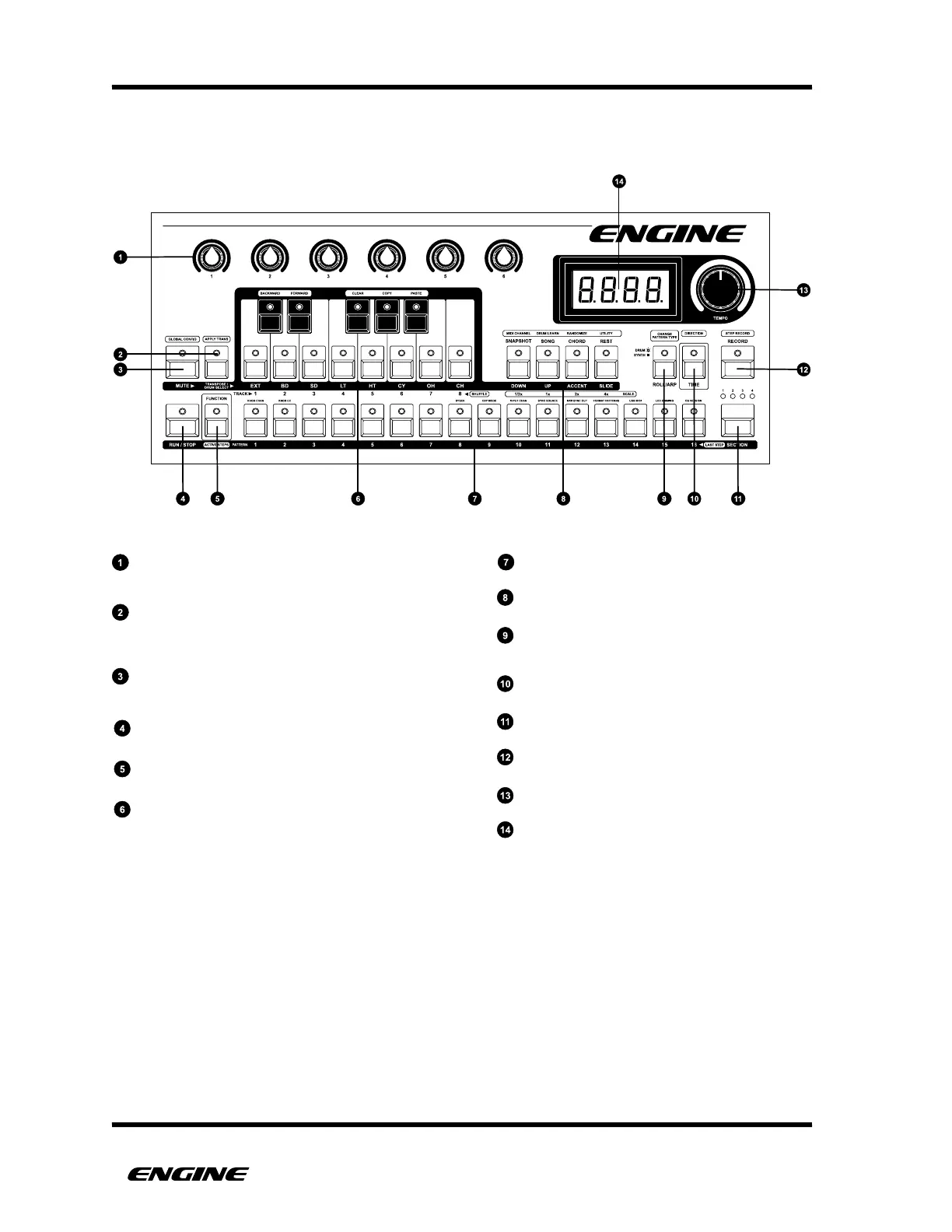
CONTROL KNOBS
Used for sending MIDI or CV control messages in realtime
The knobs are also used for setting some values
TRANSPOSE / DRUM SELECT BUTTON
Used in combination with the mini-keyboard to transpose
synth type patterns or change the selected drum instrument
in drum type patterns
MUTE BUTTON
Used to mute tracks or individual drum instruments in
drum type patterns
RUN / STOP BUTTON
Used to start or stop the sequencer
FUNCTION BUTTON
Used to access secondary functions
MINI KEYBOARD
Used to select tracks, drum instruments, or enter pitch
in semitones
16 PATTERN STEP BUTTONS
Used to edit pattern steps and select patterns
4 STEP ATTRIBUTE BUTTONS
Used to set certain step attributes or enter other modes
ROLL/ARP BUTTON
Used to enter the arpeggiator for synth type patterns
or drum roll mode for drum type patterns
TIME BUTTON
Used to enter time mode or set pattern playback direction
SECTION BUTTON
Used to select pattern sections or banks
RECORD BUTTON
Enter and leave record mode
TEMPO KNOB
Varies the tempo of the internal clock
LED DISPLAY
Usually displays tempo, but used to display information
in some other modes.



 To Next Page