OnAir 3000 Digital Mixing Console
Operation 5-25
Document generated: 10.10.14
SW V6.0
5.3.2.3 Equalizer Page
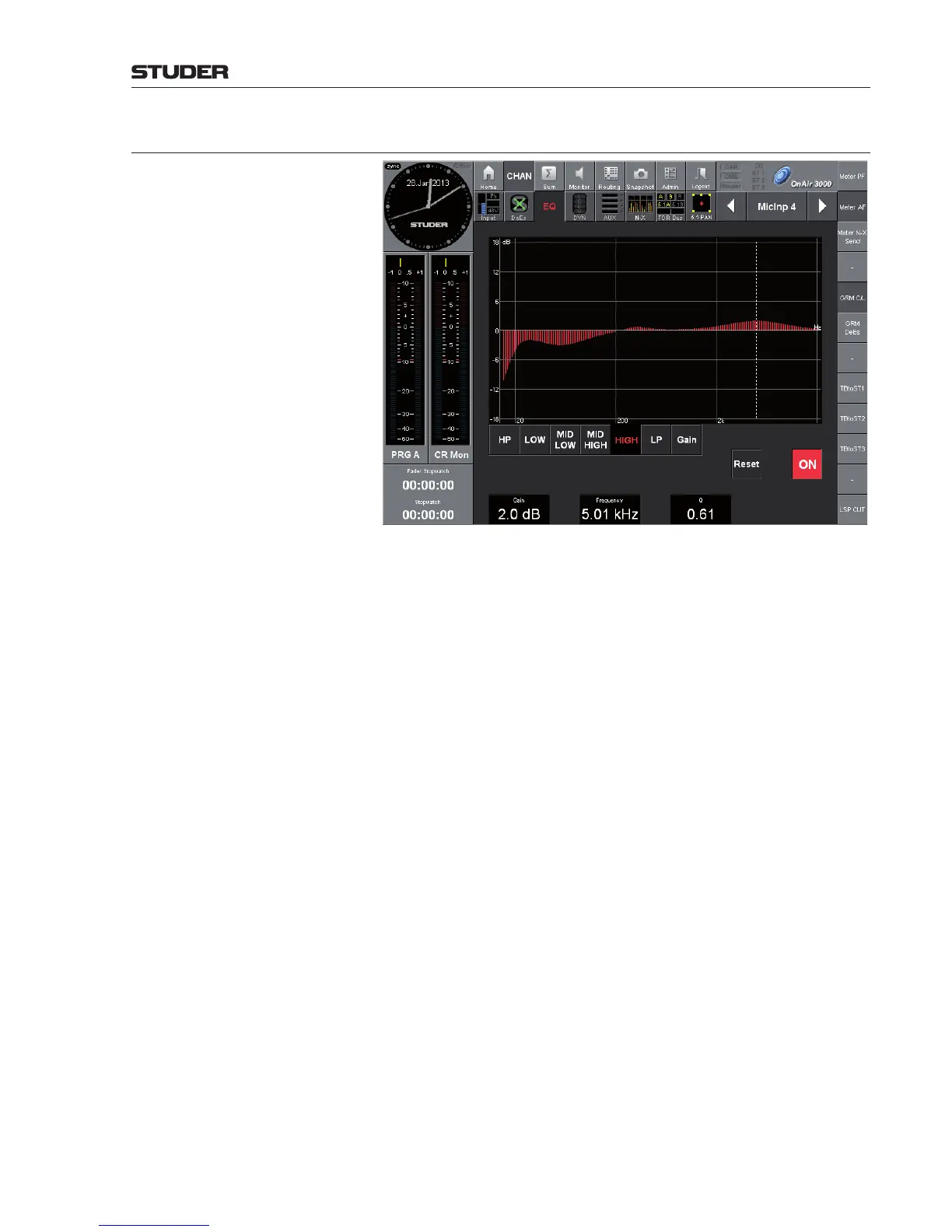
Each channel has a parametric four-band equalizer.
Graph The red graph represents the EQ’s current frequency response curve, cumu-
lated from all filters.
LOW, MID LOW, MID HIGH, HIGH
Touching one of these edit buttons selects one of the four frequency bands
for adjustment. The corresponding Gain, Frequency, and Q (bandwidth)
values appear in the fields above the rotary encoders. The current frequency
response curve is displayed in the EQ screen.
Gain The gain (boost/cut value) of the selected band is displayed in dB and can be
adjusted in a ±18 dB range with the rotary encoder below the field.
Frequency The center frequency of the selected band is indicated by a vertical, dashed
line, as well as displayed in Hz/kHz. It can be adjusted from 20 Hz to 20 kHz
with the rotary encoder below the field.
Q (Bandwidth) The Q factor of each band is displayed as a plain number and can be adjusted
from 0.27 (wide) to 8.7 (narrow) with the rotary encoder below the field.
Should a very high-Q (i.e. narrow) and/or very high/low gain band-pass (peak)
or band-stop (notch) filter be required, this can be realized by tuning two or
more of the EQ bands to the same frequency and selecting appropriate Q and
Gain values.
Gain Button Touching the Gain button displays the gain values of all four EQ bands in
the fields above the rotary encoders for adjustment; the center frequencies
are indicated by four vertical, dashed lines.
HP / LP (optional) If the ‘Subgroups, HP/LP, Ducking’ option is installed, these two edit buttons
select the desired filter for adjustment. The corresponding On/Off, cutoff
Frequency (20 Hz to 20 kHz) and Slope (12, 18, 24 dB/oct.) values appear
in the fields above the rotary encoders and can be adjusted. The matching
filter curve is displayed in the EQ screen while the filter is On. A page view
without the HP / LP option is shown below.
ON Button to enable/disable the complete EQ/filter section of this channel; high-
lighted if on. If off, the graph gets grayed out.
Reset Button to reset all EQ parameters of the current channel at once.



 To Next Page