S820E UG PN: 10580-00343 Rev. H 2-7
Instrument Overview 2-4 Front Panel Overview
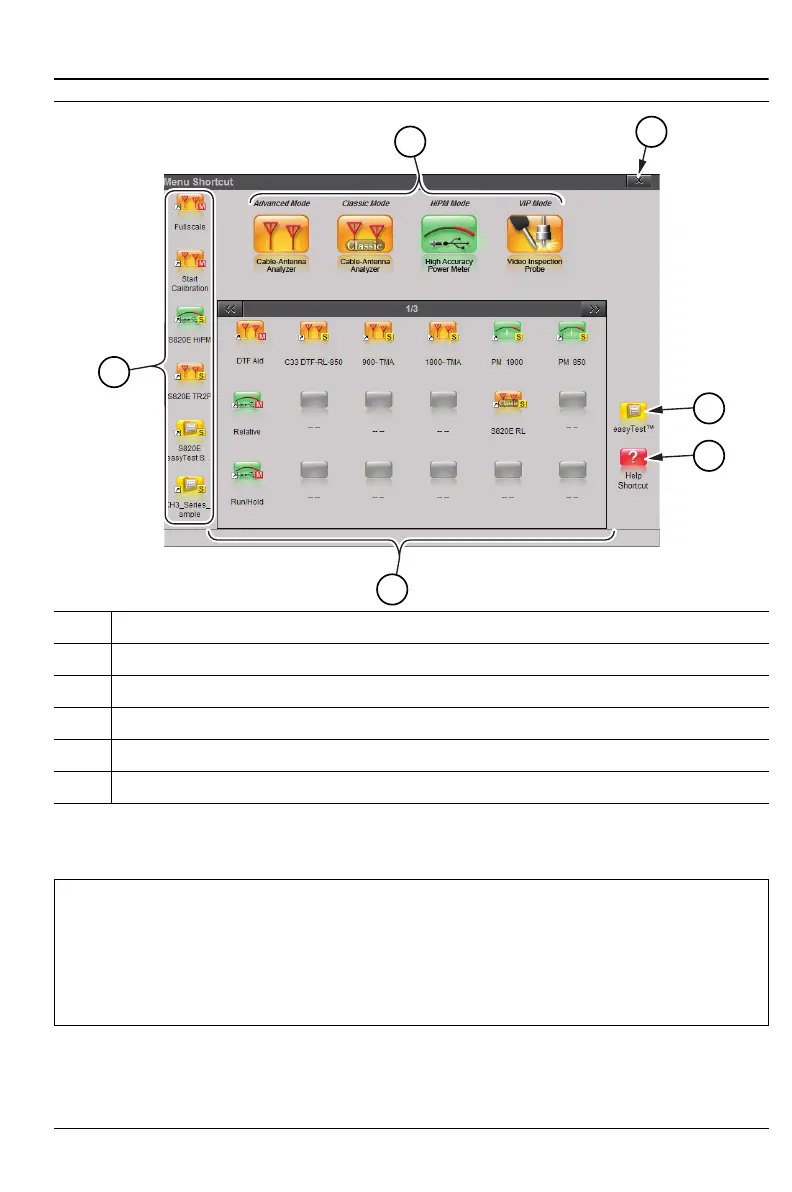
1. Installed Applications (Measurement Modes)
2. Close Box
3. Icon to Launch easyTest. Refer to Chapter 14.
4. Help for Menu Screen
5. Installed Setup and Menu Shortcuts (Screen 1 of 3)
6. Shortcuts Displayed in All Menus (not available in Classic Mode)
Figure 2-3. Menu Key Screen, Icons for Installed Applications and Shortcuts
Note
Shortcuts for both menu buttons and setup files can be deleted as
a group under the Preset Menu > Reset submenu. Select Delete
Custom Files, then select the Menu Shortcuts checkbox. Press
the Delete Custom Files button.
Refer to “Preset Menu” on page 11-27 for additional information.











 To Next Page