User preference Sets
Run Setup
• Default storage location for data files in file name conventions and results groups.
Note: You can override this setting in file name conventions and results groups.
• Pause After Last Injection—When enabled, allows reinjection of the last injection by
pausing after the last injection is complete (before completing the run).
Sequencing Settings
Trace
Default settings for color representation of nucleotide and quality value bars in the Trace
View in View Sequencing Results:
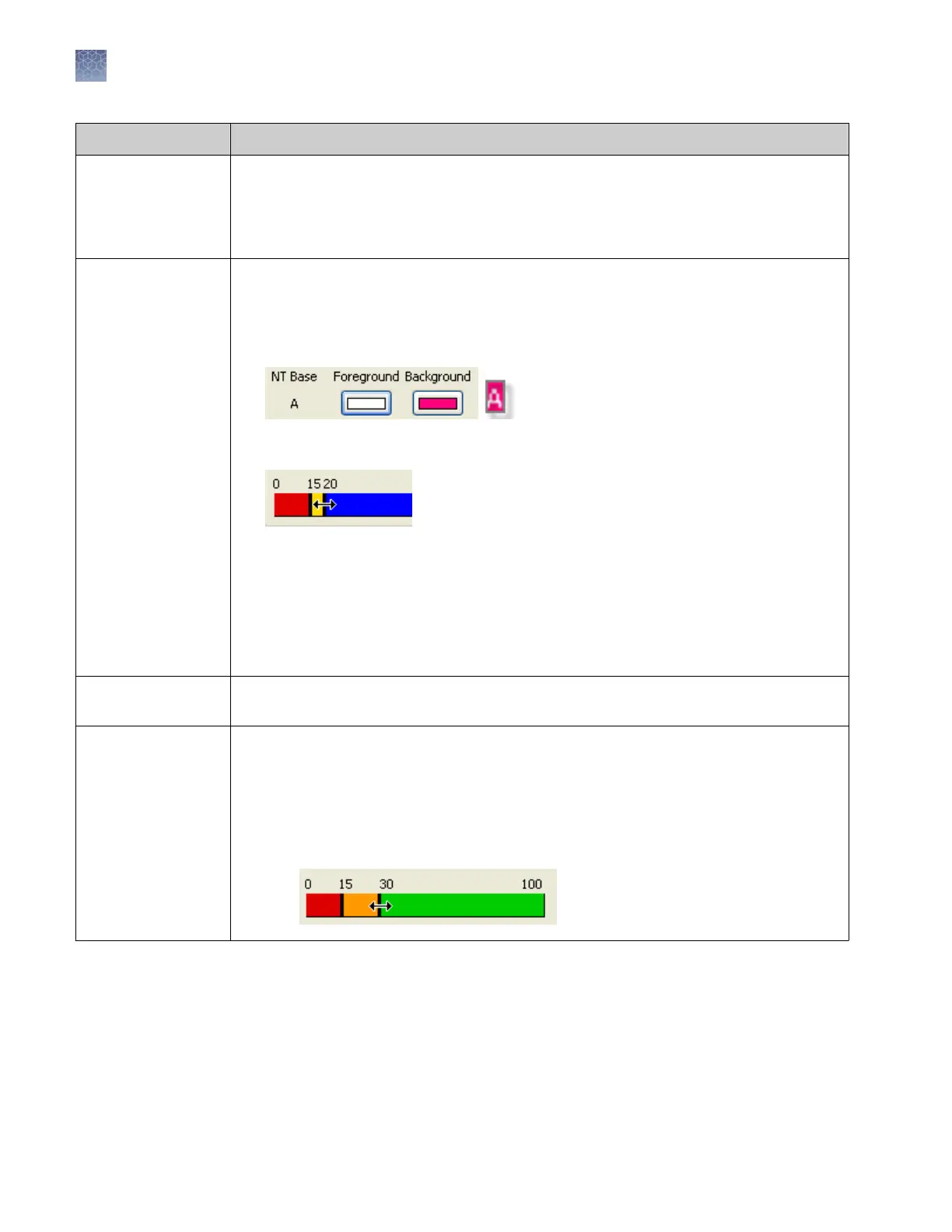
• NT (nucleotide) Base Color—Click an NT or mixed base Foreground or Background
color block, then select a color for the letter annotation or the highlight color for the
letter annotation.
• Pur
e Base and Mixed Base QV Colors—Sets the colors and ranges for pure and mixed
base QVs (quality values) displayed in the Trace View:
a. Click a pur
e base or mixed base color bar to select a new color.
b. Place the mouse pointer over a slider, then drag to set a new range.
We recommend that you set the following ranges for QVs:
– Pure bases: Low QV < 15, Medium QV = 15 to 19, High QV = 20+ (default).
– Mixed bases: Low QV < 5, Medium QV = 5 to 10, High QV > 10 (investigate to
determine the best range for your application).
Sequencing Settings
Trace Print
Settings for sequencing trace reports: Type of trace data, specific print settings, and Y-Scale.
Sequencing Settings
Trace Quality
Quality ranges for:
• QC report—Trace Score and CRL
• Plate report—Trace Score
Set colors and ranges:
a. Click a color bar to select a new color.
b. Place the mouse pointer over a slider, then drag to set a new range.
Chapter 2 Start the system
Set preferences (optional)
2
38
3500/3500xL Genetic Analyzer User Guide—Data Collection Software v3.1


 To Next Page