6. GUI orientation
6.17 Programmin g Menu
General
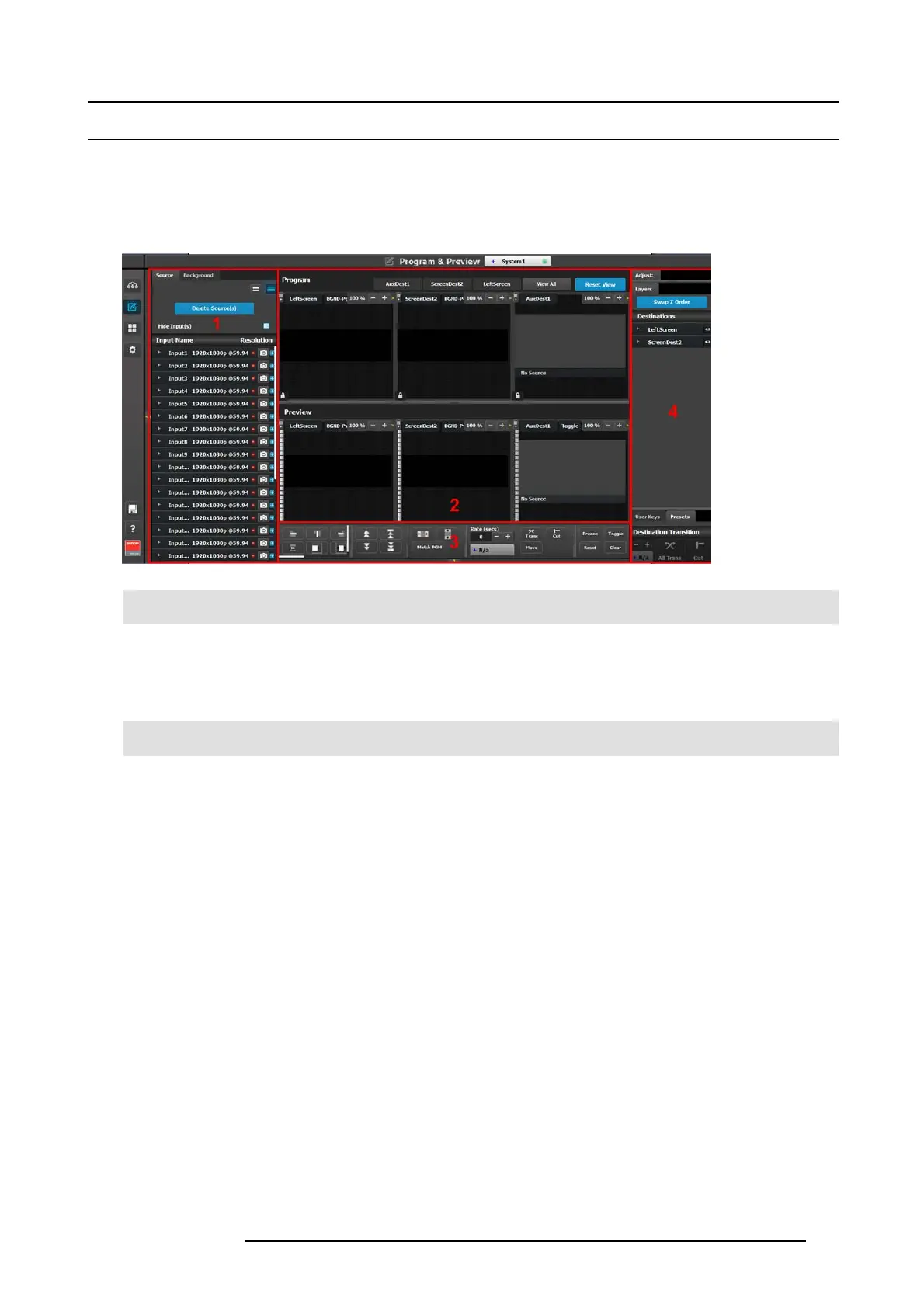
In the programming page is where the event is set up and everything comes together. Users can d e fine sources from inputs; assign
layers and backgrounds into screens and create User keys and presets.
Description
Image 6-32
1 Sources area This area contains the available inputs and sources. Also
in this area the still store (logo) images are shown.
2
Program/Preview Diagram area
For each destination the Program and Preview screens
can be created individually by selecting the corre sponding
tab. All Pr ogram and Previews screens can be v iewed
simultaneously by selecting t he “View All” butto n.
3
Layer modifie r area
Alignment adjustmen ts a nd controls manage the
Preview/Program screens.
4 Adjustment area The menus in this area provide for lay er and source
management, and the creation of User Keys and presets.
The following sections describe each part of the Program ming page in detail:
• "Programming Menu > Sources area", page 106
• "Programming Menu > Diagram area", page 112
• "Programming Menu > Layer Modifier area", page 115
• "Programming Menu > Adjustment area", pag e 119
R5905948 E2 12/12/2014
105



 To Next Page