6. GUI orientation
6.30 Multiviewer Menu > Multiviewer Layout area
General
This par t of the M ultiviewer Men u allows a user to add and position sources in Multiviewer outputs.
Description
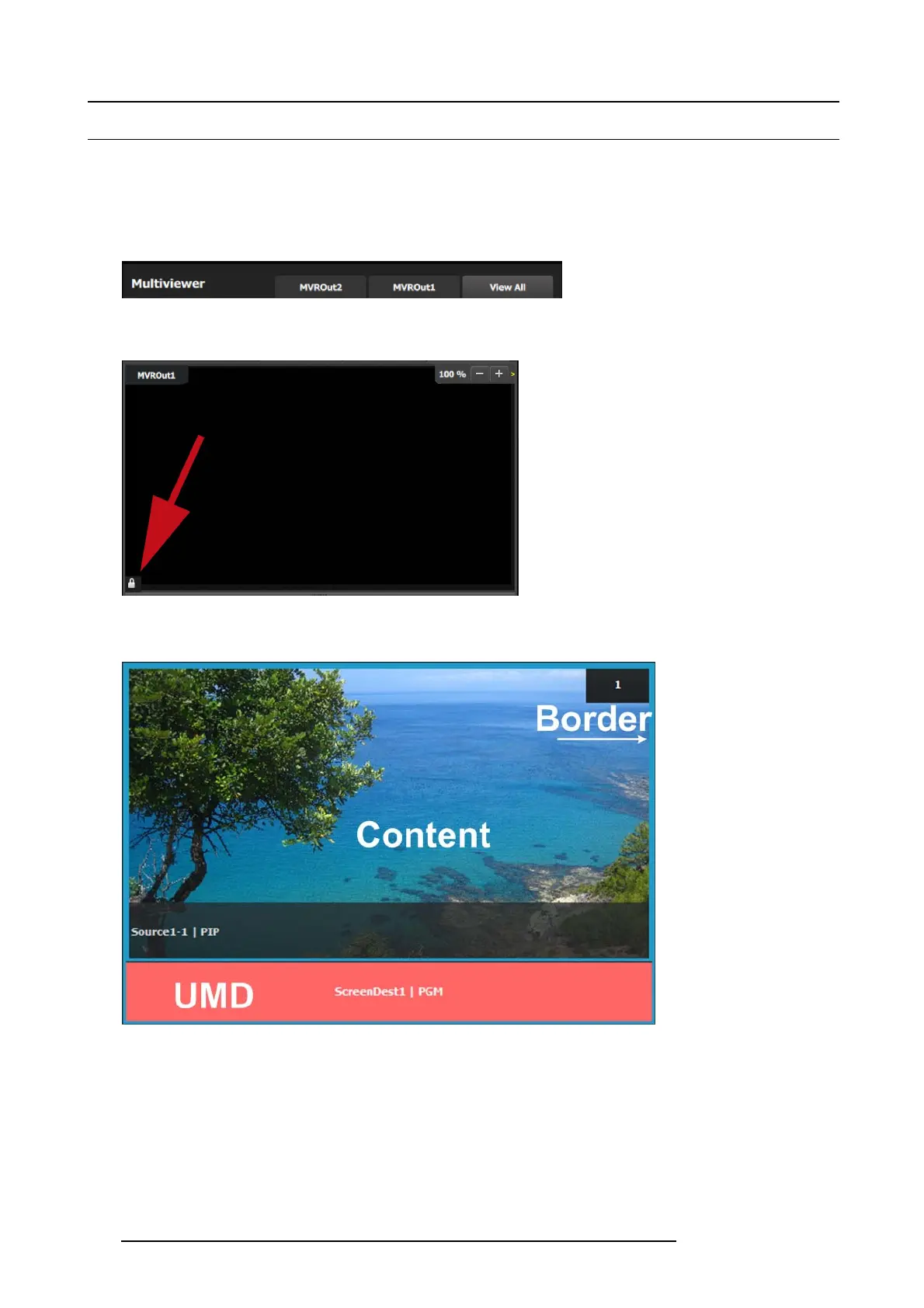
The tab s on the top of th e layout pane l area a llow the user to view the two outputs together or individually.
Image 6-64
At the bottom left corner of each output window is the lock icon button. When engaged a ny edits to the m ultiviewer window are
disabled.
Image 6-65
Multiviewer windows, also called Image windows, are composed from inputs, backgrounds and destination sources. There ar e 3
elements that make up a multiviewer im age window: Con tent area, border and UMD (Under-Screen-Display).
Image 6-66
Content area
The default content display area has 16:9 aspect ratio. If the source dr agged to this area has different as pect ratio, it w ill be adjusted
horizontally to fit the space.
If the output format of a source is changed after it is placed in the MVR, the change will not follow in the MVR w indow. The window
will nee d to be resized manually in the adjustment panel.
UMD
The text tracks the name of the sou rce in the display ar ea. If the res ource is renamed, the UMD will also ch ange to the n ew name.
The UM D can be edited in the adjustment p anel.
136
R5905948 E2 12/12/2014



 To Next Page