CS193/CS173/CS163 12-69
Utility mode
12
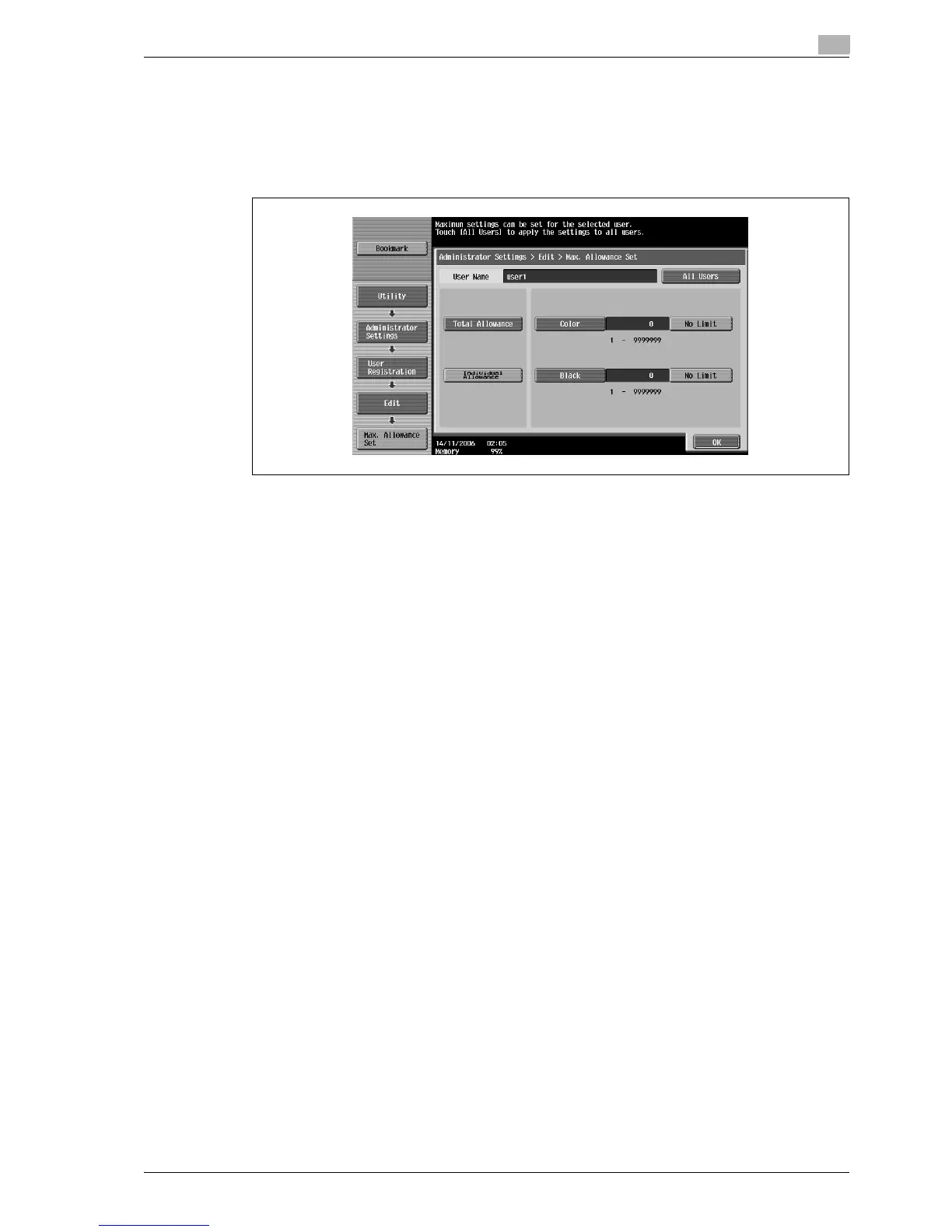
18 Touch [Total Allowance] or [Individual Allowance].
– To specify the maximum number of combined color and black prints allowed, touch [Total
Allowance].
– To separately specify the maximum number of color and black prints allowed, touch [Individual
Allowance].
– To specify no maximum for color and black prints, touch [No Limit].
19 Touch [Total], [Color] or [Black], and then use the keypad to type in the desired value.
– Touch [All Users] to apply the settings in the current screen to all registered users. Touch [All Users],
touch [OK], and then touch [OK] in the next screen that appears.
20 Touch [OK].
The maximum number of prints allowed is set.
21 To use authentication unit (biometric type) or authentication unit (IC card type), touch [Register Auth.
Info.].
– [Register Auth. Info.] appears only if an authentication unit is installed on this machine.
– For details on using the authentication unit, refer to the user manual for the authentication unit.
The Register Auth. Info. screen appears.
22 Touch [Edit].
– When using authentication unit (biometric type), place a finger on the authentication unit and
register the vein patterns.
– When using authentication unit (IC card type), place an IC card on the authentication unit and
register the card information.
23 Touch [Function Permission].
The Function Permission screen appears.



 To Next Page