5
F3SG-SR
User’s Manual
Chapter1 List of Key Features
Overview and Specifications
E
1-3. List of Key Features
1-3-1. Model Overview
The F3SG-SR series is a safety light curtain intended to be used for humans protection.
F3SG-SR Series
The F3SG-SR series has two sub-series, F3SG-SRA and F3SG-SRB. Both are safety light curtains
comprising an emitter and a receiver.
The F3SG-SRA is a full-featured model having advanced functionality. The F3SG-SRB is a standard
model, yet it supports wide variety of functionality. The F3SG-SR series is suitable for finger, arm, leg
and body detection.
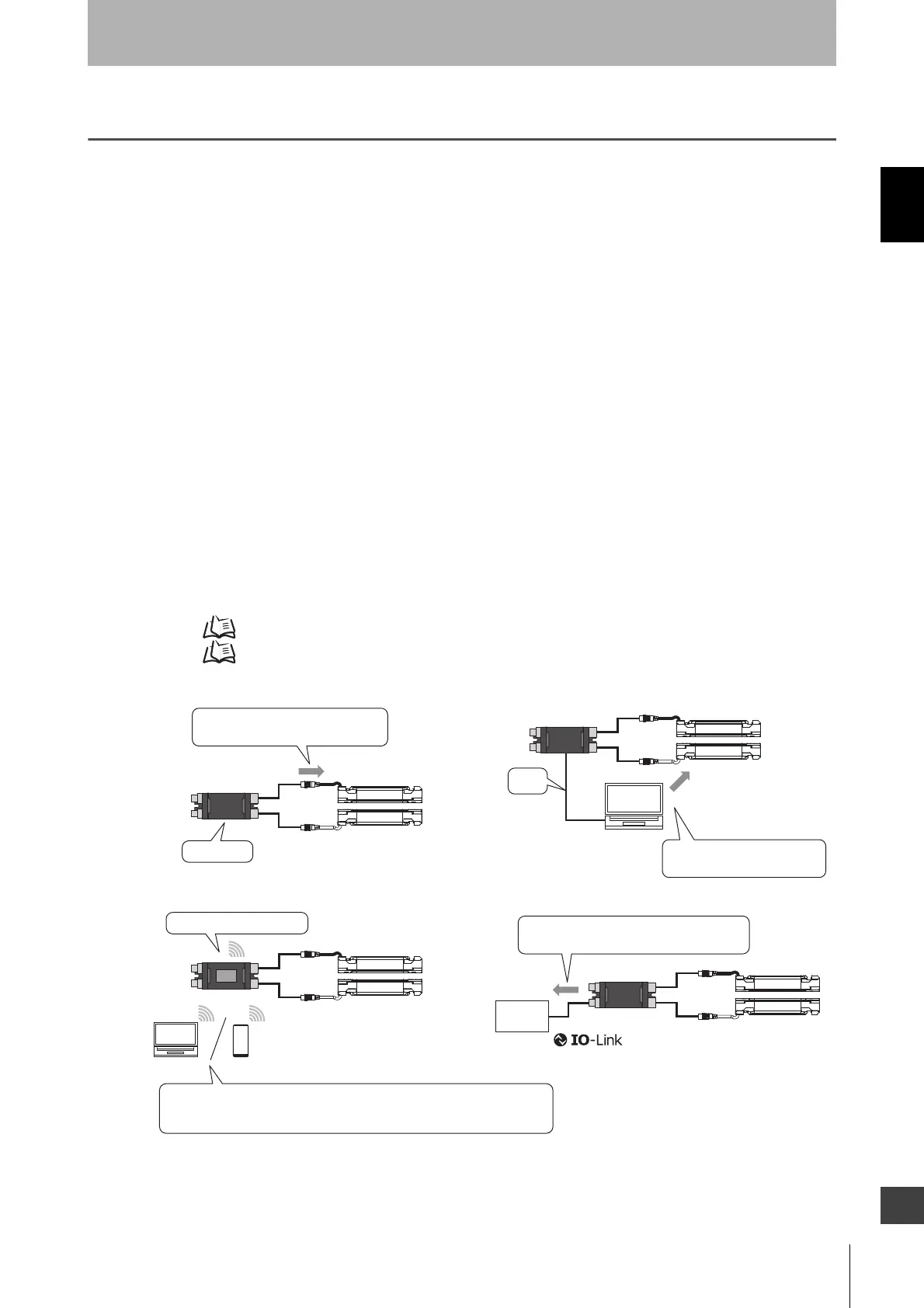
Intelligent Tap (F39-SGIT-IL3, sold separately)
The following setting functions are available by connecting the Intelligent Tap to the F3SG-SR.
(1) Setting with DIP Switch *1
(2) Setting with SD Manager 3 by connecting the Intelligent Tap to a PC *1
(3) Wireless communication with PC, smartphone or tablet by connecting the Intelligent Tap and
Bluetooth® Communication Unit (F39-SGBT, sold separately)
(4) IO-Link communication by connecting the Intelligent Tap and IO-Link Master
(5) Backup and Restoration of settings *2
*1. Refer to 1-3-2. List of Key Features for more information on configurable functions.
*2. Refer to Chapter 3 Setting with Intelligent Tap for more information on the Backup and Restoration.
(1)
(4)
Obtaining data is possible via IO-Link
communication by connecting IO-Link Master
PC
PC
IO-Link
Master
Setting of F3SG-SR is possible with
DIP Switch on Intelligent Tap
DIP Switch
(3)
· PC: Setting is possible with SD Manager 3 via Bluetooth
®
communication
· Smartphone/Tablet: Monitoring is possible with SD Manager 3 Mobile APP
via Bluetooth
®
communication
Bluetooth
®
communication
BT: Bluetooth
®
Communication Unit
(2)
Setting of F3SG-SR is possible
with SD Manager 3 via PC
USB
BT



 To Next Page
 Loading...







