349
F3SG-SR
User’s Manual
Chapter8 Troubleshooting
Appendix
E
8-1-3. Warning
8-1-3-1. Description
If an error is detected that prevents the F3SG-SR to continue normal operation, the SEQ indicator or
Area Beam Indicator (ABI) blinks to notify warning information according to the error. The F3SG-SR
continues normal operation. In the Auto Reset mode, the F3SG-SR automatically recovers from the
warning status when the cause of the error is solved. In the Manual Reset mode, the F3SG-SR keeps the
safety outputs in the OFF state. A reset signal is required to release the INTERLOCK state in this mode.
8-1-3-2. Troubleshooting
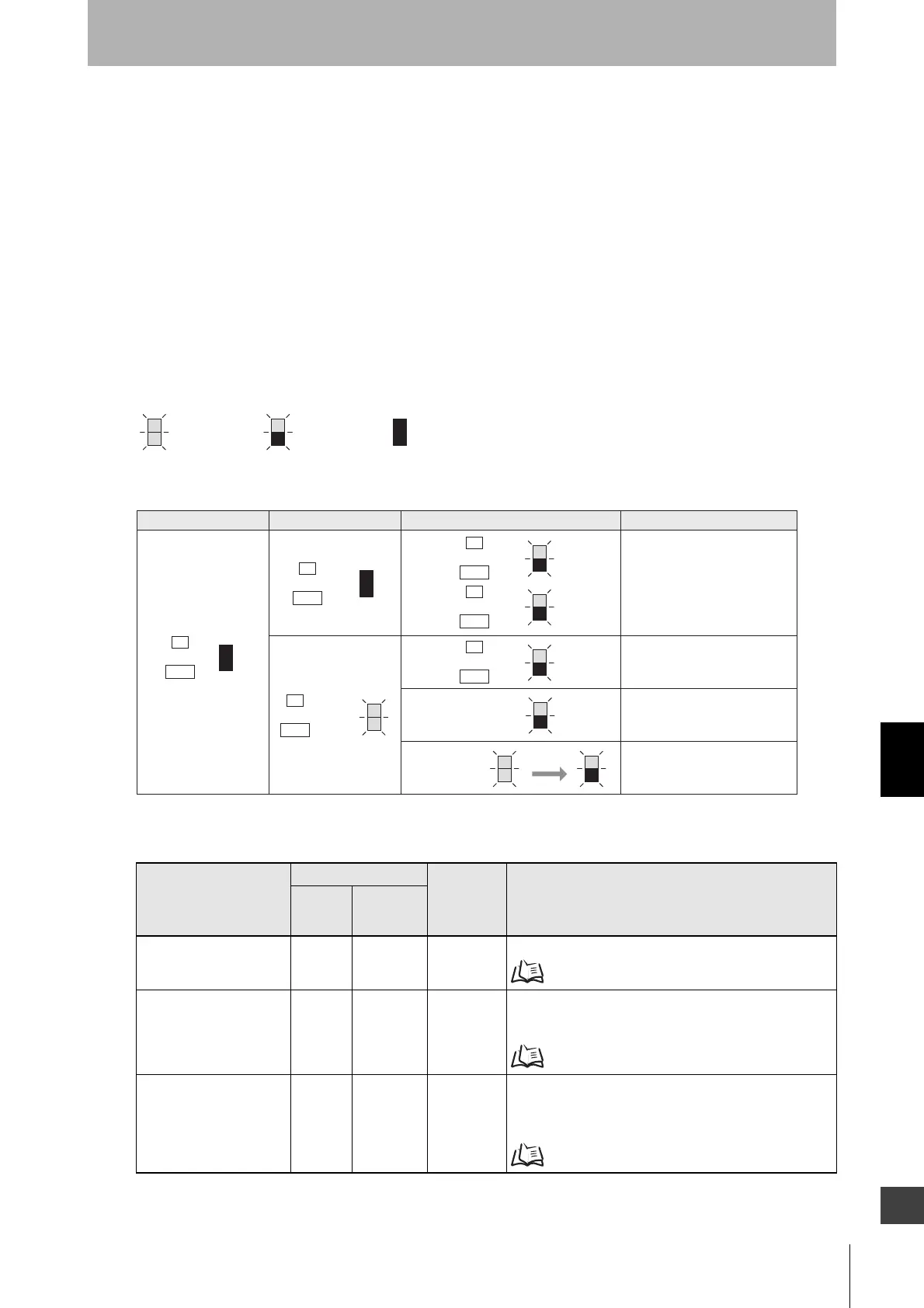
Identify an error according to the combination of the indicators when the error occurs. See the following
troubleshooting tables to take measures.
Description
Checking by
Warning
code
(HEX)*1
Cause and measures
Indicator
SD Manager 3/
SD Manager 3
Mobile APP
Teach-in error X X ED Teach-in failed. Perform the Teach-in again.
3-7. Teach-in (Fix Blanking / Floating Blanking)
Muting sequence error X X 2C, 2D, 2F Muting input may have been applied in the incorrect order.
Check the pattern of illumination of the LED indicator to
identify the cause.
8-1-3-3. Muting Sequence Error Indication
Interlock sequence error X - - When using the Pre-reset function, the reset signals for
interlock may be input in the wrong order. Check the
pattern of illumination of the LED indicator to identify the
cause.
8-1-3-4. Interlock Sequence Error Indication
*1 In the warning state, no indicators on the emitter are illuminated or blink.
*2 There are several illumination patterns to identify a faulty sequence.
Muting sequence error,
Interlock sequence error
or PSDI sequence error
Teach-in error
Low incident light level
Malfunction due to ambient
light or vibration
Area Beam
Indicator
Orange
Area Beam
Indicator
Green
*2
After 5 to 10 s
F
or
CFG
S
or
SEQ
ERR indicator Other indicatorsMAINT indicator Error description
Combination of indicators and error description
<Indicator status at warning: Receiver *1>
OFFBlinking
Illuminated
E
or
ERR
Orange
M
or
MAINT
M
or
MAINT
S
or
SEQ



 To Next Page
 Loading...







