When You Have Problems Operating the Machine
11
1
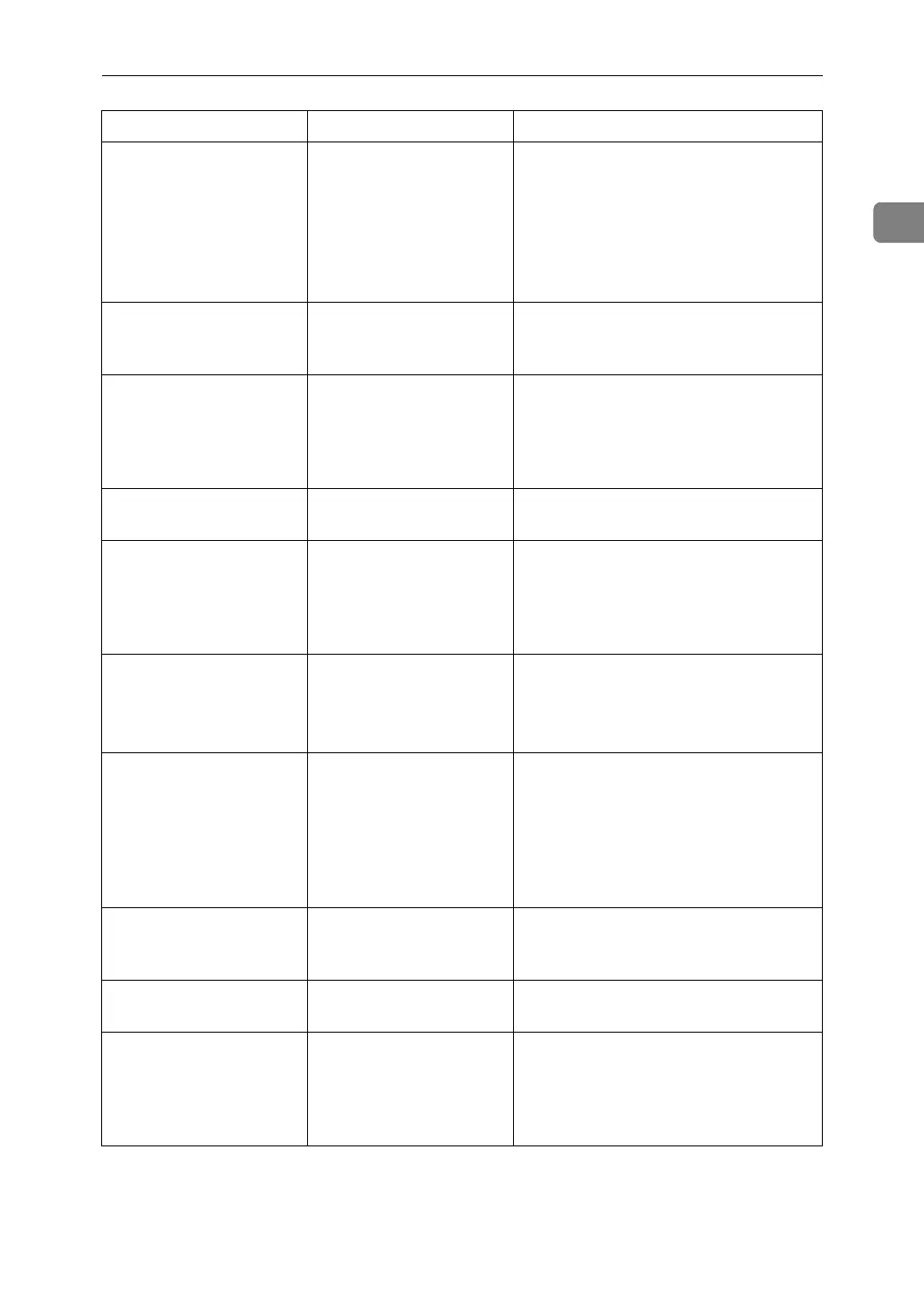
An error message re-
mains, even if misfed pa-
per is removed.
• When a misfeed mes-
sage appears, it re-
mains until you open
and close the cover as
required.
• Paper is still jammed
in the tray.
Clear misfed paper, and then open and
close the front cover. see p.93 “Clearing
Misfeeds”.
Cannot print in duplex
mode.
[1 Sided Copy] is selected
for Paper Type: Tray 1-7.
Select [2 Sided Copy] for Paper Type:
Tray 1-7 See “Paper Size: Tray 1-7”,
General Settings Guide.
Cannot print in duplex
mode.
You cannot select duplex
printing if the paper type
is set to [OHP], [Tab Stock],
[Translucent] or [Label Pa-
per].
Select a paper type that allows duplex
printing. See “Paper Size: Tray 1-7”,
General Settings Guide.
The user code entry
screen is displayed.
Users are restricted by
user management.
Enter the user code (up to eight digits),
and then press {q}.
The Authentication
screen appears.
Basic Authentication,
Windows Authentica-
tion, LDAP Authentica-
tion or Integration Server
Authentication is set.
Enter your login user name and user
password. See “When the Authentica-
tion Screen is Displayed”, About This
Machine.
“
You do not have
the privileges to
use this function.
”
is displayed.
The use of the function is
restricted to authenticat-
ed users only.
Contact the administrator.
“
You do not have
the privileges to
use this function.
”
continues to be displayed
even though you have
entered a valid user code.
This user code is not al-
lowed to use the function
selected.
Press the
{
Energy Saver
}
key. Confirm
that the display goes off, and then press
the
{
Energy Saver
}
key again. The display
will return to the user code entry dis-
play. When printing under the copier or
printer function, press the
{
Energy Saver
}
key only after printing has finished.
Authentication failed. The entered login user
name or login password
is not correct.
Inquire the user administrator for the
correct login user name and login pass-
word.
Authentication failed. The machine cannot per-
form authentication.
Contact the administrator.
The selected file(s) con-
tained file(s) without ac-
cess privileges. Only
file(s) with access privi-
leges will be deleted.
You have tried to delete
files without the authori-
ty to do so.
Files can be deleted by the person who
created the file. To delete a file which
you are not authorized to delete, con-
tact the person who created the file.
Problem Cause Solution



 To Next Page