Document Server
172
4
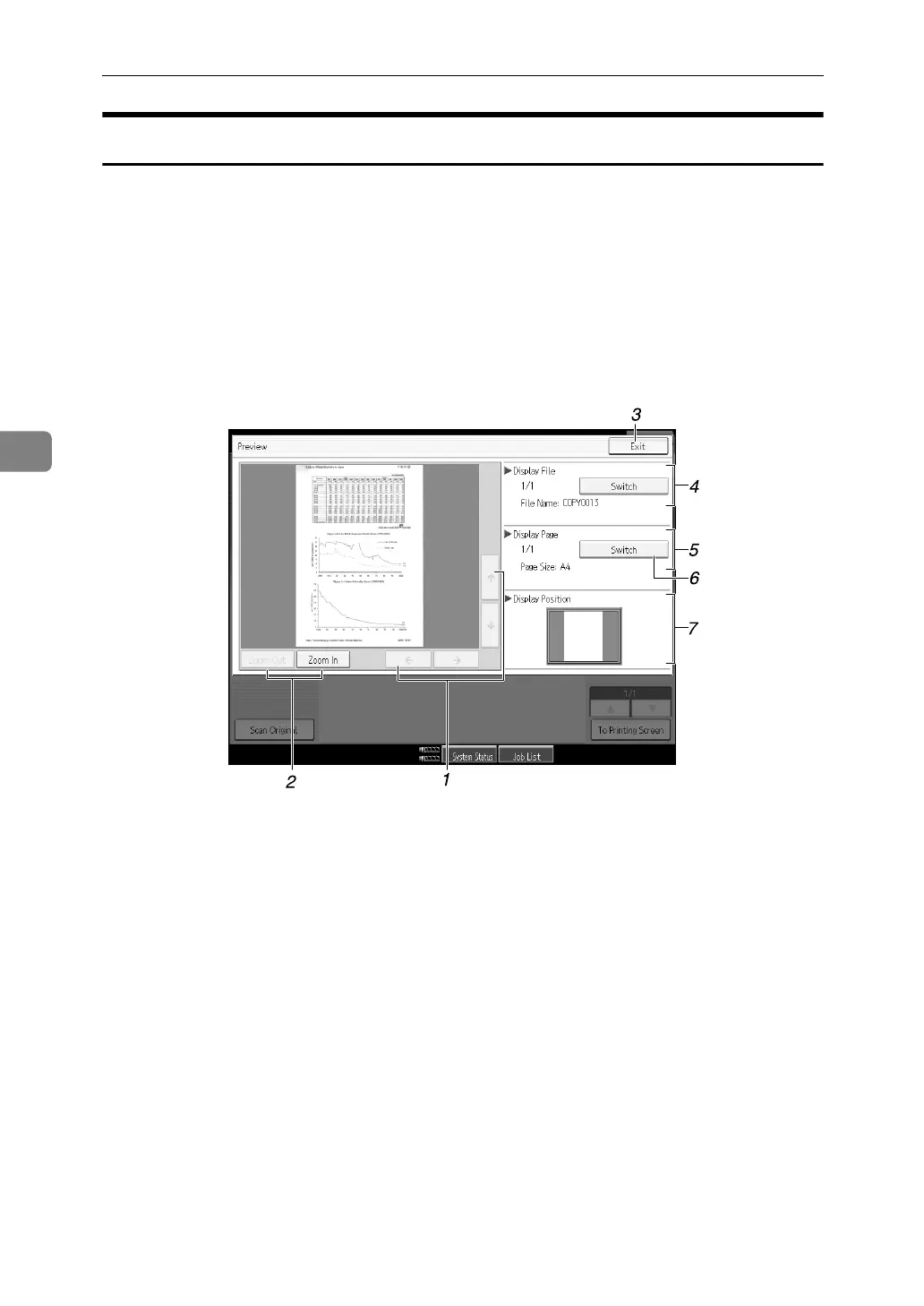
Preview Display
Following explains the preview display displaying procedure and the items dis-
played on this screen.
The Preview Display appears after scanning completes. You can also display
stored documents on the preview display. For details, see “Displaying the List
of Stored Files”, Scanner Reference.
The preview display denotes the screen that allows confirming contents of the
scanned documents.
❖ Preview Display
1. [←][→][↑][↓]
Used to move the portion to be displayed.
2. [Zoom Out], [Zoom In]
Used to scale up or down the document
to be displayed.
3. [Exit]
Used to exit the preview display.
4. Display File
Used to display the document name.
[Switch] is displayed on the preview
screen for the stored documents. It is
used to switch the document to be dis-
played in the preview.
5. Display Page
Used to display the currently opened
page number, total number of pages, and
page size.
6. [Switch]
Used to turn the page of the selected document.
7. Display Position
When the image is enlarged, the position
on the document is displayed.
APG041S



 To Next Page