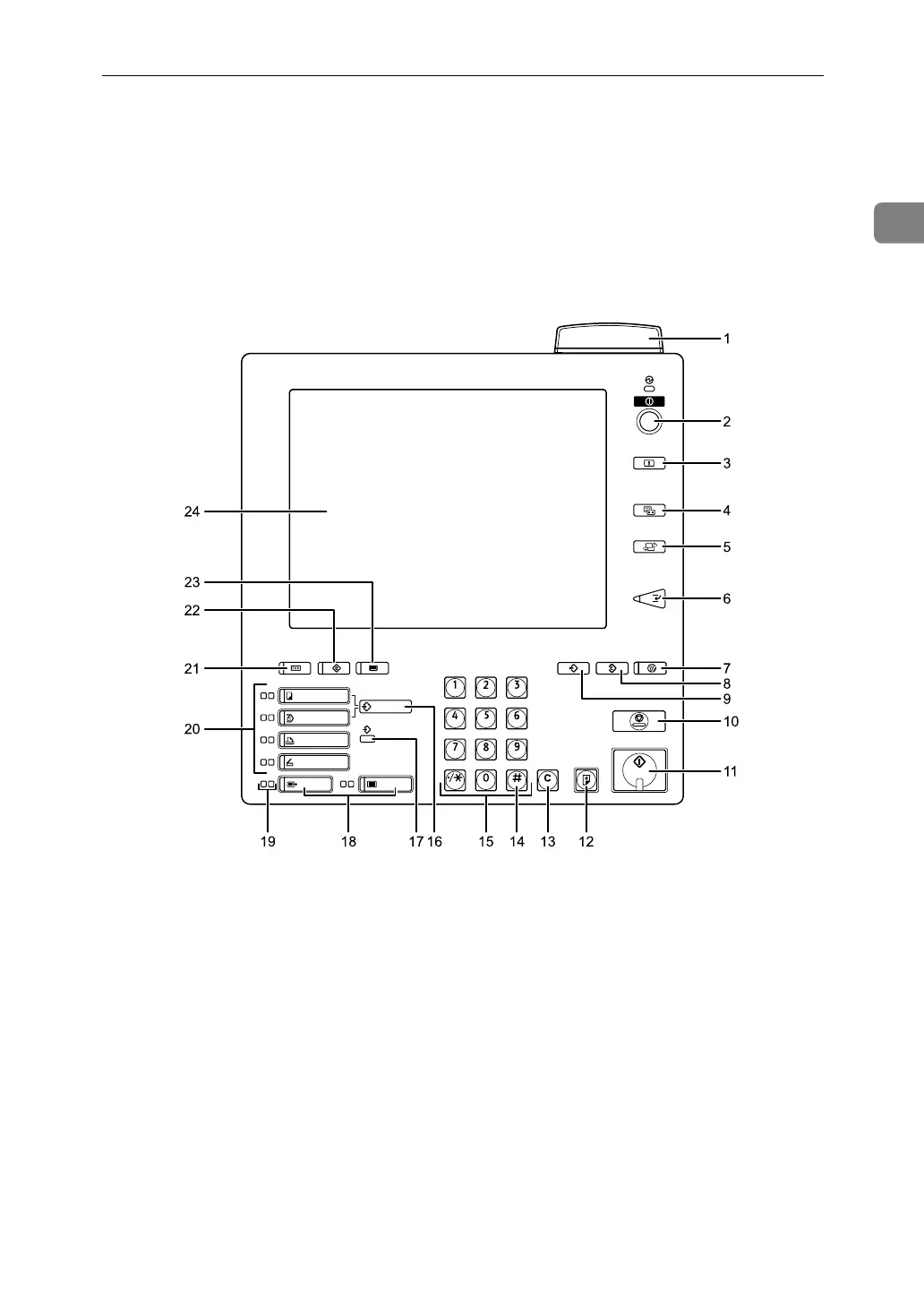
Control Panel
13
1
Control Panel
This section introduces the names and functions of the components on the con-
trol panel.
This illustration shows the control panel of the machine with options fully installed.
1. Status indicator
Machine status is described by this indi-
cator. By default, this indicator is turned
off. You can select the status indicator lit
or not.
• Off: The main power switch is turned
off or ready to make copies.
• Flashing green: Scanning originals.
• Lit green: Copying (ready to scan originals).
• Flashing red: Toner has nearly run out.
• Lit red: Paper jam or other malfunction.
If the status indicator is blinking red, pa-
per jam has occurred in the current copy
job. Bring up the current job screen.
2. Operation switch
Press this switch to turn the power on
(the On indicator lights up). To turn the
power off, press this switch again (the On
indicator goes off). See “Turning On the
Power”.
3. { Login/Logout} key
Press to log in or log out of the system.
4. { Simplified Display} key
Press to go to the Simplified Display screen.
See “Simplified Display”.
5. { Language Selection} key
Press to change the language of the display.
APG010S



 To Next Page