7
1. Connecting the Machine
Connect the machine to the network to configure network environment.
Connecting to the Interfaces
This section explains how to check the machine’s interface, connect the machine
according to the network environment, and specify the network settings.
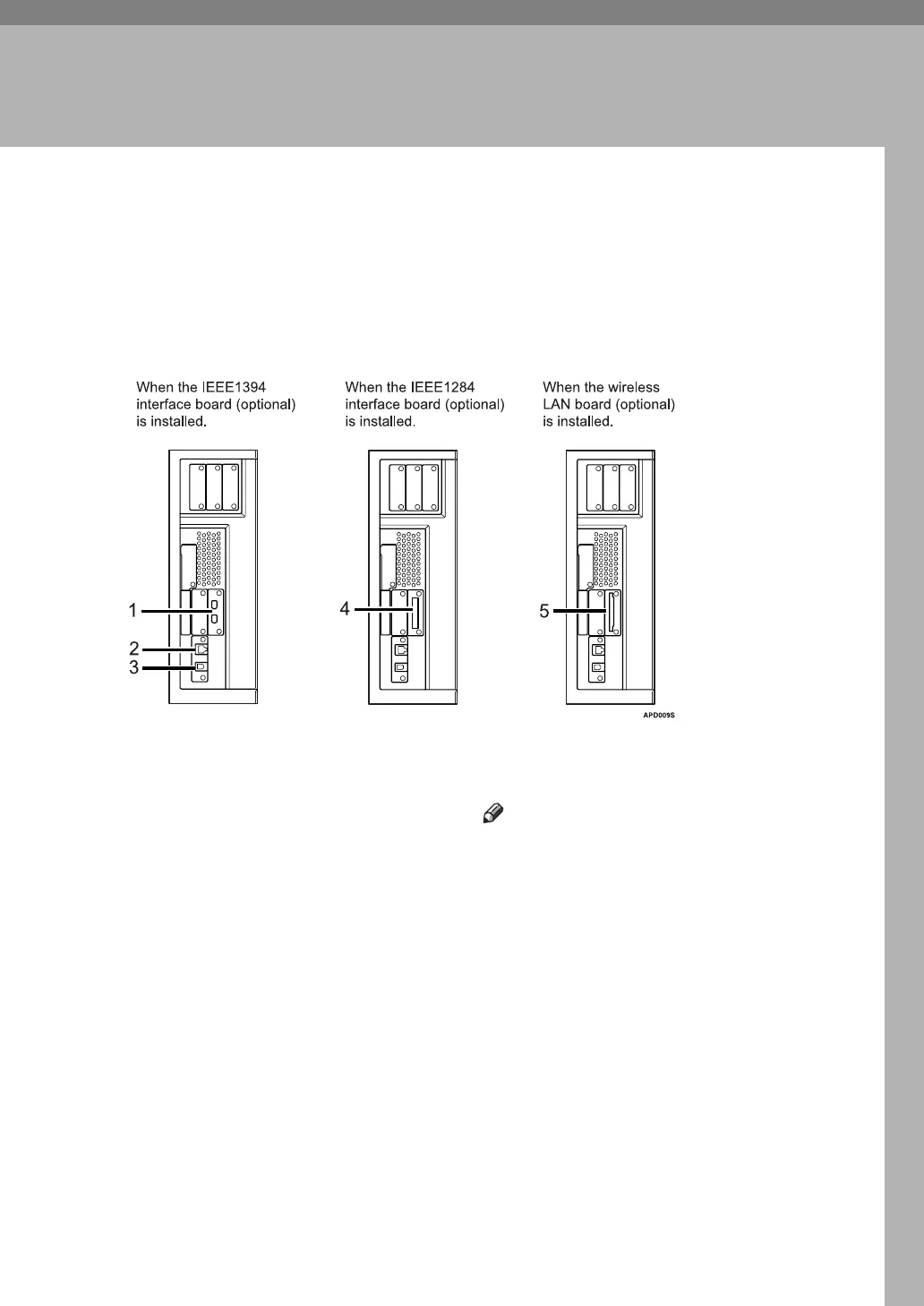
1. IEEE 1394 ports (optional)
Ports for connecting the IEEE 1394 inter-
face cable
2. 10BASE-T/100BASE-TX port
Port for connecting the 10BASE-T or
100BASE-TX cable
Port for connecting the 1000BASE-T,
100BASE-TX or 10BASE-T cable when
the Gigabit Ethernet (Optional) is in-
stalled
3. USB2.0 port
Port for connecting the USB2.0 interface
cable
4. IEEE 1284 port (optional)
Port for connecting the IEEE 1284 inter-
face cable
5. Wireless LAN port (optional)
Port for using the wireless LAN
Note
❒ You cannnot install two or more of the
options below: IEEE 1394 interface
board, IEEE 1284 interface board,
IEEE 802.11b wireless LAN



 To Next Page