Enhanced Network Security
148
5
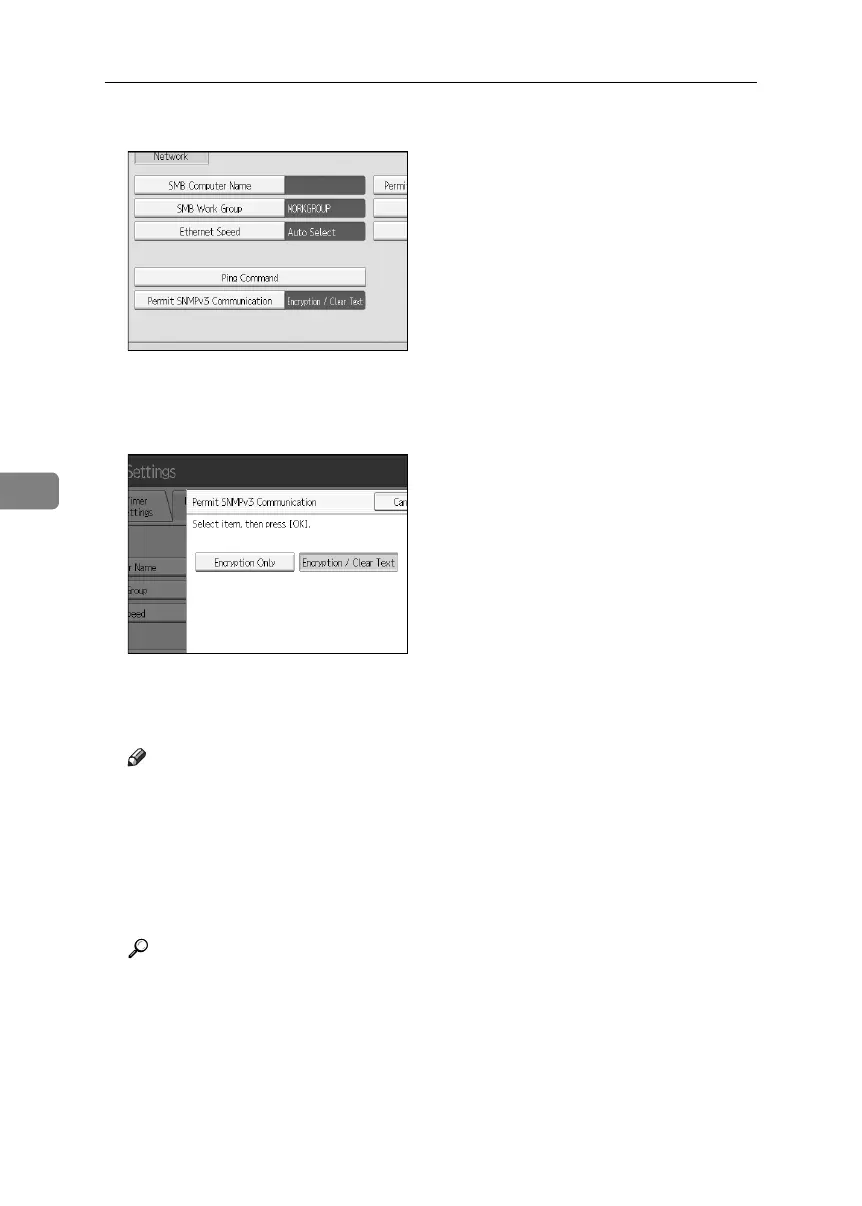
D Press [Permit SNMP v3 Communication].
If the setting to be specified does not appear, press [TNext] to scroll down to
other settings.
E Press [Encryption Only].
F Press [OK].
G Press the {User Tools} key.
Note
❒ To use SmartDeviceMonitor for Admin for encrypting the data for speci-
fying settings, you need to specify the network administrator’s [Encryption
Password] setting and [Encryption Key] in [SNMP Authentication Information] in
SmartDeviceMonitor for Admin, in addition to specifying [Permit SNMP v3
Communication] on the machine.
❒ If network administrator’s [Encryption Password] setting is not specified, the
data for transmission may not be encrypted or sent.
Reference
For details about specifying the network administrator’s [Encryption Pass-
word] setting, see p.20 “Registering the Administrator”.
For details about specifying [Encryption Key] in SmartDeviceMonitor for
Admin, see the SmartDeviceMonitor for Admin Help.
BelliniC3-EN_Sec_F_FM_forPaper.book Page 148 Friday, December 16, 2005 9:16 AM



 To Next Page