User Settings
205
8
*1
If you select [Auto-Obtain (DHCP)], you can only view the setting.
*2
You can only view the encryption setting.
*3
You can only view Main Delivery Server IP Address and Sub Delivery Server IP Ad-
dress.
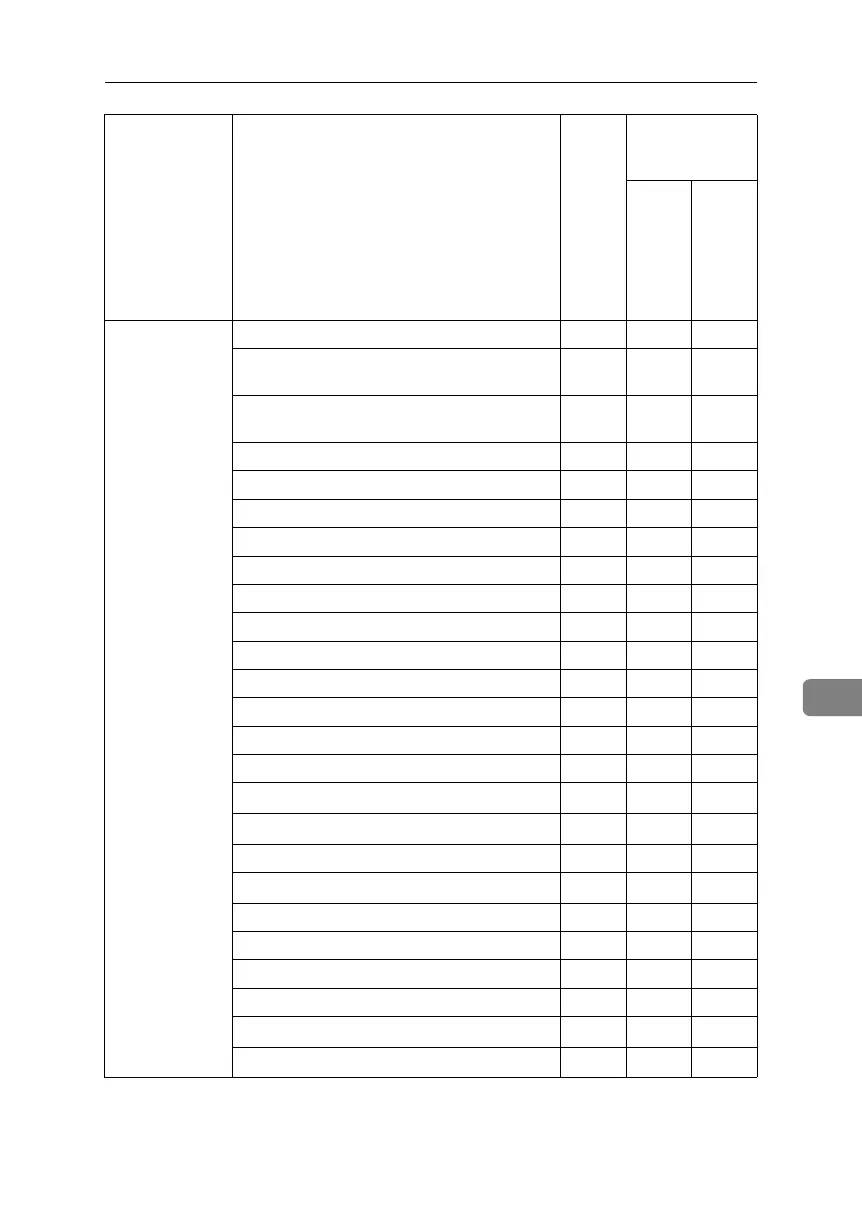
Administrator
Tools
Address Book Management UUU
Address Book: Program / Change / Delete
Group
UUU
Address Book: Program / Change / Delete
Transfer Request
UUU
Address Book: Change Order ❍❍U
Address Book: Edit Title ❍❍U
Address Book: Select Title ❍❍U
User Authentication Management ❍❍U
Administrator Authentication Management ❍❍U
Key Counter Management ❍❍U
Extended Security ❍❍U
External Charge Unit Management ❍❍U
Display / Clear / Print Counter per User ❍❍U
Print Address Book: Destination List UUU
Auto Delete File in Document Server ❍❍U
Delete All Files in Document Server ❍❍U
Capture Priority
*7
❍❍U
Capture: Delete All Unsent Files
*7
❍❍U
AOF (Always On) ❍❍U
Program / Change / Delete LDAP Server
*4
❍❍U
LDAP Search ❍❍U
Firmware Version ❍❍U
Data Security for Copying UUU
Transfer Log Setting UUU
Auto Erase Memory Setting
*9
❍❍U
Erase All Memory
*9
❍❍U
Tab Names Settings
Admin-
istrator
authen-
tication
has not
been
speci-
fied.
Administrator au-
thentication has
been specified.
“Availa-
ble Set-
tings”
has
been
speci-
fied.
“Availa-
ble Set-
tings”
has not
been
speci-
fied.
BelliniC3-EN_Sec_F_FM_forPaper.book Page 205 Friday, December 16, 2005 9:16 AM


 To Next Page