User Settings
211
8
*1
You can only specify the password.
User Authenti-
cation Manage-
ment
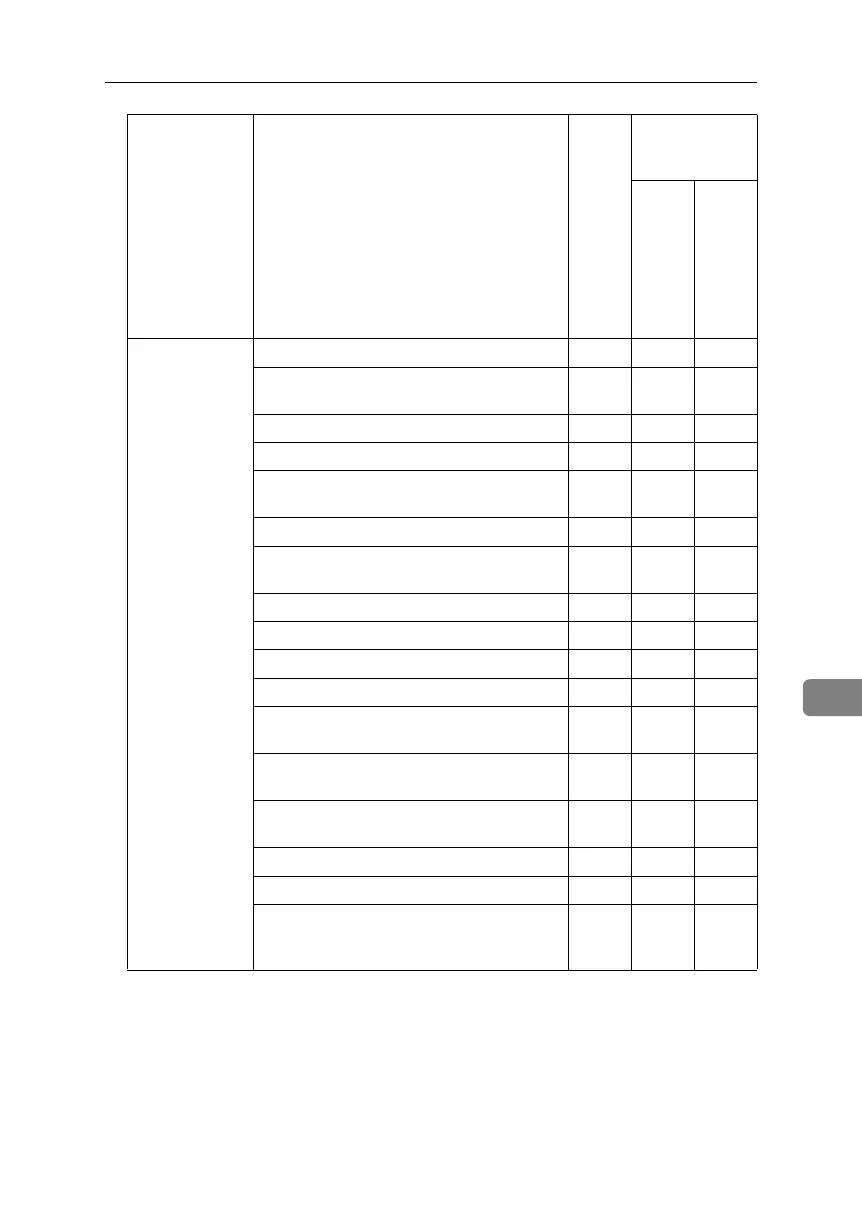
User Authentication Management ❍❍U
User Code Authentication - Printer Job Au-
thentication
❍❍U
User Code - Available Function ❍❍U
Basic Authentication - Printer Job Authentication
❍❍U
Windows Authentication - Printer Job Au-
thentication
❍❍U
Windows Authentication - Domain Name ❍❍U
Windows Authentication - Group Settings
for Windows Authentication
❍❍U
LDAP Authentication - Printer Job Authentication
❍❍U
LDAP Authentication - LDAP Authentication
❍❍U
LDAP Authentication - Login Name Attribute
❍❍U
LDAP Authentication - Unique Attribute ❍❍U
Integration Server Authentication - Printer
Job Authentication
❍❍U
Integration Server Authentication - Integra-
tion Server Name
❍❍U
Integration Server Authentication - Authen-
tication Type
❍❍U
Integration Server Authentication - Obtain URL
❍❍U
Integration Server Authentication - Domain Name
❍❍U
Integration Server Authentication - Group
Settings for Integration Server Authentica-
tion
❍❍U
Category Settings
Admin-
istrator
authen-
tica-
tion has
not
been
speci-
fied.
Administrator au-
thentication has
been specified.
“Avail
able
Set-
tings”
has
been
speci-
fied.
“Avail
able
Set-
tings”
has not
been
speci-
fied.
BelliniC3-EN_Sec_F_FM_forPaper.book Page 211 Friday, December 16, 2005 9:16 AM



 To Next Page