Chapter 8: Configuration and Remote System Upgrades in Cyclone IV Devices 8–39
Configuration
May 2013 Altera Corporation Cyclone IV Device Handbook,
Volume 1
You can use a download cable to configure multiple Cyclone IV device configuration
pins.
nCONFIG
,
nSTATUS
,
DCLK
,
DATA[0]
, and
CONF_DONE
are connected to every device in
the chain. All devices in the chain utilize and enter user mode at the same time
because all
CONF_DONE
pins are tied together.
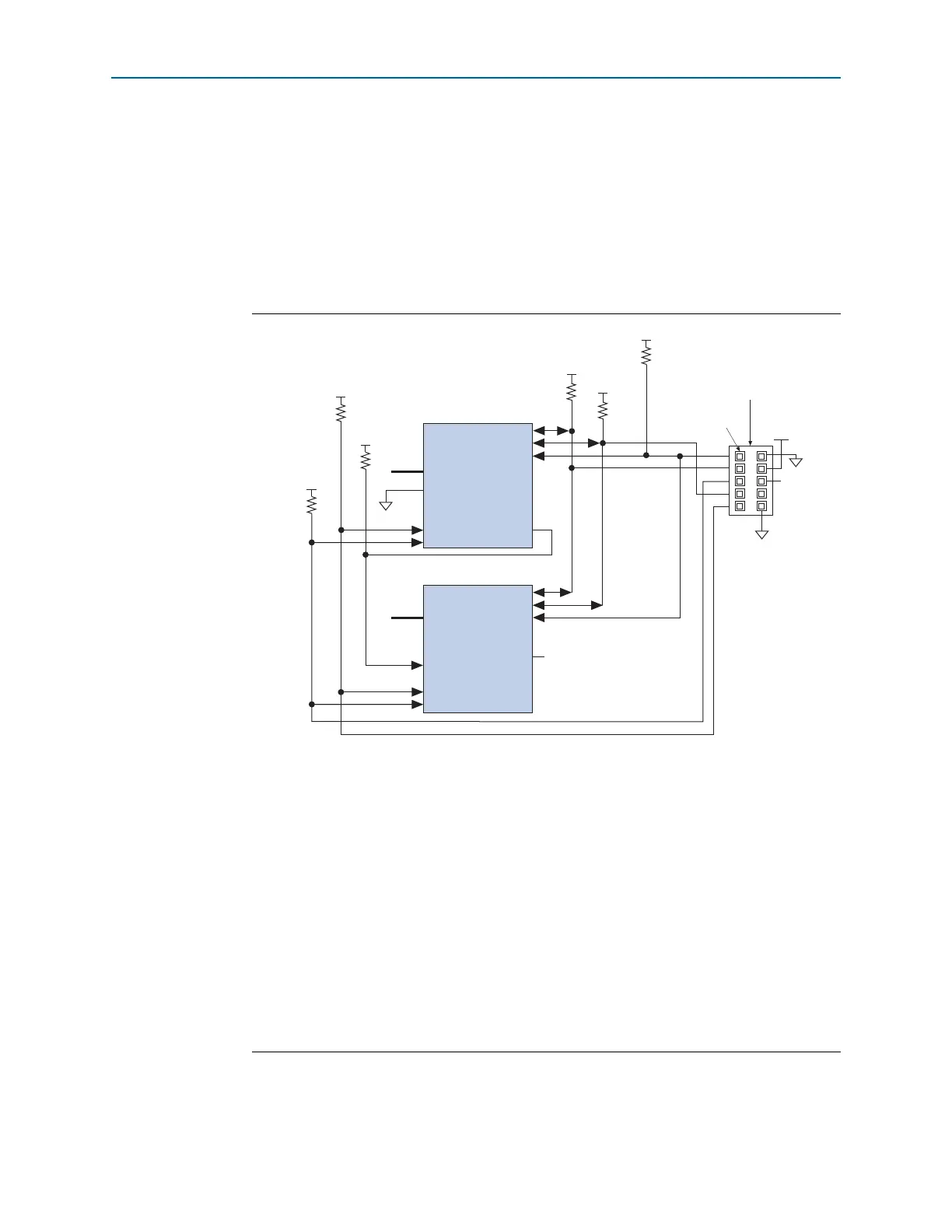
In addition, the entire chain halts configuration if any device detects an error because
the
nSTATUS
pins are tied together. Figure 8–18 shows the PS configuration for
multiple Cyclone IV devices using a MasterBlaster, USB-Blaster, ByteBlaster II, or
ByteBlasterMV cable.
Figure 8–18. Multi-Device PS Configuration Using a Download Cable
Notes to Figure 8–18:
(1) You must connect the pull-up resistor to the same supply voltage as the V
CCA
supply.
(2) The pull-up resistors on
DATA[0]
and
DCLK
are only required if the download cable is the only configuration scheme
used on your board. This ensures that
DATA[0
] and
DCLK
are not left floating after configuration. For example, if you
also use a configuration device, the pull-up resistors on
DATA[0]
and
DCLK
are not required.
(3) Pin 6 of the header is a V
IO
reference voltage for the MasterBlaster output driver. V
IO
must match the V
CCA
of the
device. For this value, refer to the MasterBlaster Serial/USB Communications Cable User Guide. When using the
ByteBlasterMV download cable, this pin is a no connect. When using USB-Blaster, ByteBlaster II, and EthernetBlaster
cables, this pin is connected to
nCE
when it is used for AS programming. Otherwise, it is a no connect.
(4) Connect the pull-up resistor to the V
CCIO
supply voltage of the I/O bank in which the
nCE
pin resides.
(5) The
nCEO
pin of the last device in the chain is left unconnected or used as a user I/O pin.
(6) The
MSEL
pin settings vary for different configuration voltage standards and POR time. To connect
MSEL
for PS
configuration schemes, refer to Table 8–3 on page 8–8, Table 8–4 on page 8–8, and Table 8–5 on page 8–9. Connect
the
MSEL
pins directly to V
CCA
or GND.
(7) Power up the V
CC
of the ByteBlaster II, USB-Blaster, or ByteBlasterMV cable with a 2.5 V supply from V
CCA
. Third-party
programmers must switch to 2.5 V. Pin 4 of the header is a V
CC
power supply for the MasterBlaster cable. The
MasterBlaster cable can receive power from either 5.0- or 3.3-V circuit boards, DC power supply, or 5.0 V from the
USB cable. For this value, refer to the MasterBlaster Serial/USB Communications Cable User Guide.
Cyclone IV Device 1
Cyclone IV Device 2
MSEL[ ] (6)
nCE
nCONFIG
CONF_DONE
DCLK
nCE
nCEO
nCONFIG
CONF_DONE
DCLK
nCEO
GND
(Passive Serial Mode)
V
CCA
(7)
V
CCA
(1)
GND
V
CCA
(1)
V
CCA
(1)
nSTATUS
nSTATUS
DATA[0]
DATA[0]
MSEL[ ]
(6)
Pin 1
Download Cable
10-Pin Male Header
N.C. (5)
VIO (3
GND
V
CCA
(1)
(2)
V
CCA
(1)
(2)
V
CCIO
(4)
10 kΩ
10 kΩ
10 kΩ
10 kΩ
10 kΩ
10 kΩ



 To Next Page