E-Signature type
Function to check
before
Signatures and authorities
required (defaults if
enabled)
Approve MicroSeq ID Install Standard
Results
Start Run 1 signature, any authorities
(any user, any user role)
Approve BDTv1.1 POP6 Install
Standard Results
Approve Fragment Install Standard
Results
Approve HID Install Standard Results
How the software prompts electronic signature before a run
If the system is congured to check that data is signed before starting a run and the
data for the run is not signed, a message is displayed when the user clicks Start Run.
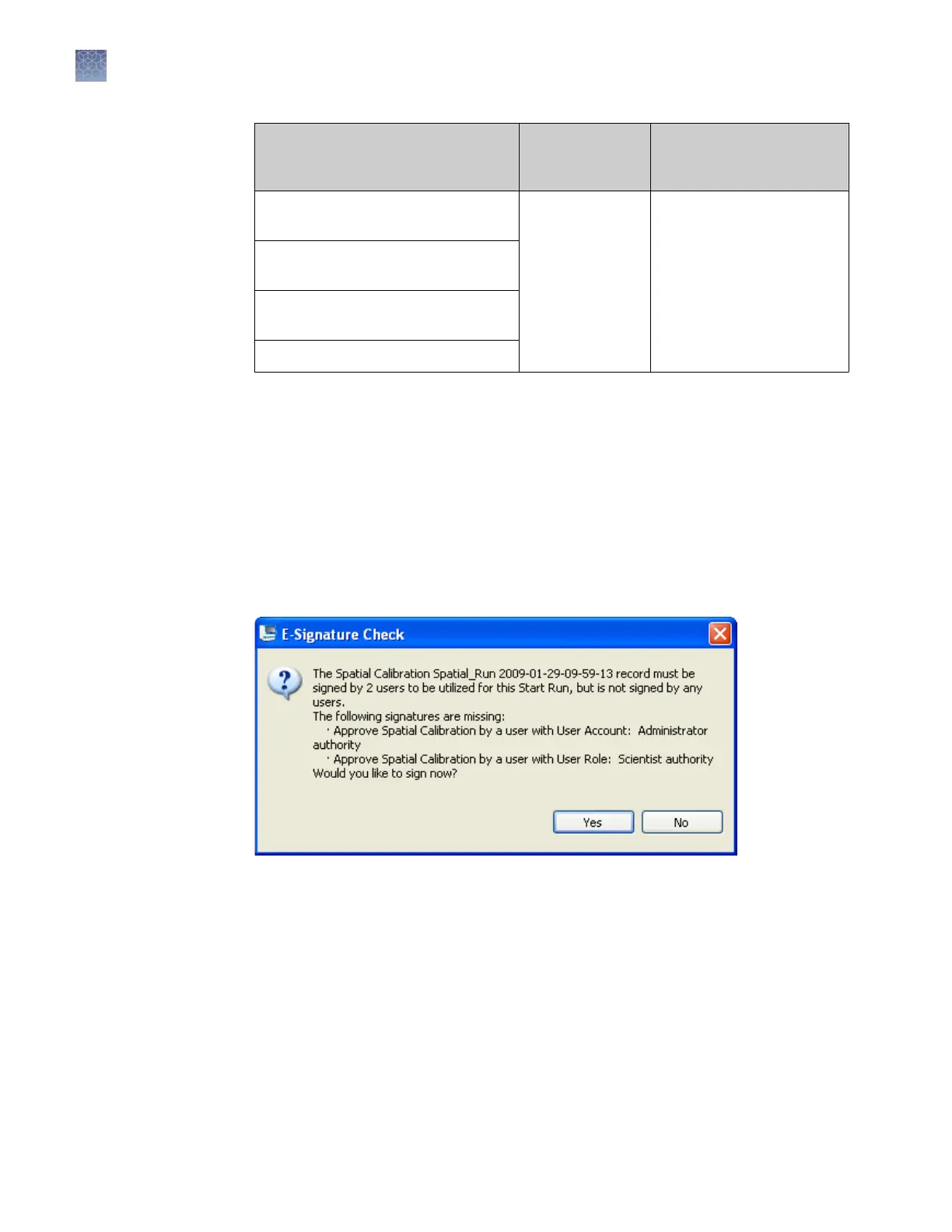
Example
The e-sig system is congured to require signatures from two users (one from the user
account named Administrator, and the other from any user account with a scientist
user role) for a spatial calibration before it can be used in a run. The spatial calibration
has not been signed.
A user starts a run. The following message is displayed:
Before the run can start, the following users must sign:
•
The Administrator user
• Any other user with the Scientist role specied and electronic signature enabled
in their user account
If a user that does not meet the specied criteria signs, a message is displayed to
indicate which users have e-signed.
Chapter 8 Use Security
, Audit, and E-Sig functions (SAE Module)
Administrators
8
214
3500/3500xL Genetic Analyzer User Guide—Data Collection Software v3.1


 To Next Page