Home
Sinee
Inverter
EM500
Page 115 (User-Defined Parameter Group)
Sinee EM500 - User-Defined Parameter Group
459 pages
Manual
Save Page as PDF
To Next Page
To Next Page
To Previous Page
To Previous Page
Loading...
EM500
Open-Loop
V
ector
Control
Inverter
User
Manual
115
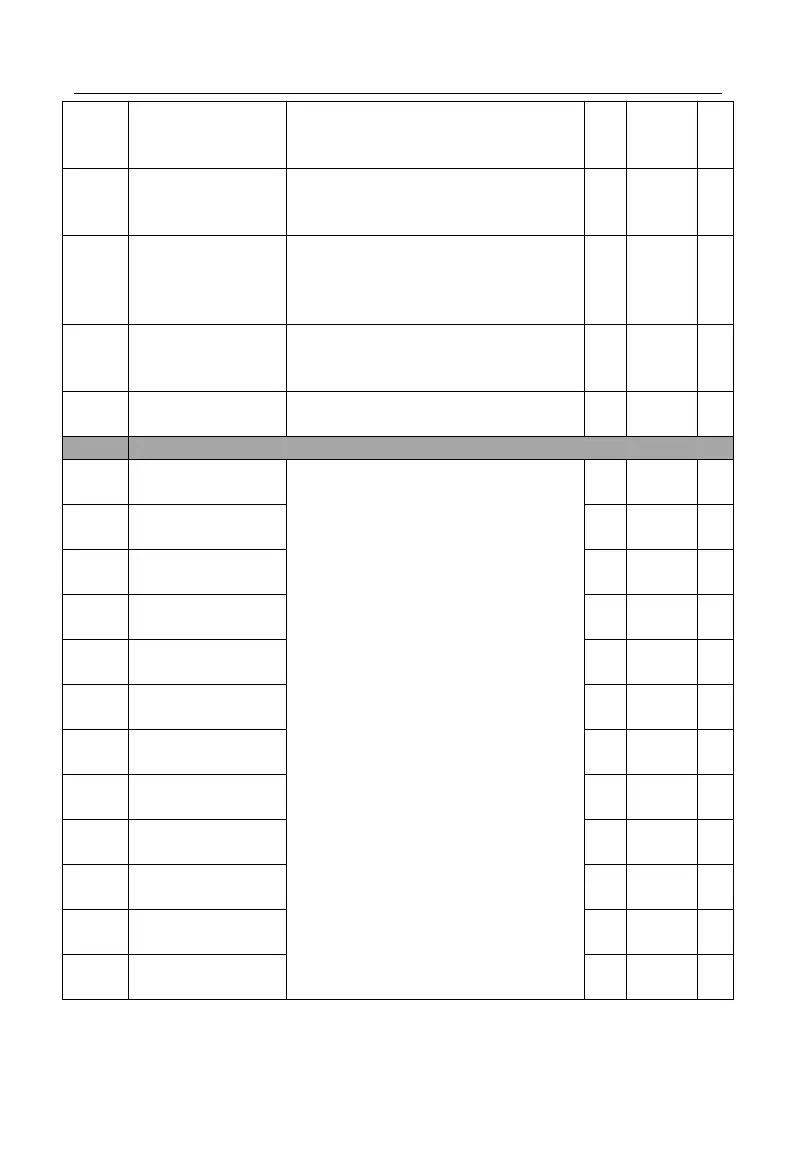
F10.52
Communication
card
manual
reset
selection
0
:
disable
1
:
enable
0
●
F10.53
CANSinee
Communication
address
1
~
31
1
〇
F10.54
CANSinee
Communication
baud
rate
0
:
125K
1
:
250K
2
:
500K
3
:
1M
0
〇
F10.55
CANSinee
Communication
timeout
0.0
-
60.0,
0.0:
Disabled
(also
works
for
master
-
slave
system)
s
0.0
●
F10.56
RS485write
EEPROM
0
~
10
:
default
for
debugging
11:
No
trigger
write
before
debugging
0
〇
F11
User-Defined
Parameter
Group
F11.
00
User-Defined
Parameter
1
The
content
displays
Uxx.xx,
which
means
that
function
code
Fxx.xx
is
selected.
If
keypad
displays
U00.00
at
the
time
of
entering
the
function
code
F11.
00,
it
means
that
the
first
user-defined
parameter
is
F00.00.
U00.00
●
F11.
01
User-Defined
Parameter
2
U00.01
●
F11.
02
User-Defined
Parameter
3
U00.02
●
F11.
03
User-Defined
Parameter
4
U00.03
●
F11.
04
User-Defined
Parameter
5
U00.04
●
F11.
05
User-Defined
Parameter
6
U00.07
●
F11.
06
User-Defined
Parameter
7
U00.14
●
F11.
07
User-Defined
Parameter
8
U00.15
●
F11.
08
User-Defined
Parameter
9
U00.16
●
F11.
09
User-Defined
Parameter
10
U00.18
●
F11.
10
User-Defined
Parameter
11
U00.19
●
F11.
11
User-Defined
Parameter
12
U00.29
●
114
116
Table of Contents
Main Page
Default Chapter
1
Main Features
1
Preface
1
Before Installation
3
During Installation
3
Safety Information
3
Safety Precautions
3
After Power-On
5
Before Power-On
5
During Operation
6
Maintenance
6
Attentions
7
Beyond Rated Voltage
7
Motor Insulation Inspection
7
Motor Thermal Protection
7
Operation at Power Frequency
7
Altitude and Derating
8
Attentions at Inverter Scrapping
8
Surge Protection
8
Table of Contents
9
Overview
14
Em500 Model List and Technical Specifications
14
Technical Specifications
15
Operating Status of Inverter
17
Em500 Operation Status
17
Control Modes of Inverter
18
Setting Modes of Inverter
18
Speed Input Mode
18
Main Frequency Source a Setting
19
Auxiliary Frequency Source B Setting
19
Main and Auxiliary Arithmetic Setting
20
Torque Setting Mode
20
Control Logic of Terminal Control Mode
21
Description of Parts of Em500 Inverter
22
Installation
24
Product Verification
24
Check List
24
Overall and Installation Dimensions
25
Model Numbering Description
25
Keypad Dimension
25
Considerations for Installation Site
29
Ambient Temperature
29
Installation Direction and Space
30
Assembly and Disassembly of Keypad
31
Flush Mounting
32
Keypad Installation
32
Disassemble Top and Bottom Mounting Holes
33
Assemble Top and Bottom Mounting Holes
33
Left and Right Accessories for Flush Mounting
34
Installation Dimensions for Flush Mounting
35
Wiring
36
Connection of the Inverter and Peripherals
36
Connection to Peripherals
36
Main Circuit Terminal Block
37
Wiring Main Circuit Terminals
37
90 Kw – 400 Kw Terminal Dimension
39
Internal Main Circuit
39
Main Circuit Terminal Functions
39
Standard Wiring of Main Circuit
40
Circuit Breaker Installation
41
Connecting to Input Circuit Breaker
41
Electromagnetic Contactor Installation
41
Leakage Circuit Breaker Installation
41
AC Reactor Installation
42
Connection to Terminal Block
42
Noise Filter Installation at Power Supply Side
42
Surge Suppressor Installation
42
Incorrect Installation of Noise Filter
43
Inverter and Motor Connection
43
Wiring on Output Side of Main Circuit
43
Never Connect Power Supply Cable to Output Terminals
44
Never Short-Circuit or Ground Output Terminals
44
Never Use an Phase-Shifting Capacitor
44
Noise Filter Installation at Output Side
44
Countermeasures against Inductive Interference
45
Countermeasures against RF Interference
45
Main Circuit Cable and Terminal Screw Size
46
Wiring Distance and Carrier Frequency between Inverter and Motor
46
Wiring Distance between Inverter and Motor
46
Grounding Cable
47
Connection Methods of Grounding Cable
48
Wiring Control Circuit Terminals
48
Function and Wiring of Control Circuit Terminals
49
Analog Input Terminal Wiring
51
Configuring Voltage Modes with S4 and S5
51
Wiring Terminals AI1, AI2 and AI3 through Analog Voltage Signal
51
Wiring of Multi-Function Input Terminal
52
Wiring of Terminals AI2 and AI3
52
Wiring Terminals AI2 and AI3 (Input Analog Current Signal)
52
Analog Output Terminal Wiring
54
Wiring of Multi-Function Output Terminal
54
Wiring of 485 Communication Terminal
55
Wiring of Communication Interfaces of Multiple Inverters
55
Wiring of Single Inverter Communication Interface
55
Wiring of Cansinee Communication Interface
56
Attentions for Control Circuit Wiring
57
Cansinee Communication Wiring of Several Inverters
57
Control Circuit Cable and Screw Size
57
Standard Wiring of Control Circuit
59
Extending Keypad Wire
60
Wiring of Keypad Extension Line
60
Wiring Verification
60
Keypad Operation
61
Keypad Function
61
Structure of LED Keypad
61
Functions of Buttons and Indicators of LED Keypad
62
LED Keypad Operation Mode
63
All Menu Mode (--A--)
64
Operation Procedure of Menu Mode Selection
64
Operation Procedure from Power-On to Setting F03.28=5.28
65
Procedure of Canceling Parameter Change by Pressing ESC
66
User-Defined Mode (--U--)
66
Example of User-Defined Mode Setting
67
Changing Function Code under User-Defined Mode
68
Non-Factory Defaults (--C--)
68
Changing Function Parameters under Non-Factory Defaults Mode
69
Fault Monitoring
69
Operation Monitoring
70
Parameter Copy
70
Function of M.K.
71
Run/Stop
71
Trial Operation Procedure
72
Attentions for Trial Operation
74
Turn on the Power Switch
74
Confirm the Power-On Status
75
Function Code Table
76
Parameter Description
76
All Items of the Function Code Table
76
Function Parameter Table
78
Basic Function Parameter Group
78
Motor 1 Parameter
81
Input Terminal Function Group
84
Output Terminal Function Group
90
Start/Stop Control Parameter Group
94
V/F Control Parameter Group
96
Vector Control Parameter Group
97
Protection Function Setting Group
101
Preset Speed and Simple PLC
103
PID Function Group
108
Communication Function Group
110
User-Defined Parameter Group
115
Keypad and Display Function Group
117
Torque Control Parameter Group
121
Motor 2 Parameter Group
122
Auxiliary Function Group
128
Customized Function Group
131
Virtual I/O Function Group
133
Monitoring Parameter Group
135
Fault Record Group
137
Application of Water Supply Basic Groups
140
Winding Rolling Application
144
F00 Group: General Parameter
154
F00.01=0: V/F Control (VVF)
154
F00.01=1: Sensorless Vector Control (SVC)
154
Parameter Description
154
F00.02=0: Keypad Control (LOC/REM Indicator On)
155
F00.02=1: Terminal Control (LOC/REM Indicator Off)
155
F00.02=2: Communication Control (LOC/REM Indicator Flickers)
155
F00.03=0: Terminal RUN, Forward/Reverse (F/R)
156
F00.03=1: Terminal RUN Forward, F/R Reverse
156
3-Wire Sequence
157
F00.03=2: Terminal RUN Forward, XI Stop, F/R Reverse
157
F00.03=3: Terminal RUN, XI Stop, Forward/Reverse (F/R)
157
F00.04=0: Numeric Frequency Setting F00.07
159
F00.04=4: AI4 (Expansion Card)
159
F00.04=5: High-Frequency Pulse Input (X7)
159
F00.04=6 or 7: Main Frequency Setting by Communication
159
F00.04=8: Digital Potentiometer
160
Setting of Main Frequency Source a
160
F00.05=0: Numeric Frequency Setting F00.07
161
F00.05=4: AI4 (Expansion Card)
162
F00.05=5: High-Frequency Pulse Input (X7)
162
F00.05=6 or 7: Auxiliary Frequency Setting by Communication
162
F00.05=8: Digital Potentiometer
162
F00.05=10: Process PID
163
F00.05=11: Simple PLC
163
F00.06=0: Main Frequency Source a
163
F00.06=1: Auxiliary Frequency Source B
163
F00.06=2: Main and Auxiliary Arithmetic Results
164
Switching between Main Frequency Source a and Auxiliary Source B
164
F00.08=0: Main Frequency Source a + Auxiliary Frequency Source B
165
F00.08=1: Main Frequency Source a - Auxiliary Frequency Source B
165
Maximum of Main Frequency Source a and Auxiliary Frequency Source B
165
Minimum of Main Frequency Source a and Auxiliary Frequency Source B
165
F00.13=0: Synthetic Frequency of Main and Auxiliary Channels
167
High-Frequency Pulse (X7) Synthetic Frequency of Main, Aux Channels
167
Acceleration/Deceleration Time
168
F00.17=0: Set through F00.18
169
F00.17=4: AI4 (Expansion Card)
169
F00.17=5: High-Frequency Pulse Input (X7)
169
F00.17=6 or 7: Communication Setting
170
F00.21=0: Permit Forward/Reverse
171
F00.21=1: Prohibit Reverse
171
F00.24=0: Disabled
172
Setting Relationship Betw. Inverter Rated Power and Carrier Frequency
172
F00.24=1: Enabled 1
173
F00.24=2: Enabled 2
173
Motor Parameter Group Selection
173
F01 Group: Motor 1 Parameter
174
F01.34=0: no Autotuning
178
Synchronous Motor Remains Stationary in Parameter Autotuning
178
The Induction Motor Remains Rotational in the Parameter Autotuning
178
The Induction Motor Remains Stationary in Parameter Autotuning
178
F02 Group: Input Terminal Parameter
179
Synchronous Motor Remains Rotational in Parameter Autotuning
179
Numeric Multi-Function Input Terminals
180
High-Speed Pulse Input Offset Curve
192
Analog Input Terminal Voltage and Present Logic Status Relationship
193
F03 Group: Output Terminal Function Parameter
196
Numeric Multi-Function Output Terminals
196
Numeric Output Terminal Level and Monopulse Output
204
Multi-Function Analog Output Terminals
205
F04 Group: Start/Stop Control Parameter
208
F04.00=0: Start Directly
208
F04.00=1: Rotation Speed Tracking Start
208
F04.09: Rise Speed of Rotation Speed Tracking Voltage
210
F04.12: Tracking Intensity
210
Tracking Current, Which Is a Ratio Relative to Inverter Rated Current
210
F04.14=0: Linear Acceleration/Deceleration
211
F04.14=1: S Curve Acceleration/Deceleration
211
Acceleration/Deceleration Time Control
212
F04.19=0: Ramp-To-Stop
212
F04.19=1: Coast-To-Stop
212
F04.27=0: Not to Confirm
214
F04.27=1: Confirm
214
F05 Group: VF Control Parameter
215
F05.00=0: Straight Line V/F
215
F05.00=1: Multi-Pot V/F
215
F05.00=2/3: VF to the 1.3Rd / VF to the 1.7Th
216
F05.00=4: Square V/F
216
F05.00=5: VF Complete Split Mode
216
F05.00=6: VF Half-Split Mode
216
Multi-Dot Polyline V/F Curve
217
F05.07=0: Numeric Setting of VF Separation Voltage (F05.08)
218
F05.07=4: High-Frequency Pulse Input (X7)
218
F05.07=5: Process PID
218
F05.07=6: Communication Percentage Setting
218
F06 Group: Vector Control Parameter
221
PI Parameter
222
F06.21=0: Disabled
226
F06.21=1 Direct Calculation
226
F06.21=2: Automatic Adjustment
226
High Frequency Injection
228
F07 Group: Fault Protection Parameter
229
Fault Protection Blocking Bit
229
F07.06=0: Disabled
231
F07.06=1: Undervoltage Stall, Enabled
231
F07.06=2: Overvoltage Stall, Enabled
231
F07.06=3: Overvoltage Stall and Undervoltage Stall, Enabled
232
Overvoltage Stall Protection
232
Current Limit Action Procedure
233
Action Bit at Fault
235
F07.27=0: AVR Is Disabled
236
F07.27=1: AVR Is Enabled
236
F07.27=2: AVR Is Automatic
236
F08 Group: Preset Speed and Simple PLC Parameter
237
Preset Speed Commands and Preset Speed Terminals
237
PLC Running Mode
238
Simple PLC Running
239
F09 Group: PID Function Parameter
244
D (Differential)
245
I (Integral)
245
P (Proportion)
245
Process PID Block Diagram
245
F09.00=0: Numeric PID Settingf09.01
246
F09.00=4: AI4 (Expansion Card)
246
F09.00=5: PULSE High-Frequency Pulse (X7)
246
F09.00=6: Communication Percentage Setting
246
F09.02=4: AI4 (Expansion Card)
247
F09.02=5: High-Frequency Pulse (X7)
247
F09.02=6: Communication Percentage Setting
247
PID Positive/Negative Action
248
PID Parameter Options
249
PID Automatic Switching of PID Parameters by Offset (F19.11=2)
250
PID Initial Value Output
250
Integral Separation Function Description
252
Sleep Awakening Function
254
Preset PID Setting Function
256
F10 Group: Communication Function Parameter
257
Communication Overtime
259
Complete Data Frame Time Sequence Translation
260
F11 Group: User-Defined Parameter
266
F12 Group: Keypad and Display Parameter
268
Function Codes with Reference Input
269
F13 Group: Torque Control Parameter
278
Final Control Mode of Inverter
278
Preset Torque Commands and Preset Torque Terminals
280
F14 Group: Motor 2 Parameter
284
F15 Group: Auxiliary Function
285
Jog Running
285
JOG Running Command
286
Automatic Switching between Acceleration Time and Deceleration Time
288
Frequency Hopping
290
FAR Detection
291
FDT Detection
292
ADT Detection
293
Energy Consumption Brake
294
Fan Running
295
F16 Group: User Defined Function Parameter
298
Block Diagram of Fix Length Count Function
300
Block Diagram of Count Function
301
Fixed Length Count (Example)
301
Count (Example)
302
Count Value and Length Value Analog Output
304
F17 Group: Virtual I/O Function Parameter
305
F18 Group : Monitoring Parameter
310
F19 Group : Fault Record Parameter
314
Fault Types
315
F25 Application of Water Supply Basic Groups
317
Running Modes at Fault
317
F25.44=0: Disabled
325
F25.44=1: Enabled
325
F25.45=0: All Stop
326
F25.45=1: Maintain the Status Quo
326
F25.47 One Place=1
326
F25.47 Ones Place=0
326
F25.47 Tens Place=1
327
F26 Application of Water Supply Advanced Group
327
F26.04=0: Disabled
328
F26.04=1: Enabled
328
F26.17=0: Saturday and Sunday Effective
329
F26.18=1: Effective on Sunday, Saturday Is Invalid
329
F26.19=2: Saturday and Sunday Is Invalid
330
F27 Winding Rolling Application
330
F27.00=0: Winding Mode/F27.00=1: Unwinding Mode
330
F27.00=2: Wire Drawing Mode
330
F27.00=3: Straight Wire Drawing Machine Mode
331
Feedforward Parameters and Other Settings
336
F27.01=2: Feedforward Gain 10V
341
F27.02=2:-Upper Limit Feedforward Gain~+ Upper Limit Feedforward Gain
341
F27.03 Ones Place Set to 0
342
F27.03 Ones Place Set to 1
342
F27.03 Tens Place Set to 0
342
F27.03 Tens Place Set to 1
342
F27.07 Feedforward Range 0
343
F27.12 Feedforward Range 5
343
F27.13 Soft Start Incremental
343
F27.20 Hundreds Place=0
344
F27.20 Hundreds Place=1
344
F27.20 Hundreds Place=2
344
F27.20 Thousands Place=0
344
F27.20 Myriabit=0
345
F27.20 Myriabit=1
345
F27.20 Thousands Place=1
345
F28 Air Compressor Application
347
F28.01=0 Local Control
349
F28.01=1 Remote Control
349
F28.02=0: Automatic
350
F28.02=1: Manual
350
Early-Warning Pressure
352
Warning Pressure
352
Early-Warning Temperature
354
Warning Temperature
354
F28.53=1: Reset
357
F28.68=0: JT Normally Closed
358
F28.68=1: JT Normally Open
358
8 Motorparameterautotuning
362
Motor Parameter Autotuning
362
Precautions before Autotuning
362
Equivalent Circuit of 3-Phase Induction Motor
362
F28 Air Compressor Application 8. Motor Parameter Autotuning
362
Steps of Autotuning
363
9 Troubleshooting
365
Steps of Autotuning 9. Troubleshooting
365
Faults
365
Warning Analysis
373
Fault Analysis
375
Parameters Unavailable for Setting
375
Abnormal Motor Operation
375
Excessively Long Acceleration Time
376
Excessively Long Deceleration Time
376
Electromagnetic Interference (EMI), Radio Frequency Interference (RFI)
377
Leakage Current Circuit Breaker for Leakage Protection
377
Mechanical Vibration
377
Inverter Stops Output While Motor Still Rotates
378
Output Frequency Not as Per the Set Frequency
378
10 Maintenanceandinspection
379
Fault Analysis 10. Maintenance and Inspection
379
Routine Maintenance and Inspection of Inverter
379
Items for Routine Check
380
Replacement Terms of the Components of Inverter
380
11 Options
382
Braking Resistor
382
Warranty Instruction for Inverter 11. Options
382
Braking Unit
383
Options of Cable
383
Option Card
384
I/O Expansion Card Configuration
384
Communication Card Configuration
384
Cable for Braking Unit and Braking Resistor
384
Base
385
Dedicated Functions Interface Card Configuration Scheme Description
385
Base Installation Dimensions
385
Base Installation
387
Installation Dimensions of Anchor Bolt of Base
387
Upper Mounting Hole
388
Base and Top Cover of Inverter (450 - 560Kw)
388
Installation of Base and Top Cover of Inverter (450 - 560Kw)
388
Installation Dimension of Upper Mounting Hole
389
Copper Row for Incoming and Outgoing Cable Switchover
389
Installation of Copper Row for Incoming and Outgoing Cable Switchover
390
MODBUS Communication Protocol
391
Application Scope
391
Physical Interface
391
Protocol Format
392
Message Format
392
Address Code
392
Function Code
392
Function Code 0X03 Read Multiple Registers or Status Bytes
393
EM500 Defined Function Code
393
20X41Write Single Register or Command (Not to Save)
395
30X42 Write Multiple Registers or Commands (Not to Save)
396
0X08 Diagnosis Function Code
398
50X06 Write Single Register or Command
399
60X10 Write Multiple Registers or Commands
401
Allocation of Register Address
402
MODBUS Protocol Register Address Definitions
402
Data Frame Length
407
CRC Parity
408
Abnormal Information Response
413
Definitions of Exceptional Codes
413
Protocol Description
414
Definitions of Time Interval of Interframe/Intraframe Time Interval
414
Correct and Incorrect Data Frames
415
Data Frame Processing
415
Modbus Response Delay
415
Time Sequence Translation of Complete Data Frame
416
Network Link Data
417
Example
417
Cansinee Communication Protocol
422
Physical Interfaces
422
Bus Topology
422
Baud Rate and Transmission Distance
422
Application Scope
422
Standard Frame Format
423
Protocol Format
423
Protocol Content
424
Read Register or Status Word Function Code (0X200)
425
Write Register or Command Function Code, (0X400, no Save EEPROM)
427
Write Register or Command Function Code, (0X600, Save EEPROM)
429
Diagnostic Function Code(0X700)
430
Broadcast Messages
431
Definition of Abnormal Codes
432
Abnormal Information Response
432
Illustrate
433
Installation of IO Expansion Card
438
Appendix I. Multi-Functional Io Expansion Card
438
(Ec-Io-A1)
438
General
438
Installation Nstructions
438
Expansion Terminal Function
439
DIP Switch of IO Expansion Card
440
Multi-Functional IO Expansion Card 3 (EC-IO-A3)
441
Appendix II Multi-Functional IO Expansion Card 3
441
II.1 General
441
II.2 Installation Instructions
441
Installation of IO Expansion Card 3
442
II.3 Expansion Terminal Function
442
Appendix III Profibus-Dp Expansion Card (Ec-CM-P1)
443
III.1 General
443
III.2 Installation Instructions
443
III.3 Expansion Terminal Function
444
Appendix IV Canopen Expansion Card (Ec-CM-C1)
446
IV.1 General
446
IV.2 Installation Nstructions
446
Canopen Expansion Card Terminal Function
447
Canopen Expansion Card Indicator
447
IV.3 Expansion Terminal Function
447
Flicker of Canopen Expansion Card Indicator
448
DIP Switch of Canopen Expansion Card
448
Installation of Devicenet Expansion Card
449
Appendix V Devicenet Expansion Card (Ec-CM-D1)
449
General
449
Installation Nstructions
449
Devicenet Expansion Card Terminal Function
450
Devicenet Expansion Card Indicators
450
DIP Switch of Devicenet Expansion Card
452
IO Expansion Card Installation Diagram
453
Appendix Ⅵ Air Compressor Expansion Card
453
(Ec-CM-D1)
453
Ⅵ.1 General
453
Ⅵ.2 Installation Instructions
453
IO Expansion Card Terminal Function
454
Appendix Ⅶ Clock Expansion Card (Ec-Tm-A1)
456
Ⅶ.1 General
456
Ⅶ.2 Installation Instructions
456
Ⅶ.3 Expansion Terminal Function
457
Appendix Ⅷ Appendix VII. Phase Sequence Expansion Card (Ec-Psp-A1)
458
Ⅷ.1 General
458
Ⅷ.2 Installation Instructions
458
Ⅷ.3 Expansion Terminal Function
459
Related product manuals
Sinee EM100-0R4-1B
120 pages
Sinee EM730 Series
345 pages
Sinee EM100-7R5-3B
120 pages
Sinee EM303A-1R1-1CB
139 pages
Sinee EM730/EM730E-7R5-3B
345 pages
Sinee EM730/EM730E-2R2-2B
345 pages
Sinee EM730/EM730E-1R5-3B
345 pages
Sinee EM303A-030G/037P-3C
139 pages
Sinee EM730/EM730E-022-3B
345 pages
Sinee EM303A-2R2G/3R0P-3CB
139 pages
Sinee EM303A-015G/018P-3CB
139 pages
Sinee EM303A-1R5G/2R2P-3CB
139 pages







 To Next Page