EM500 Open-Loop Vector Control Inverter User Manual
66
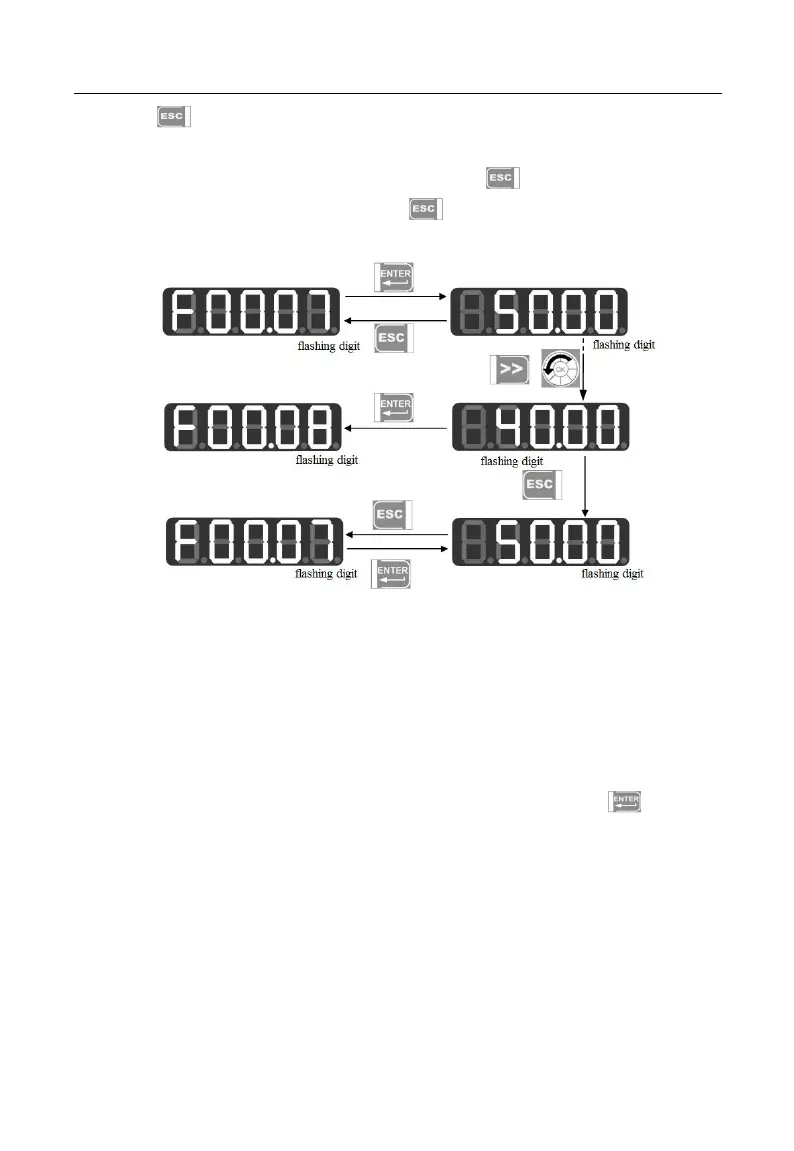
Press to cancel parameter change under the third level menu; if the function
code is changed to a value as it was, it will exit the third level menu and get back to the
second level menu; before completing the change, press to cancel the change with
original parameter value displayed, and press again to exit the third level menu and
return to the second level menu. See Figure 4–4 for details.
Figure 4-4 Procedure of Canceling Parameter Change by Pressing ESC
4.2.2User-Defined Mode (--U--)
When entering function code group F11 from the all menu mode, the third level
menu still displays function codes, which can be set as you please. The default display is
U00.00 for the first time to enter F11.00, which means that the default function code of
F11.00 is F00.00; at this time, the lowest cursor bit flickers and user may set any function
parameter as in selecting a function code in the second level menu; press to save
setting; when entering the user-defined mode, only corresponding function parameters
will be shown.
For instance, we set F11.00 as U00.07 and set F11.01 as U00.09, i.e., F11.00 and
F11.01 are respectively defined as F00.07 and F00.09. The letters U and F are used for
distinguishing. U means that the function parameter is user defined. See Figure 4–5 for
details.







 To Next Page