EM500 Open-Loop Vector Control Inverter User Manual
68
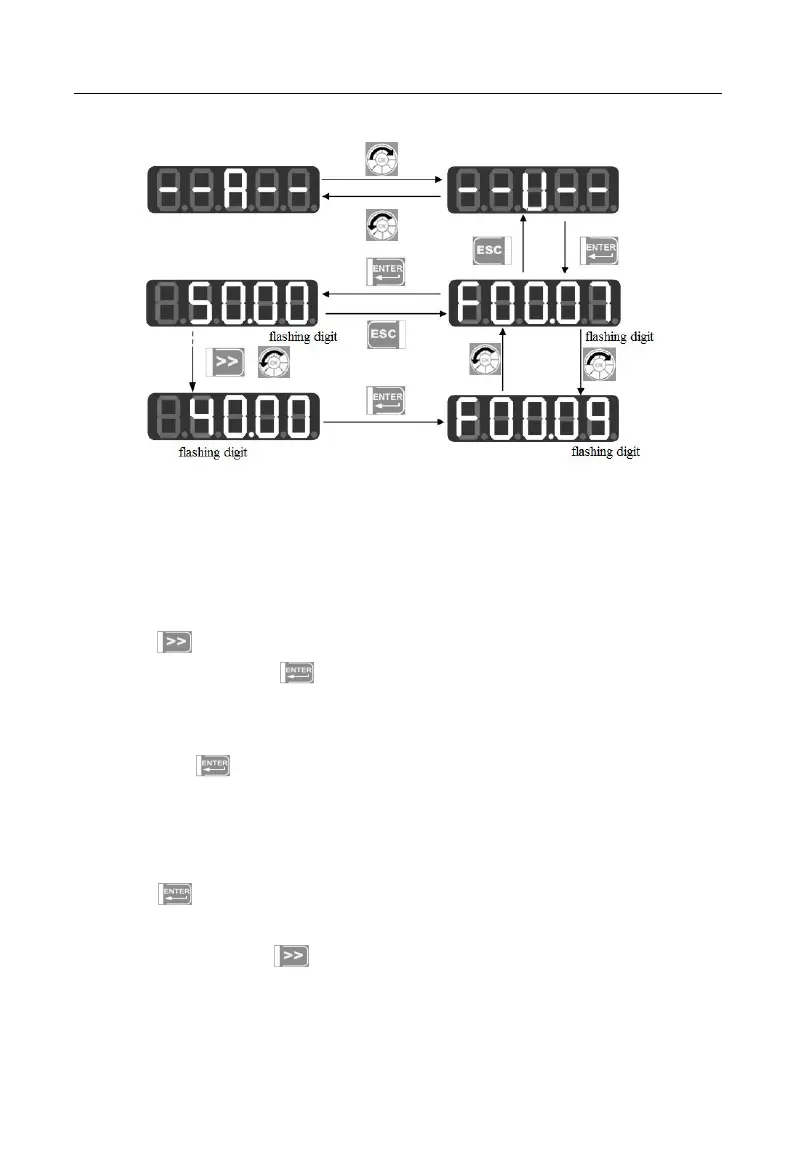
Figure 4-6 Changing Function Code under User-Defined Mode
Rotate digital potentiometer in the second level menu under the user-defined mode
to switch to the parameters set by previous or next user, because user can not add or
remove any function parameter of the second level menu. Switch sequence: from the
function parameter defined by F11.00 to the function parameter defined by F11.31.
Press in the second level menu and cursor will not shift. After entering the
third level menu by pressing , the lowest position of cursor will flash if current status
of corresponding function code is permitted for change. The method of changing
parameters is the same as that in the third level menu under all menu modes; after
changing, press to save the change and enter the next user-defined parameter.
Changing the parameter in the third level menu under different menu modes has the same
effect.
4.2.3Non-factory defaults (--C--)
Press under this mode to enter the second level menu, which displays the first
parameter that starts from F00.00 and differs from the default setting of inverter. No
shifting works by pressing under this mode; no function group or function
parameter may be changed arbitrarily by rotating digital potentiometer but one







 To Next Page