EM500 Open-Loop Vector Control Inverter User Manual
51
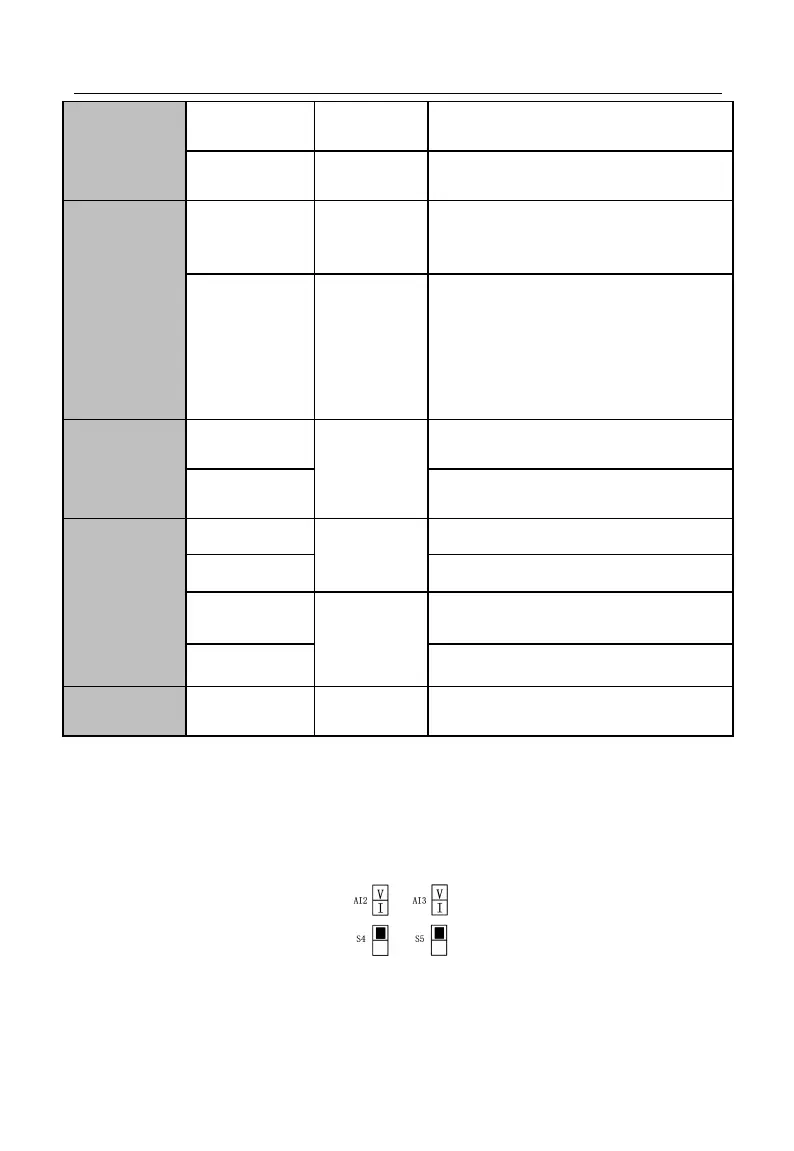
Output range: DC 0 - 10 V. S2 is VOID.
Output range: DC 0 - 10 V/0 - 20 mA;
selected by switch S3 on the terminal block.
Optocoupler isolation, OC output
Maximum output voltage: DC 48V
Output current: 50 mA
High Speed
Pulse Output
Terminal
Optocoupler isolation, OC output
Maximum output voltage: DC48V
Maximum output current: 50 mA
For high speed pulse output, maximum output
frequency 100 kHz
Output impedance <5 kΩ
RS-485
Communication
Interface
RS485 communication input (+)
RS485 communication input (-)
CANSinee
Communication
Interface
CAN communication input (+)
CAN communication input (-)
For shielded ground of terminal cable
3.3.3Analog Input Terminal Wiring
3.3.3.1Wiring Terminals AI1, AI2 and AI3 Through Analog Voltage Signal:
When selecting the analog voltage signal input for terminals AI2 and AI3, configure
the voltage mode through switches S4 and S5 of the terminal block (see Figure 3–13).
Figure 3-13 Configuring Voltage Modes with S4 and S5



 To Next Page