EM500 Open-Loop Vector Control Inverter User Manual
302
with the “Designated Count Value
”. If
, it means that the “Set Count Value”
has not been reached, otherwise it finishes and this result is output in the form of the
terminal DO. Continue the count and compare it with the “Set Count Value.f
, it
means that the “Set Count Value” has not been reached, otherwise it finishes and this
result is outputted in the form of the terminal DO with the count stopping.“36: Counter
Clear” is used to clear the counter and reset the output signal.
If the pulse frequency is greater than 250 Hz (=1/(2(default filter times)*2*1ms
-1
)), please complete
the input via X7 and set F02.06 as “35: High-Speed Count Input”: 250 Hz is just a theoretical value. The
actual value will apply. To avoid any mistake, please use the high speed pulse input terminal.
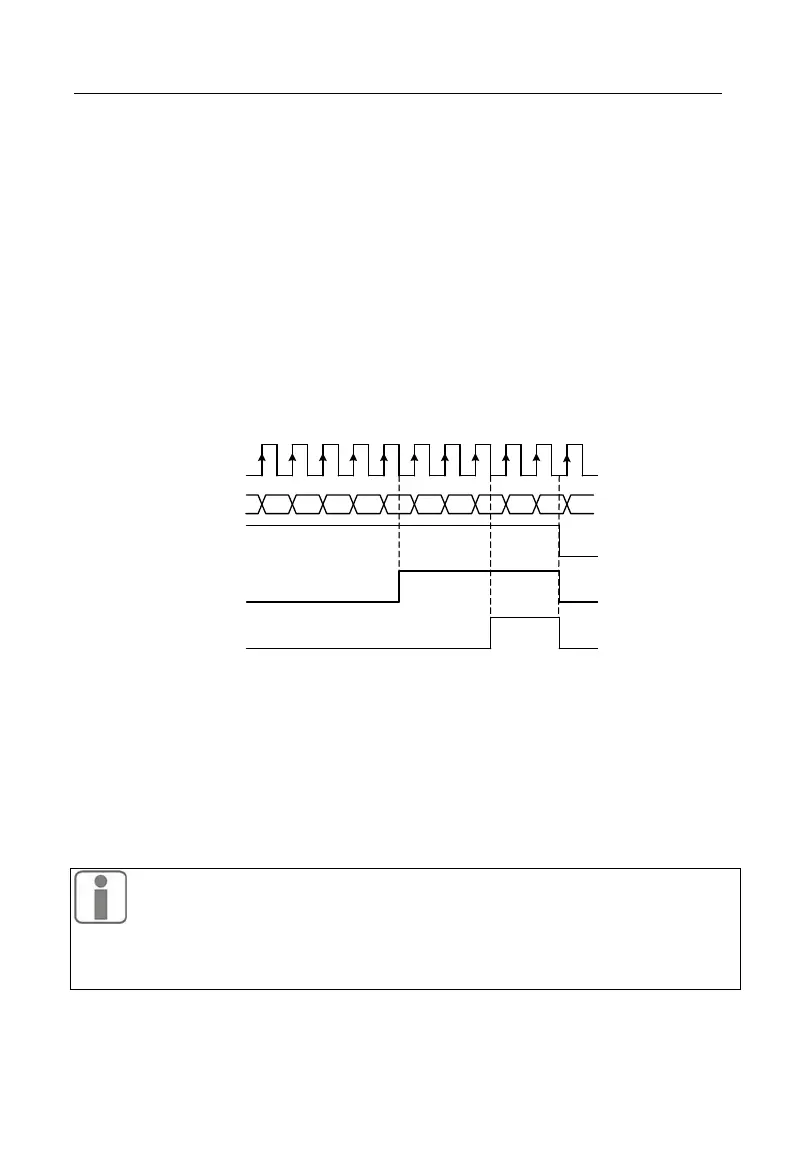
21 3 4 5 6 7 8 9 10 11
Designated
Output
Set Output
Pulse Input
Clear
Count
21 3 4 5 6 7 8 8 8 00
Disabled
Enabled
Disabled
Enabled
Enabled
Disabled
Disabled
Figure 7-43 Count (Example)
Figure 7-43 is an example. In the figure, F16.03=8 and F16.04=5. When the count
reaches 5, “15: Designated Count Value Reach” is enabled; when the count reaches 8,
“14: Set Count Value Reach” is enabled; when “36: Counter Clear” is enabled, the count
will be cleared and both “15: Designated Count Value Reach” and “14: Set Count Value
Reach” are disabled.
Set 65535≥Set Count Value≥Set-up Count Value≥0; if set count value =
value=0, then the counter is disabled; only one terminal can be set with this fu
nction for the same time.







 To Next Page