EM500 Open-Loop Vector Control Inverter User Manual
67
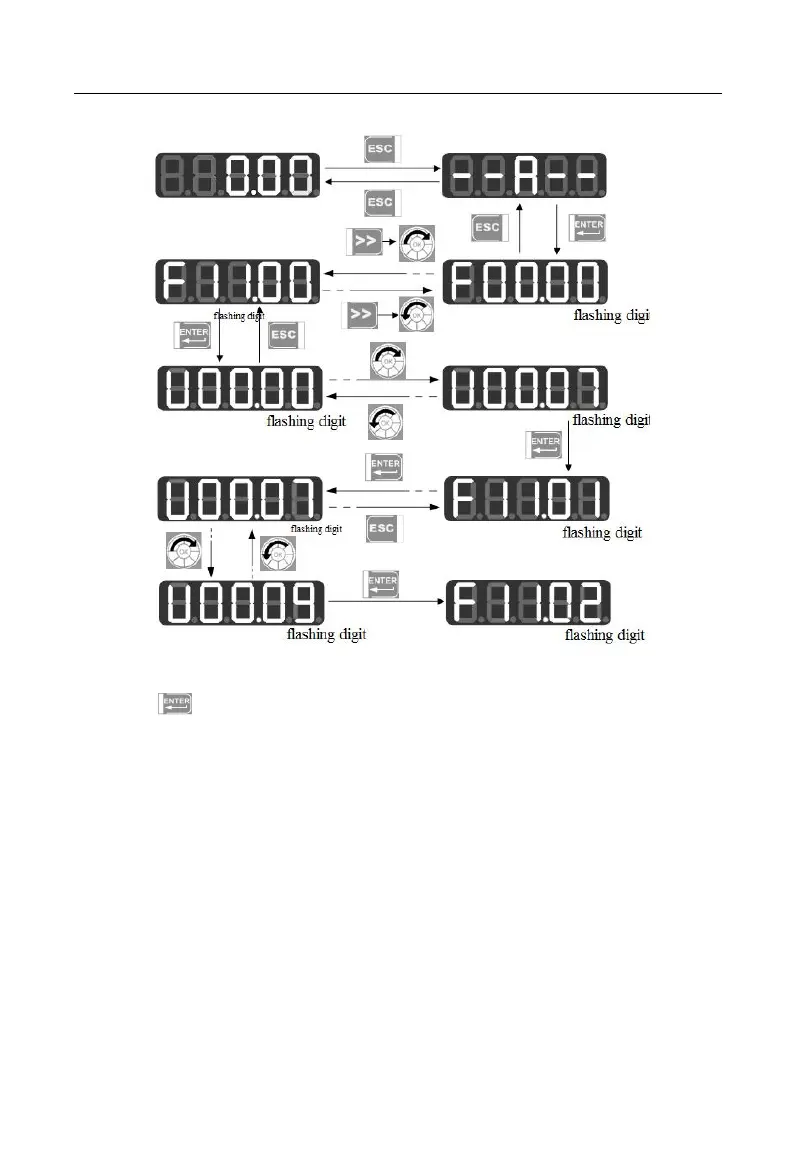
Figure 4-5 Example of User-Defined Mode Setting
Press under the user-defined mode to enter the second level menu, which
only displays 32 user-defined codes of F11. Select codes among these 32 function codes
according to user needs; for those functions codes that need to be changed or viewed
frequently, user may complete settings by entering F11 group under the all menu mode.
After the codes are defined in F11, we select and enter the user-defined mode again
and we can see that the first function code is F00.07 defined by F11.00 and the second
function code is F00.09 defined by F11.01 until F11.31. There are 32 function codes.
Only 32 function parameters can be displayed by entering this mode. Changing the
function parameters under the third level menu has the same effect as that under the all
menu mode with the same methods. See Figure 4–6 for detail.







 To Next Page