EM500 Open-Loop Vector Control Inverter User Manual
64
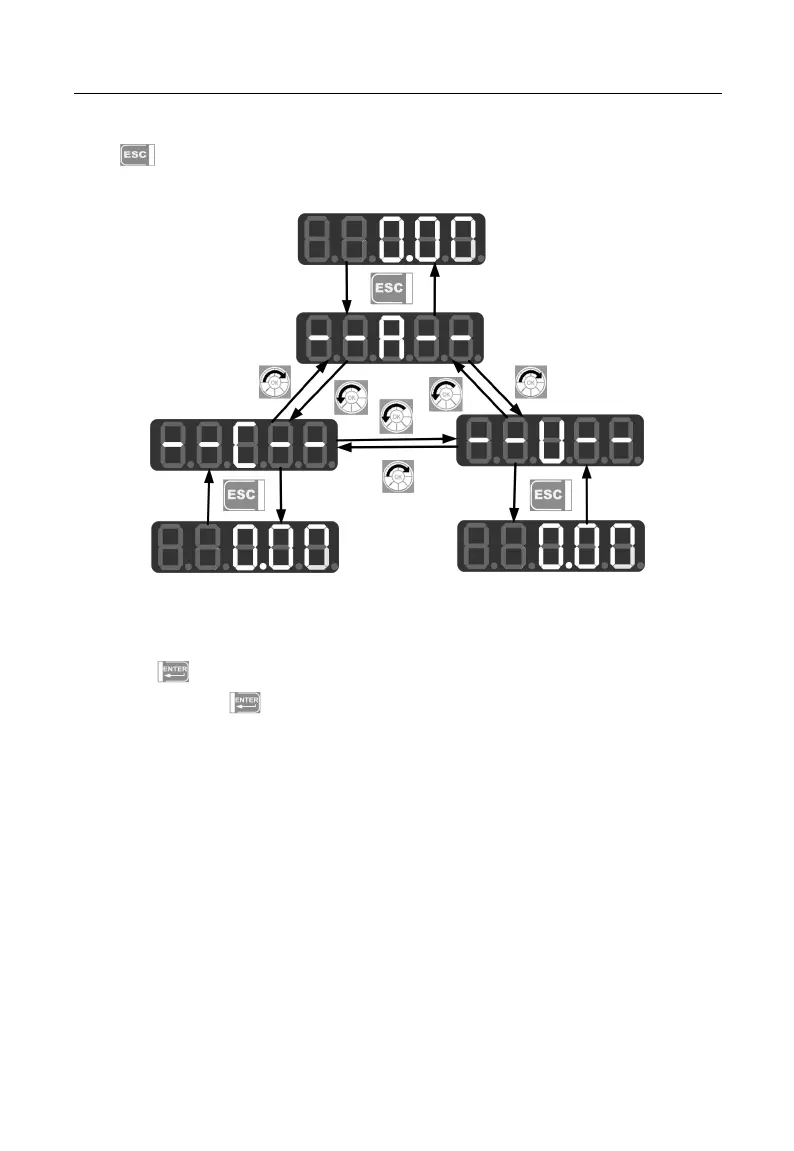
When keypad is powered, default display is the first monitoring parameter of level 0;
press to enter menu level 1, from which using digital potentiometer to select a
menu mode. The operation procedure for menu mode selection is shown in Figure 4–2.
Figure 4-2 Operation Procedure of Menu Mode Selection
4.2.1All menu mode (--A--)
Press under the all menu mode to enter the second level menu to select any
function code. Press again to enter the third level menu to review or modify
function parameters. Except some special function parameters, those function parameters
needed by users can be modified.
Under the all menu mode, the whole operation procedure from power-on and
initialization to value change of F03.28 to 5.28 is shown in Figure 4–3.







 To Next Page