3. Repair Instructions 1/2010 3 - 45
BA-TE-DE08C M.KAY
Dialog+ SW9xx_sm_Chapter 3_1-2010.doc/pdf <100329> yymmdd
B. Braun Avitum AG
Dialog
+
SW 9.xx
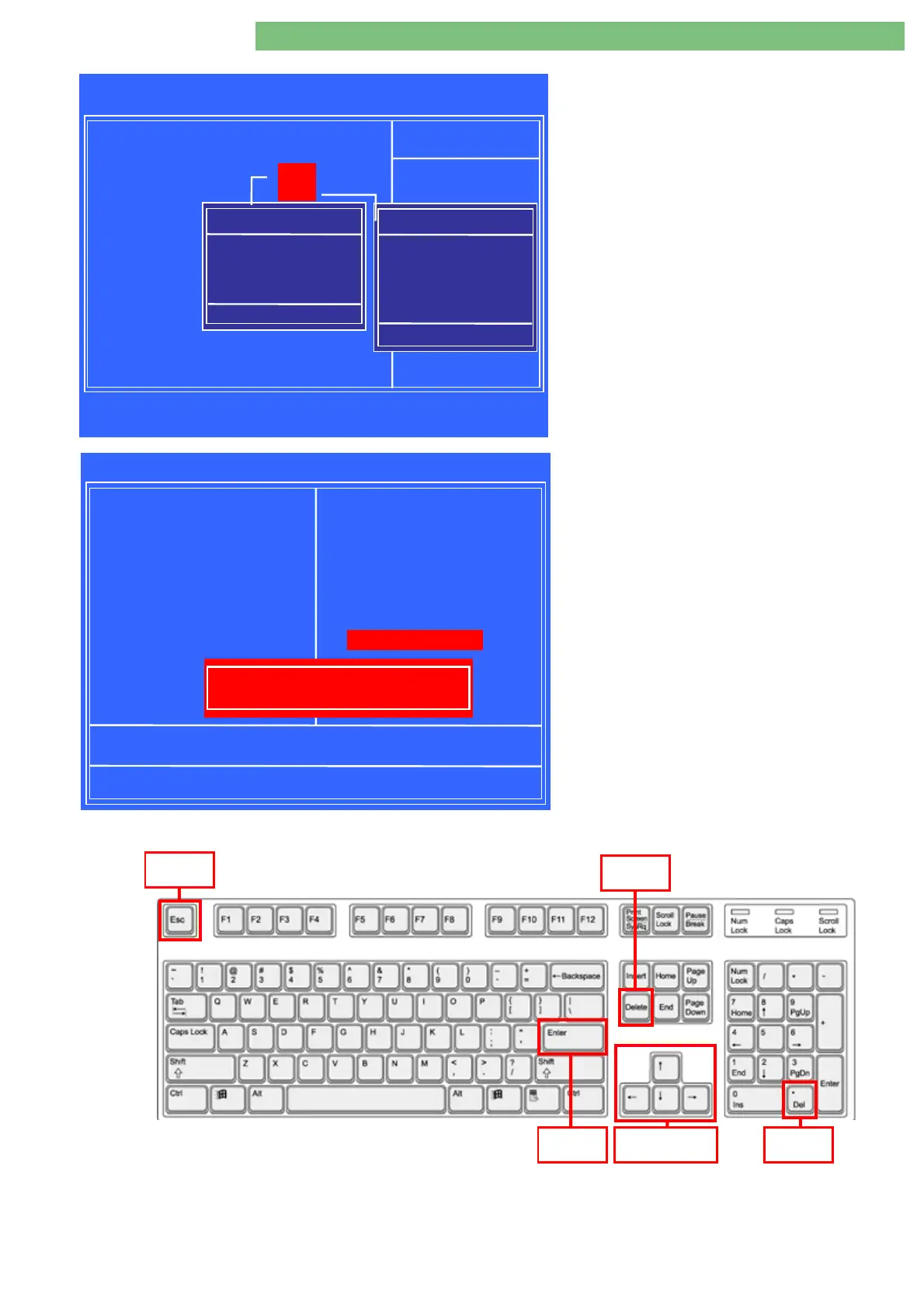
5.
Press
Enter
key to open
IDE Primary Master
window.
6.
Move down to
Auto
with the
Arrow
key.
7.
Press
Enter
key to accept. The
IDE Primary
Master
window closes.
8.
Check the
Auto
setting in the
Access Mode
.
Save and Exit BIOS
9.
Press
ESC
key to go back to the
CMOS Setup
Utility
menu.
Note:
In general you can use the
ESC
key to
go back to the previous menu.
10.
Select
Save & Exit Setup
menu with the
Arrow
keys.
11.
Save changes and exit the
BIOS CMOS Setup
with
Enter
key.
The changes in the
Standard CMOS Features
menu are saved to the
BIOS CMOS
.
Phoenix - AwardBIOS CMOS Setup Utility
Standard CMOS Features
IDE HDD Auto-Detection [Press Enter]
IDE Primary Master [ Auto ]
Access Mode [ ]
Capacity
Cylinder
Head
Precomp
Landing Zone
Sector
!
!!
!"
""
"#
##
#$
$$
$
:Move Enter:Select +/-/PU/PD:Value F10:Save Esc:Exit F1:General Hel
F5: Previous Values F6: Fail-Safe Defaults F7: Optimied Dafaults
Auto
Auto
Item Help
Menu Level
Phoenix - AwardBIOS CMOS Setup Utility
!
Standard CMOS Features Load Fail-Safe Defaults
!
Advanced BIOS Features Load Optimized Defaults
!
Advanced Chipset Features Set Supervisor Password
!
Integrated Peripherals Set User Password
!
Power Management Setup Save & Exit Setup
!
PnP/PCI Configuration Exit Without Saving
!
PC Health Staus
Esc : Quit
F10 : Save & Exit Setup
Save Data to CMOS
!
!!
!
"
""
"
#
##
#
$
$$
$
: Select Item
Save & Exit Setup
SAVE to CMOS and EXIT (Y/N)? Y
Arrow
Keys
Enter
Ke
ESC
Delete
Delete
Ke
IDE Primary Master
None . . . . [ ]
Auto . . . . [
!
]
Manual. . . . [ ]
!
!!
!"
""
"
:Move ENTER:Accept ESC:Abort
:Move ENTER:Accept ESC:Abort:Move ENTER:Accept ESC:Abort
:Move ENTER:Accept ESC:Abort
Access Mode
CHS . . . . [ ]
LBA . . . . [ ]
Large . . . . [ ]
Auto . . . . [
!
]
!
!!
!"
""
"
:Move ENTER:Accept ESC:Abort
:Move ENTER:Accept ESC:Abort:Move ENTER:Accept ESC:Abort
:Move ENTER:Accept ESC:Abort















 To Next Page