3. Repair Instructions 1/2010 3 - 46
BA-TE-DE08C M.KAY
Dialog+ SW9xx_sm_Chapter 3_1-2010.doc/pdf <100329> yymmdd
B. Braun Avitum AG
Dialog
+
SW 9.xx
3.5 Installation Software 9.xx
USB Stick for Treatment Support Settings
The system configuration saved on a USB stick (FSU utility) must only be
downloaded to an other Dialog+ machine (with software ≥ 9.xx) after a
software update if:
• the hardware matches and
•
the machine has the identical software version number.
Activation of the Treatment
Support Settings
The settings are only activated after the Dialog+ is switched off and on
again. Check the settings after the Dialog+ was switched on again.
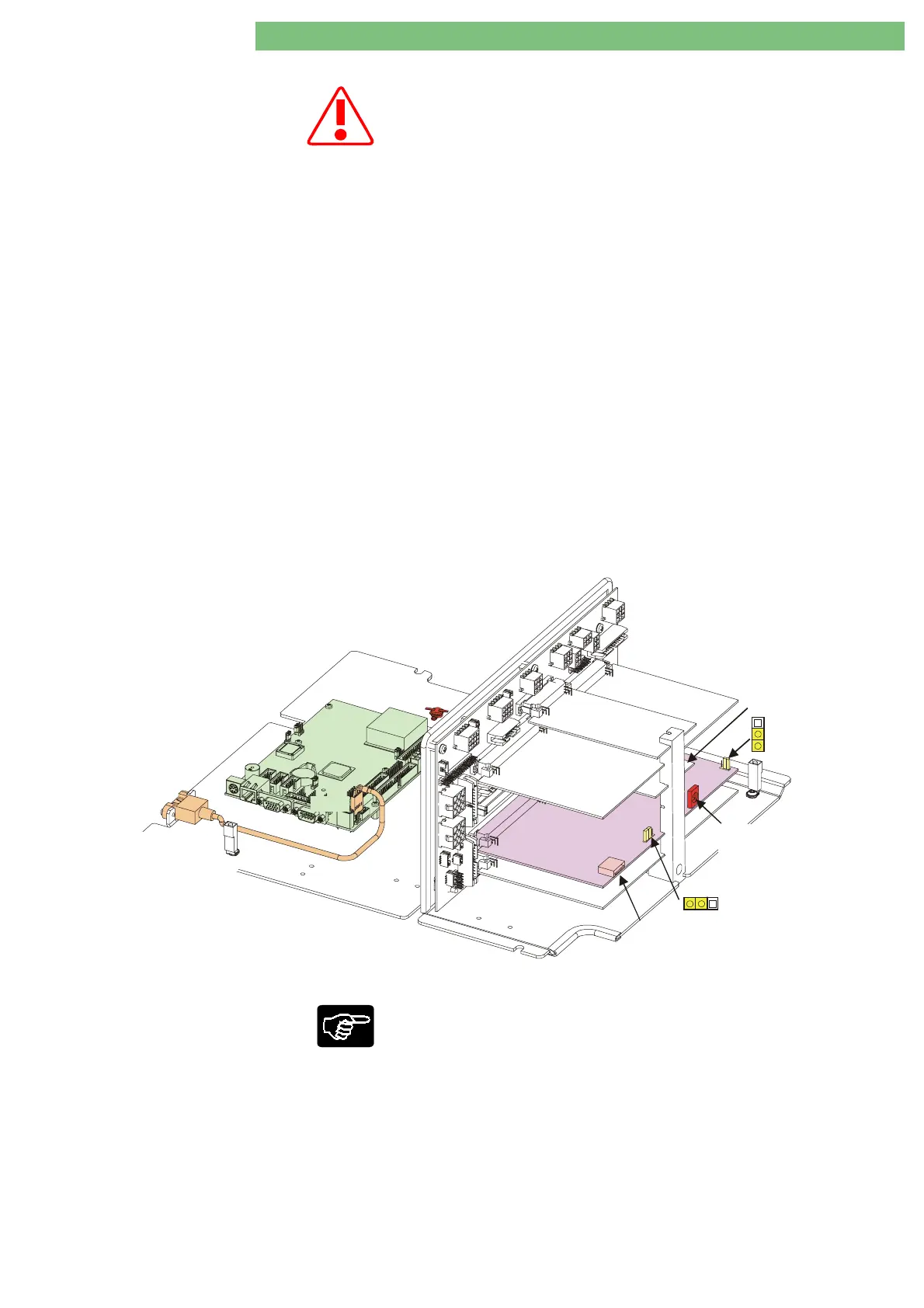
Service switch The software is installed in the software update mode: digital board,
service switch S1, position 3.
After software installation: turn service switch S1 to TSM service program
mode (position 2)
After completion of all procedures turn back service switch S1 to therapy
mode (position 0).
Default Table The default values for the parameters depend on the machine status (see
Dialog+ default table for SW 9.xx for a detailed overview).
Software Update The customer specific default values of the machine must be documented
in the default table prior to the installation of a new software. These
values must be entered again after installation.
3.5.1 Document Customer Specific
Default Values
Motherboard
Power Board Valves
HDF BoardOnline
Analog Board
Basic Board
Digital Board
P11
USB1
USB Port:
- Service (FSU)
- Installation SW TLC
Supervisor
Write Protect
(SWP)
Controller
Write Protect
(CWP)
USB Port:
Installation SW LLC/LLS
Power-Board
Motors
Service Switch:
0: Therapy
2: TSM
3: SW Installation
S1
JP1
JP2
Fig. : Top Level Sub-Rack, Digital Board with Service Switch S1, USB Port P11 and Jumpers JP1/JP2
Enter the customer specific default values of the machine in the default table:
1.
Open rear door.
2.
Switch to TSM service program mode (on digital board DB, service switch
S1 position 2).
3.
Switch on Dialog+.
4.
Document default values in default table.
5.
Switch off Dialog+.















 To Next Page