3. Repair Instructions 1/2010 3 - 58
BA-TE-DE08C M.KAY
Dialog+ SW9xx_sm_Chapter 3_1-2010.doc/pdf <100329> yymmdd
B. Braun Avitum AG
Dialog
+
SW 9.xx
3.6.3 Set-Up FSU Main Menu
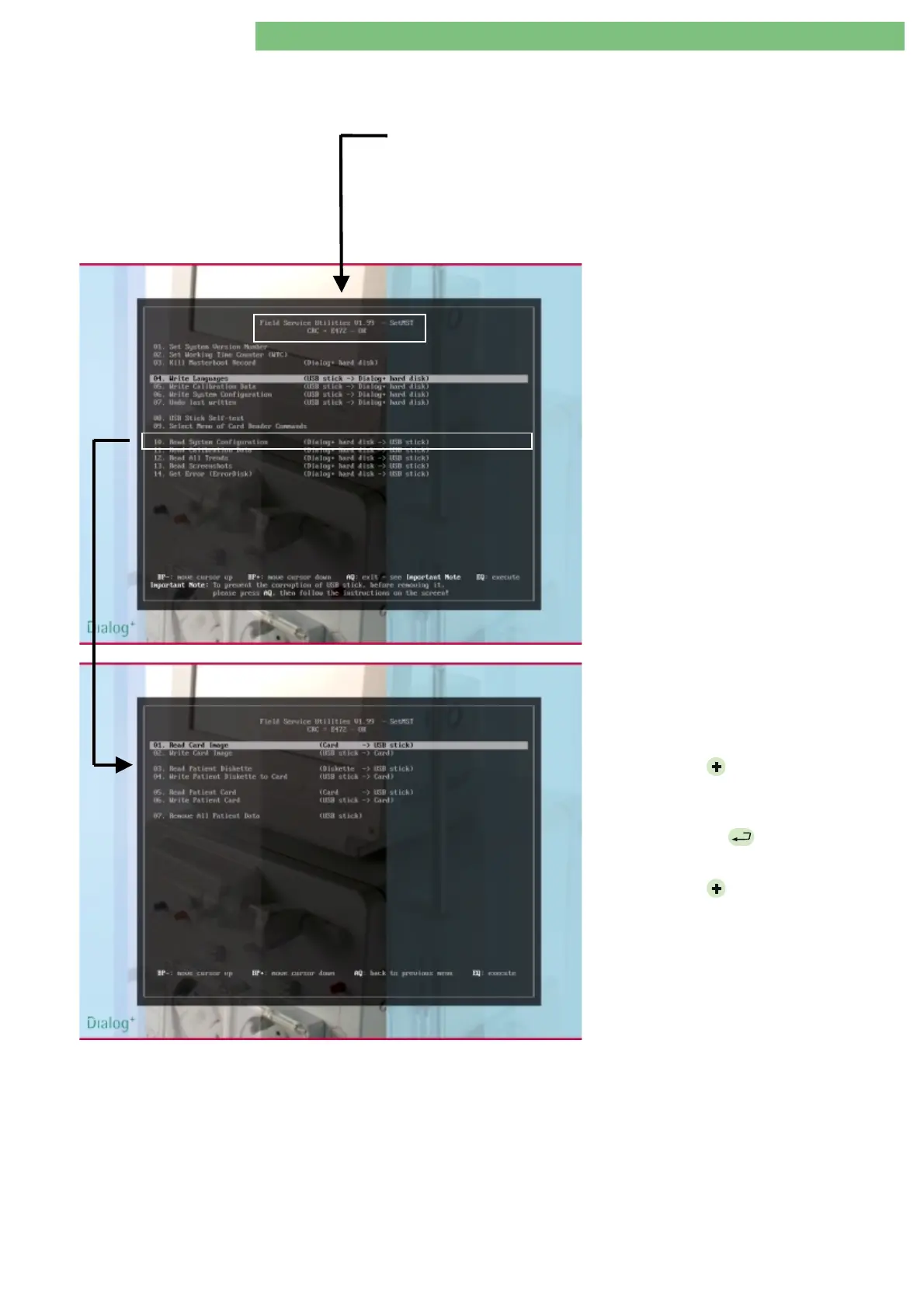
When the Dialog+ is switched on and the start window is displayed the self test
for the USB stick is performed (a few seconds). In the start screen the
Field
Service Utilities
menu appears after the CRC check (see header CRC=XXXX –
OK).
There are standard utilities in the main menu: set, write and read. A sub-menu
can be selected for the card reader with the utilities: read and write.
Main Menu Field Service Utilities
1.
Connect the USB stick (with the FSU) to
the USB port on the TLC sub-rack.
2.
Switch on Dialog+.
Sub-Menu Card Reader
The following sub-menu appears if
09 Select
Menu of Card Commands
is selected in the
Field Service Utilities main menu.
1.
Press the
BP
hardware key and move
the cursor down to
09 Select Menu of
Card Commands
in the main menu.
2.
Press the
EQ
hardware key to
execute the utility.
3.
Press the
BP
hardware key and move
the cursor down to select a utility.















 To Next Page