4. TSM Service Program 1/2010 4 - 57
BA-TE-DE08C M.KAY Dialog+ SW9xx_SM_Chapter 4-1-1_1-2010.doc/pdf <110301> yymmdd B. Braun Avitum AG
Dialog
+
SW 9.xx
4.7.1.21 Preventive Maintenance
Preventive maintenance parameters can be set in
the Preventive Maintenance menu.
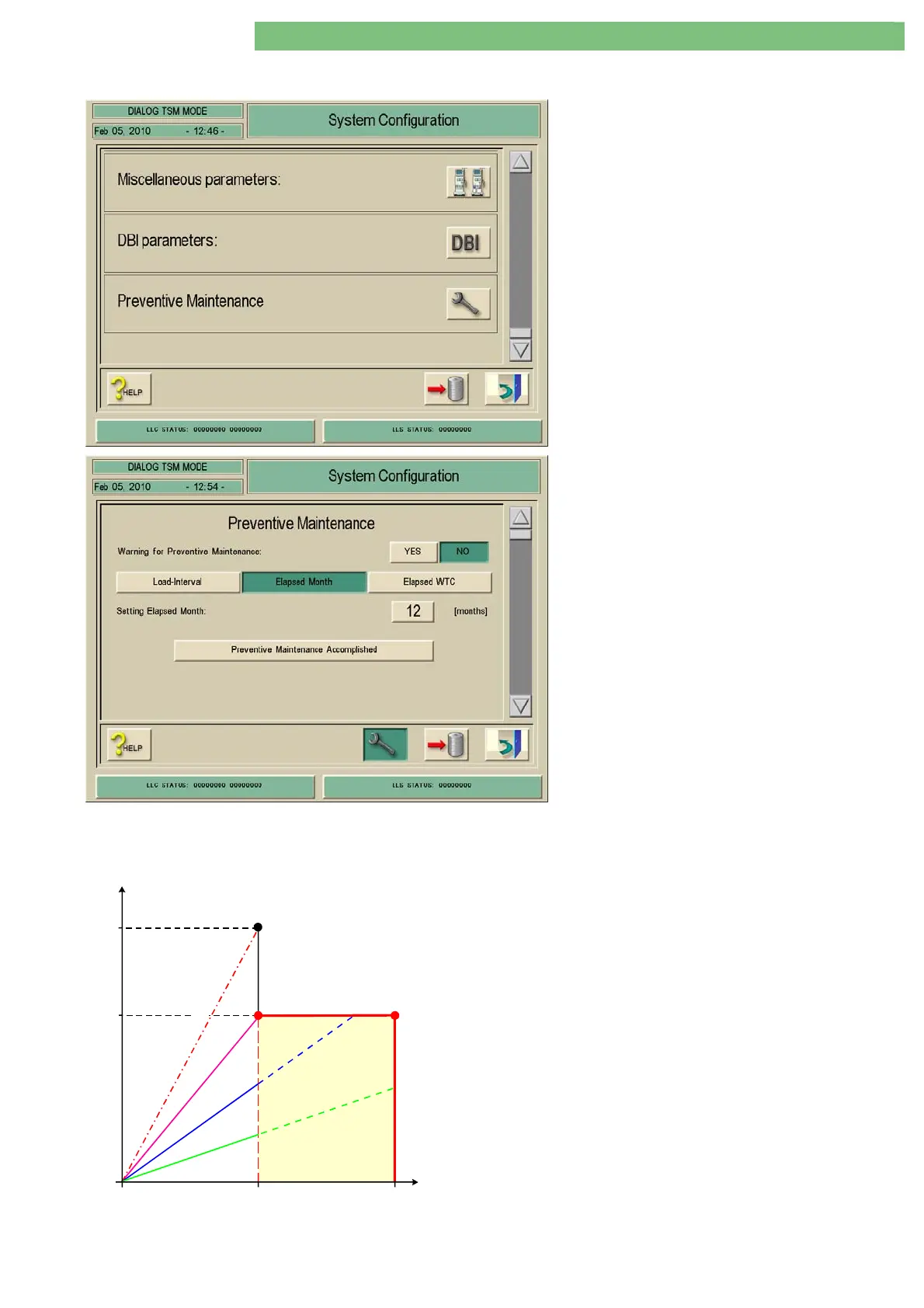
1. Activate the System Configuration menu with
the System Configuration key in menu
Treatment Support. The following menu is
opened and displayed (scroll with scroll bar).
2. Activate the Preventive Maintenance menu
with the Preventive Maintenance icon. The
following menu is displayed.
You can define an interval for a preventive
maintenance PM. If this feature is selected (YES):
the user is informed about the necessity of a
preventive maintenance. A warning message is
displayed in the transition phase end of
treatment/start of disinfection. The message is
displayed according to the following conditions:
• once if status is ≤ 5 % of set condition
• every time if set condition is expired
The following warning message is displayed:
Preventive Maintenance Recommended
The set preventive maintenance interval is expired.
Please inform your service technician.
One of three modes can be selected to calculate the next preventive
service.
Load-Interval
Elapsed
Months
Elapsed
WTC (h)
4,000
max.
hours
e
x
t
e
n
s
i
v
e
u
s
e
m
e
d
i
u
m
u
s
e
l
o
w
u
s
e
Window
4,000 hours vs
9 to 18 months
918
h
y
p
o
t
h
e
t
i
c
a
l
u
s
e
(
9
m
o
n
t
h
s
/
2
4
p
e
r
d
a
y
)
A warning message is enabled under the following defined
conditions:
• YES is selected
• the user is never warned in the first 9 month period
• the user is always warned after a 18 month period
• the user is warned between a 9 to 18 month period if the
working time is more than 4,000 hours after the last reset.















 To Next Page