4. TSM Service Program 1/2010 4 - 7
BA-TE-DE08C M.KAY Dialog+ SW9xx_SM_Chapter 4-1-1_1-2010.doc/pdf <110301> yymmdd B. Braun Avitum AG
Dialog
+
SW 9.xx
P11
JP2
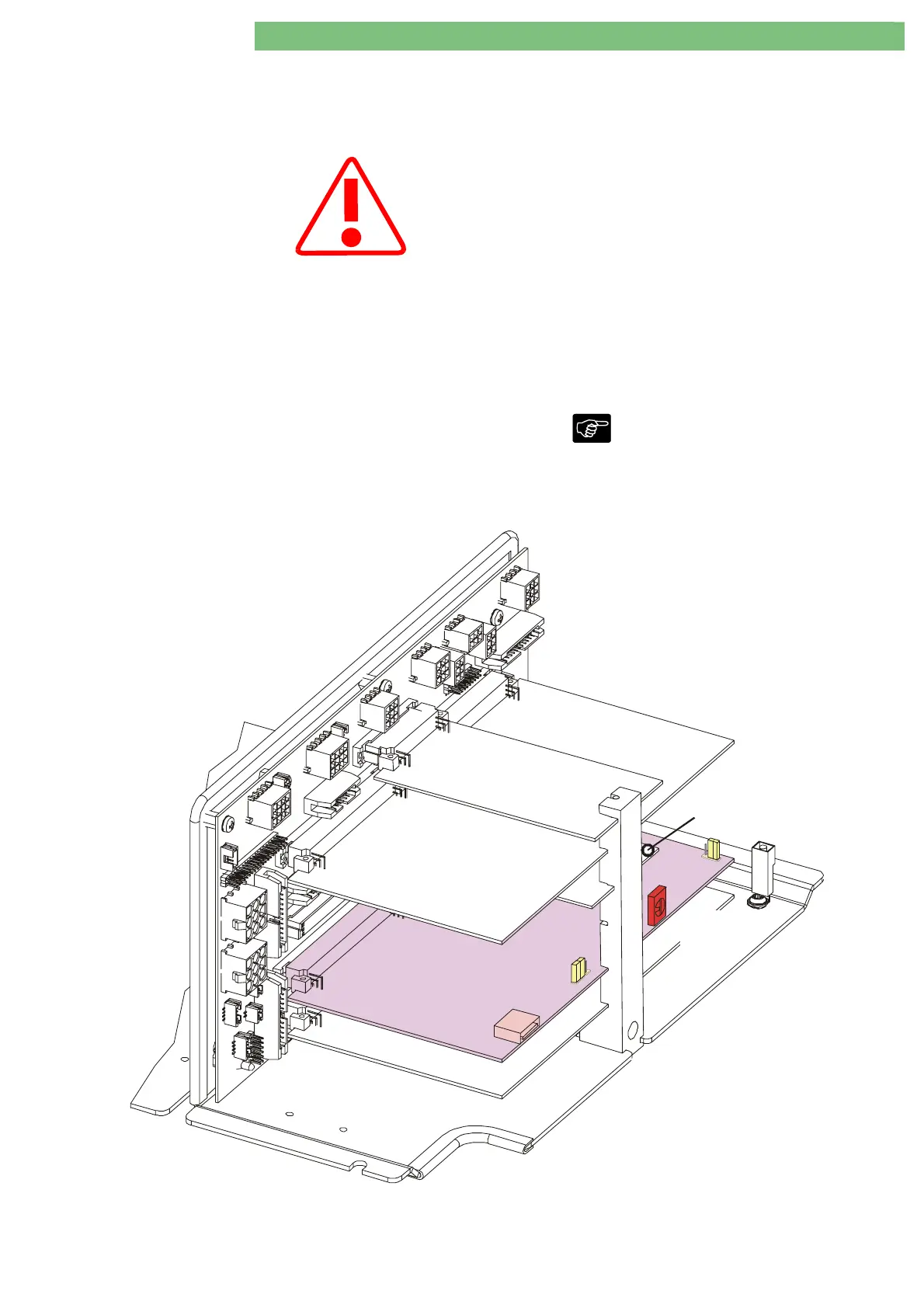
Power Board Valves
HDF BoardOnline
Analog Board
Basic Board
S1
Digital Board
JP1
Power Board
Motor s
4.2 Quit TSM Service Program
TSM Service Program Only activate the TSM service program for
service activities. It is prohibited to connect a
patient to the Dialog+ and to run a therapy if
the TSM service program is activated in the
Dialog+. If the TSM service program is
activated the complete alarm system is
disabled.
Therapy Mode
After completion of all procedures switch back
to the therapy mode: digital board, service
switch S1, position 0.
The following steps must be taken to quit the
service program and to re-enter the therapy
mode:
1. Switch off machine.
2. On digital board DB: turn service switch S1
from position 2 to position 0 therapy mode.
Service Switch S1:
Position 0 = Therapy
Position 2 = TSM Service Program
Position 3 = Software Installation/Update
3. Close rear door.
4. Switch on machine.
The machine starts in therapy mode.















 To Next Page