4. TSM Service Program 1/2010 4 - 26
BA-TE-DE08C M.KAY Dialog+ SW9xx_SM_Chapter 4-1-1_1-2010.doc/pdf <110301> yymmdd B. Braun Avitum AG
Dialog
+
SW 9.xx
4.7.1.3 Min-Max Parameters
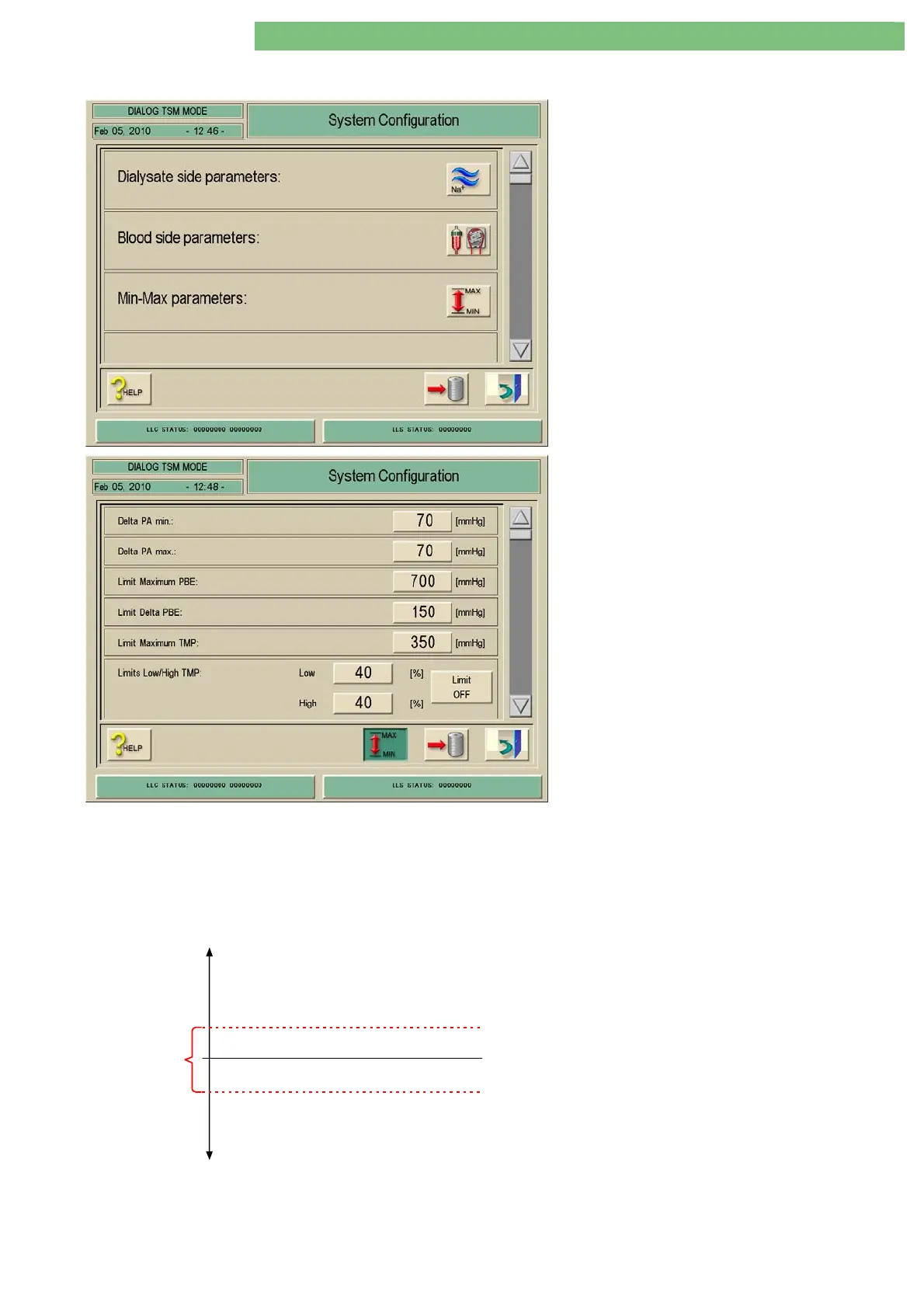
1. Activate the System Configuration menu with
the System Configuration key in menu
Treatment Support. Use the scroll bar until the
following menu appears.
2. Activate the Min-Max Parameters menu with
the MIN-Max icon. The following menu is
opened.
The following parameters can be set in the Min-
Max Parameters menu:
• Delta PA min.
• Delta PA max.
• Limit Maximum PBE
• Limit Delta PBE
• Limit Maximum TMP
• Limits Low/High TMP
• Extended TMP Limit Range Key is Displayed in
Treatment
• Select Extended TMP Limit Range
Delta PA min.
You can set the lower relative alarm limit for the
PA limit window.
Delta PA max.
You can set the upper relative alarm limit for the
PA limit window.
Delta PA
PA ref
PA max.
max.
200 mmHg
PA min.
Fig.: Limit Window for PA















 To Next Page