3. Repair Instructions 1/2010 3 - 47
BA-TE-DE08C M.KAY
Dialog+ SW9xx_sm_Chapter 3_1-2010.doc/pdf <100329> yymmdd
B. Braun Avitum AG
Dialog
+
SW 9.xx
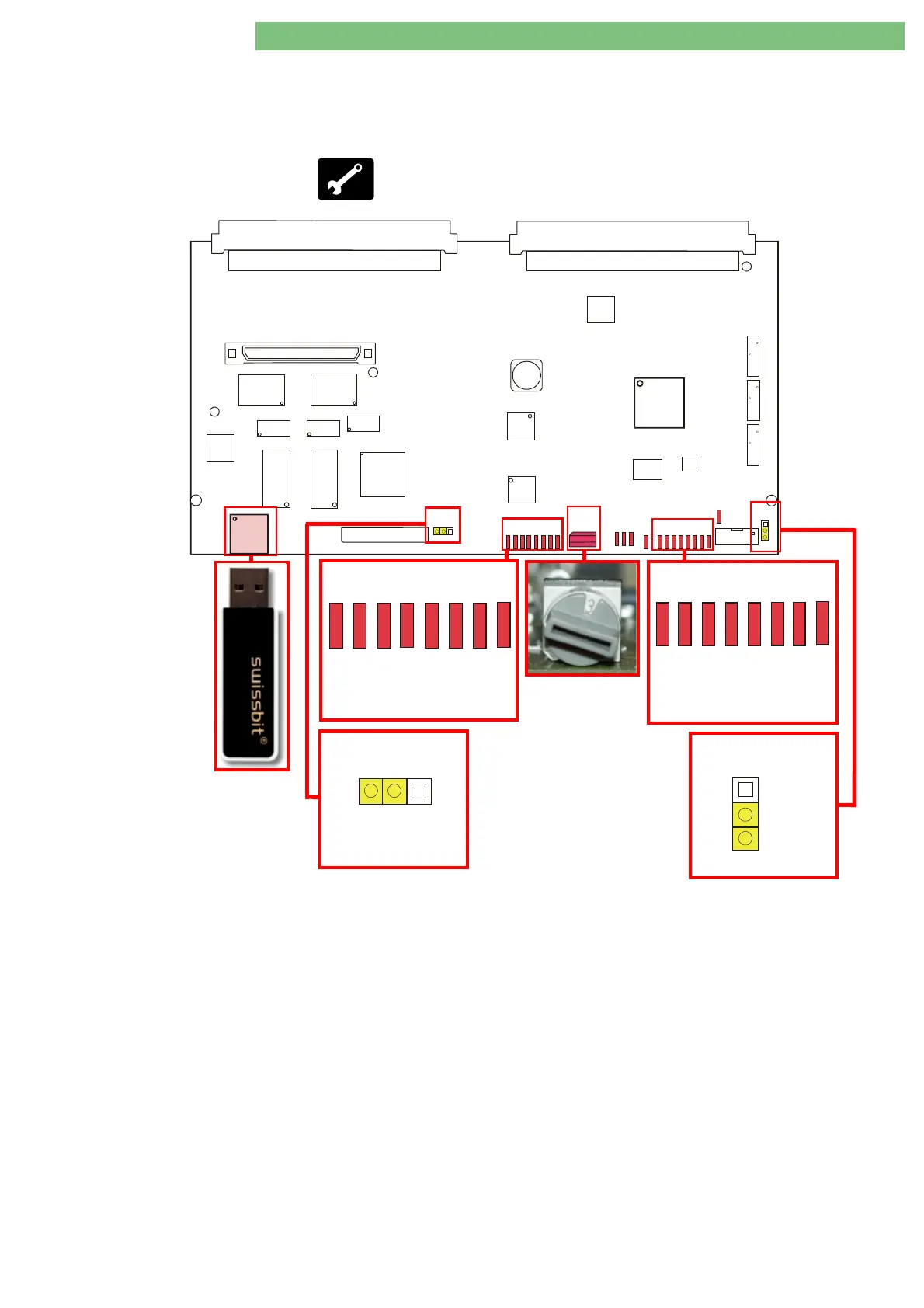
3.5.2 Installation Software LLC 9.xx
and LLS 9.xx with USB Stick
The USB stick with the TLC/LLC/LLS software is required for the installation of
the software LLC 9.xx and LLS 9.xx.
•
Bootable USB stick with the TLC/LLC/LLS software
P2
P1
P4
P14
P11
P13
U56
U55
U43
U39
U35
U36
U33
U28
U53
L33
P7
P6
P5
U7
U27
S1S1
D16
D27
D24
D17
D25
D18
D28
D26
D19
D29
D20
D30
D21
D31
D22
D32
D34
D23
D33
D35
D13
JP1
JP2
U30
FPGA
U45
U46
Fig. : Digital Board
P11
USB Type A for Installation of LLC/LLS SW with USB Stick
S1 Service Switch:
Position 0:
Therapy Mode
Position 2:
TSM Service Program Mode
Position 3:
Software Installation/Update Mode
Controller LEDs 0 to 7
(D16 – D23)
:
Status 0 – 7 for Installation of LLC Software
Jumper JP1 CWP:
Controller Write Protect
Supervisor LEDs 0 to 7
(D28 – D35)
:
Status 0 – 7 for Installation of LLS Software
Jumper JP2 SWP:
Supervisor Write Protect
D28
D29
D30
D31
D32
D34
D33
D35
01234567
Supervisor
D16
D17
D18
D19
D20
D21
D22
D23
01234
5
6
7
Controller
JP1
CWP
Default for Jumper
SWP
JP2
Default for Jumper















 To Next Page