ECG Monitoring
8-27
3) Enable [QT Analysis].
8.8.3 Display QT/QTc Parameters and Waves
Steps to display QT/QTc parameters and waves are shown below:
1) Enter [Tile Layout] page by any of the following ways:
Select [Screen Setup] hot key → [Tile Layout] tab.
Select [Main Menu] hot key → [Display] → [Tile Layout].
2) Click on the parameter area to display QT parameters and select [ECG] → [QT/QTc].
QTc value is calculated based on QT-HR, not the ECG calculation lead. You can enter QT View to view
QT-HR. Please refer to "
Section 8.8.4 Enter QT View
" for more information.
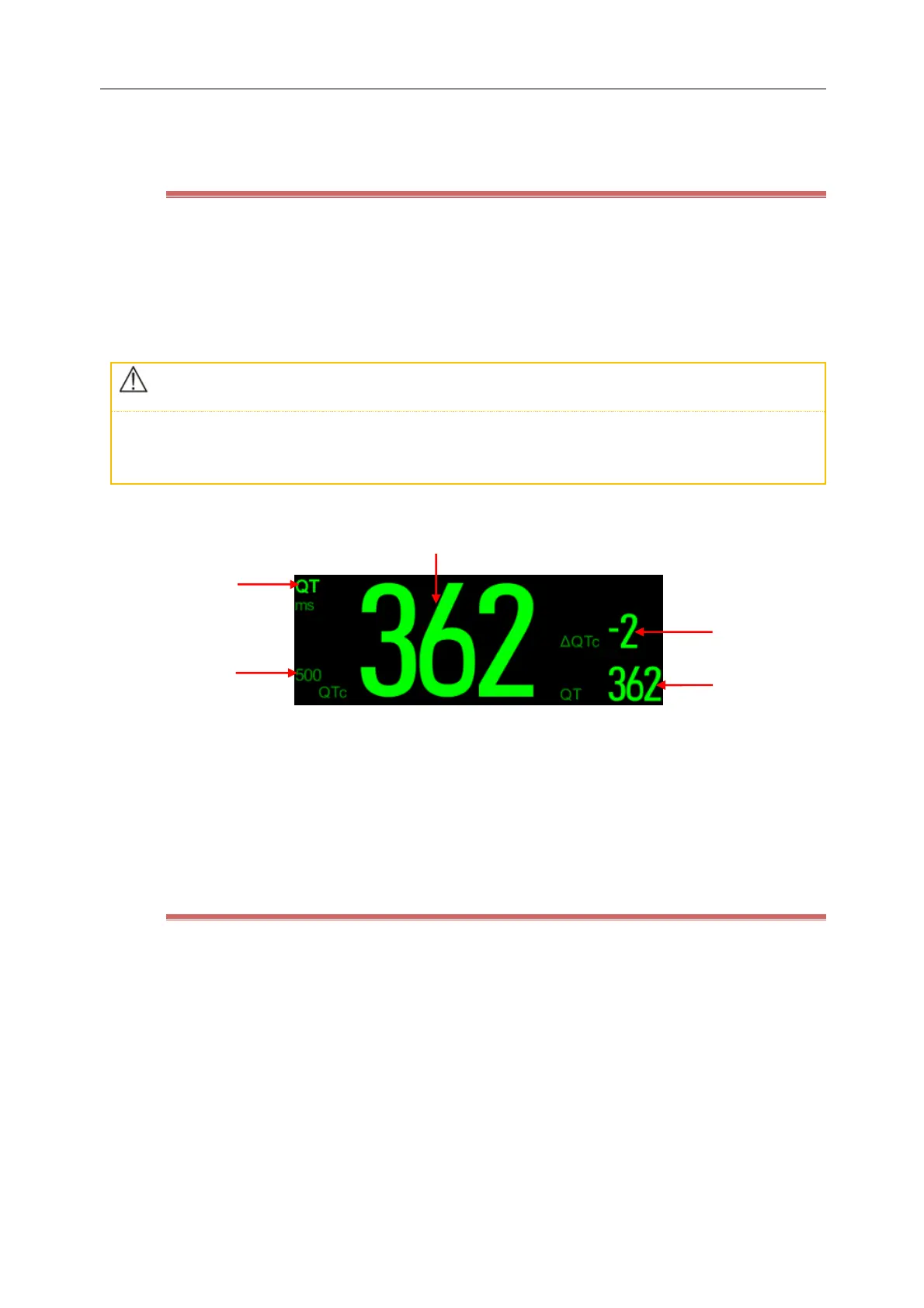
QT parameter area is shown as below, and your monitor may have a different display due to its settings.
(1) QTc alarm limit(if QTc alarm is OFF, then here the alarm-off icon is displayed instead)
(2) Parameter name (3) QTc value
(4) ΔQTc value(the difference between QTc value and baseline. If ΔQTc alarm is OFF, then here the alarm off
icon is displayed to the left of the value)
(5) QT value
8.8.4 QT View
QT View window shows the current measured QT values, waveform and base line. As the steps below:
1) Select QT parameter area into [QT] menu.
2) Select the [QT View] button.
QTView example:



 To Next Page