NIBP Monitoring
11-11
Calculation method:
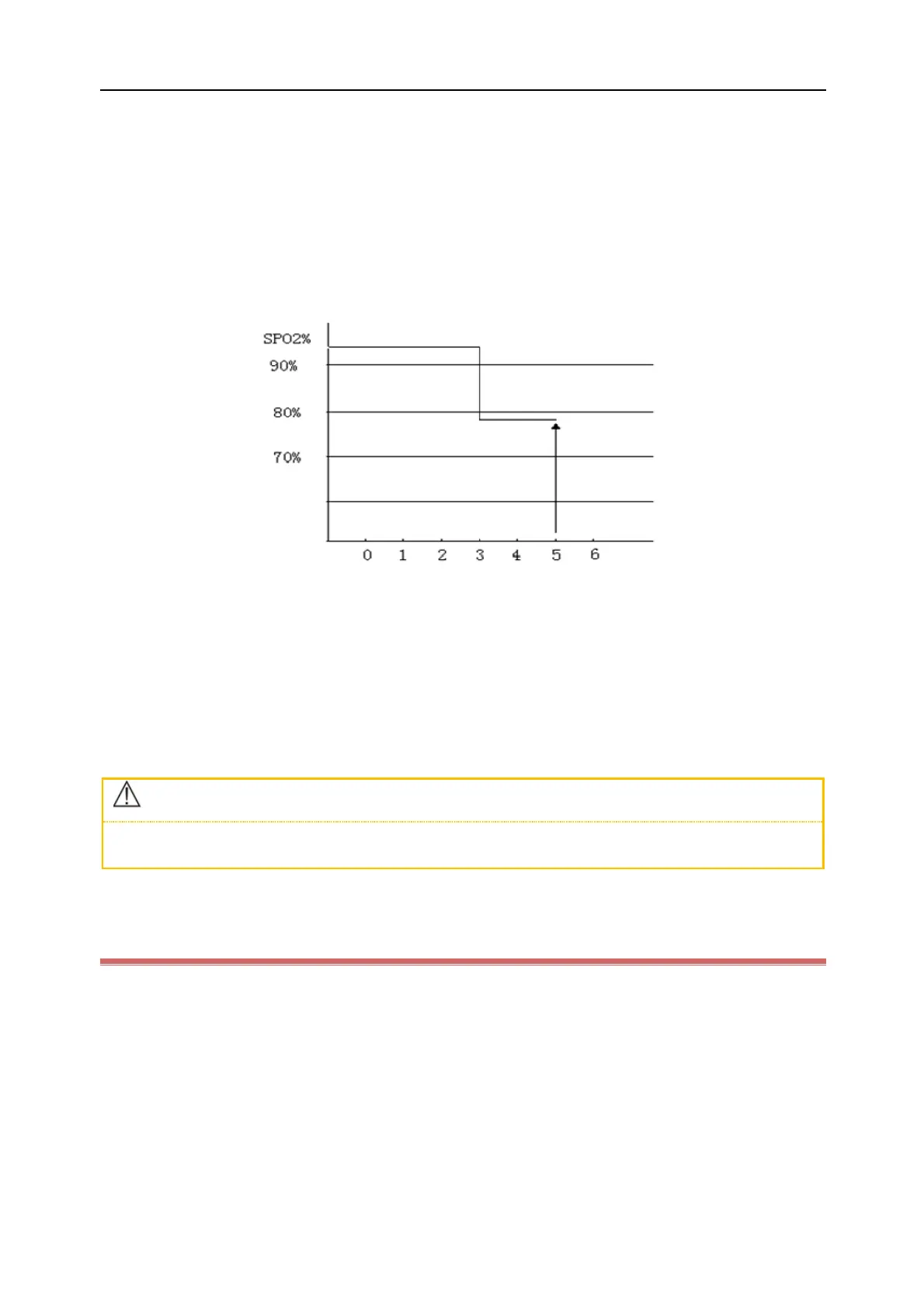
Percentage points × seconds = SatSeconds (integer)
The calculated SatSeconds is displayed as follows:
%SpO
2
Seconds SatSeconds
(90%-80%) × 3 = 30
(90%-78%) × 2 = 24
Total SatSeconds = 54
In the above SatSeconds example:
About 4.9s later, the Monitor will report a SatSeconds alarm because you've set [SatSeconds] to [50], smaller than
54.
The SpO
2
value may fluctuate in seconds rather than remain unchanged. The patient's SpO
2
value may usually
fluctuate above and below an alarm limit discontinuously. During such fluctuation, the Monitor integrates the
number of SpO
2
points, both positive and negative, until either the SatSeconds limit is reached, or the patient SpO
2
re-enters the non-alarm range and remains there.
If three or more %SpO2 alarm limit violations occur within a 60-second period, a medium priority alarm is reported
to the Host even if the SatSeconds limit has not been reached.
11.8.6 Set Sensitivity (For Masimo SpO
2
Only)
[Sensitivity] can be set to [Normal], [High] or [APOD]. [High] represents the highest sensitivity. In typical monitoring
conditions, please select [Normal]. If the sensor is likely to fall due to wet skin, violent movements or other causes,
please select [APOD]. If the patient's perfusion level is extremely low, please select [High] to increase the sensitivity.
Steps to set [Sensitivity]:
1) Select the SpO
2
parameter area to enter [SpO
2
Setup] → [Sensitivity].
2) Select an appropriate [Sensitivity] for Masimo & Rainbow SpO
2
: [Normal], [High] or [APOD].



 To Next Page